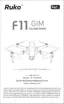
At this time, you need to follow the prompts to pick up the Aircraft at a distance of 3.28
ft from the ground and rotate the Aircraft horizontally for 1-2 laps until the app interface prompts
to enter the vertical calibration.
F11GIM User Manual
Copyright ©2021 Ruko All Rights Reserved.
33
①
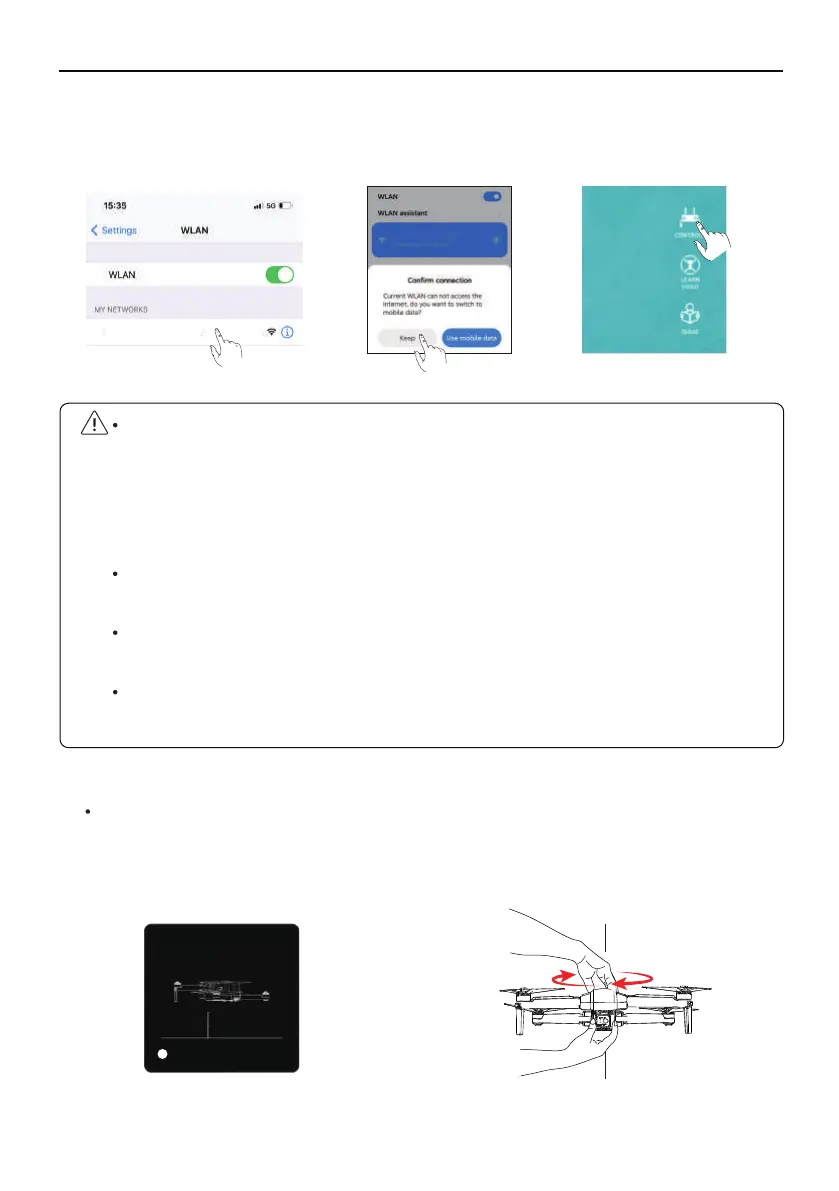
Connect the mobile phone to Aircraft's WiFi (name: RUKO-GIM-****** ), click on the app to
enter the control interface
.
⑤
Calibrate the compass
When the Android phone is connected to Aircraft WiFi (named RUKO-GIM-******), as the
Aircraft WiFi has no network, wait for about 10-40 seconds on the phone Wifi setting
page, the phone will pop up the network setting option to ask whether to continue to
connect to Aircraft wifi, please set it continue to use Aircraft wifi, so as not to cause the
APP to be unable to see the image transmission screen.
Please turn off the VPN switch of the phone to avoid the app not being able to see the
image transmission screen.
If the mobile phone is set to priority on internet speed and the app cannot see the image
transmission screen, please set the mobile phone to airplane mode and try.
Aircraft image transmission WiFi is 5.8G, mobile phone WLAN function must be
supported; dual-band WiFi, 2.4G+5.8G, can be applied.
GeomagneticHor Calibration
Plaese place the aircraft 1 meter high
on the groud and rotate it
horizontally for 2-3times .
3.28ft
1
RUKO-GIM-******
RUKO-GIM-******



 To Next Page