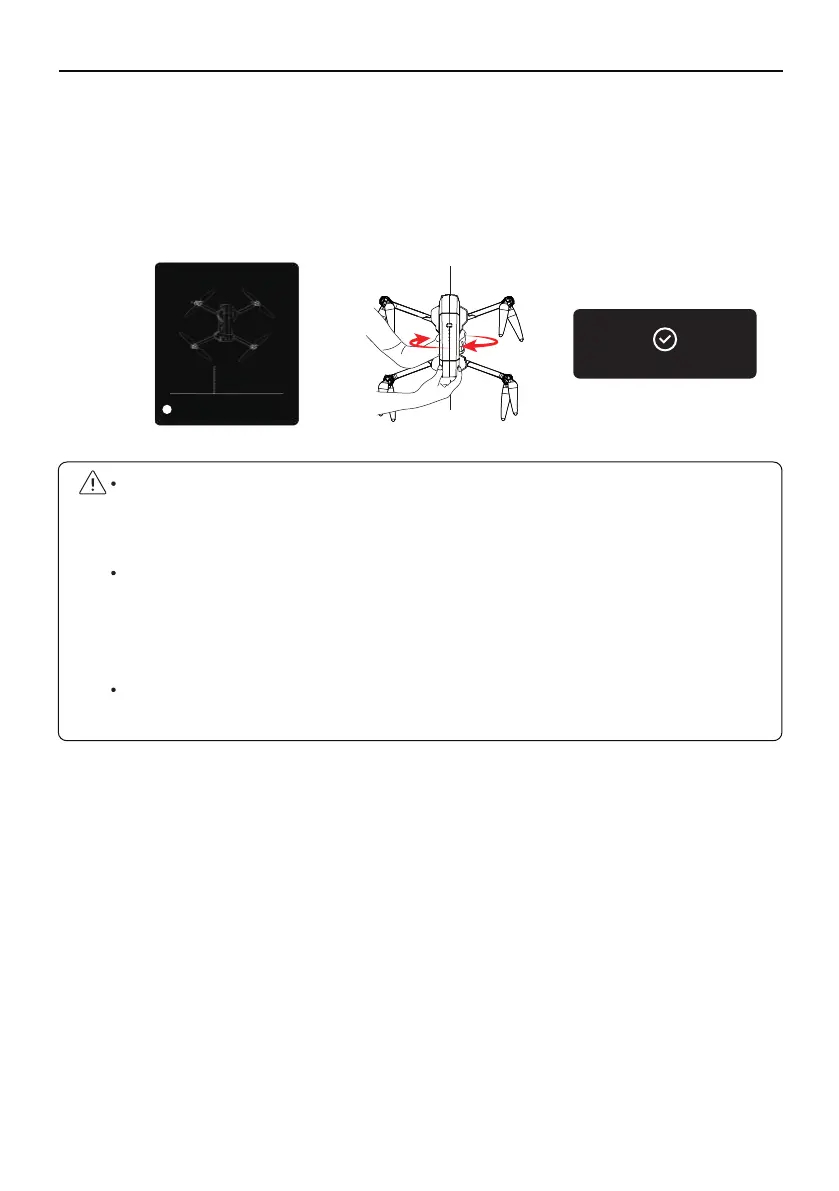
Pick up the Aircraft at a distance of 3.28 ft from the ground, and rotate the Aircraft 1-2 laps
vertically with the camera facing upwards until the prompt of vertical calibration on the app
interface disappears. After the compass calibration is completed, place the Aircraft on a level
ground. At this time, the front arm of the Aircraft has a white light and the rear arm has a blue
light, and the app prompts that the compass calibration is complete.
F11GIM User Manual
Copyright ©2021 Ruko All Rights Reserved.34
②
The aircraft must be calibrated with the compass every time it is turned on before it can
take off. After the aircraft is turned on and the frequency is turned on, the aircraft can be
calibrated in steps ① and ②.
When the Aircraft is flying in a circle or out of control in a complex environment, the
aircraft compass calibration is not standard or interfered. Please land the Aircraft
manually in time to manually calibrate the Aircraft (refer to the first step of calibrating
the compass).
When calibrating the Aircraft, please open the arm to avoid the influence of the magnetic
field of the motor.
GeomagneticHor Calibration
Please place the airctaft 1 meter high on
the ground, nose up, and rorate it 2-3
times.
3.28ft
2
Geocalibration finished!



 To Next Page