EasyManua.ls Logo

RUKO F11GIM2 - Drone Status Indicators

RUKO F11GIM2
56 pages
Print Icon
To Next Page IconTo Next Page
To Previous Page IconTo Previous Page
Loading...
F11GIM2 User Manual
Copyright ©2022 Ruko All Rights Reserved.
27
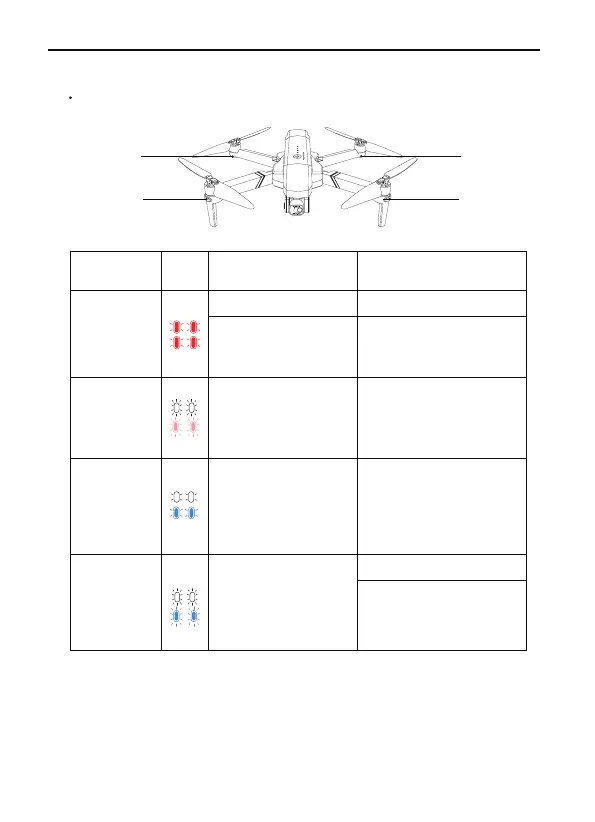
8 Drone Status Indicators
F11GIM2 drone has front and back four LED lights.
Front LED
Back LED
Front LED
Back LED
Front and
back lights
flashing red
Front and
back lights
flashing white
and pink
Front and
back lights
flashing
white and
blue
Front and
back lights
rapid-flash-
ing white and
blue
The controller is not
connected to the
drone
The drone turns to
Compass Calibration
process
Follow the insturction to
rotate the drone to
complete calibration
process
The drone is in
Gyroscope Calibration
process
Wait till the drone
complete calibration
automatically (This only
take 2-3 seonds)
GPS searching
Waiting for GPS signal
Change to another
place and try again
Charge the battery
Restart and wait for the
drone and controller
auto-connection
Low Power
LED light
indicator
Reason Action requiredColor

Related product manuals