F11GIM2 User Manual
Copyright ©2022 Ruko All Rights Reserved. 43
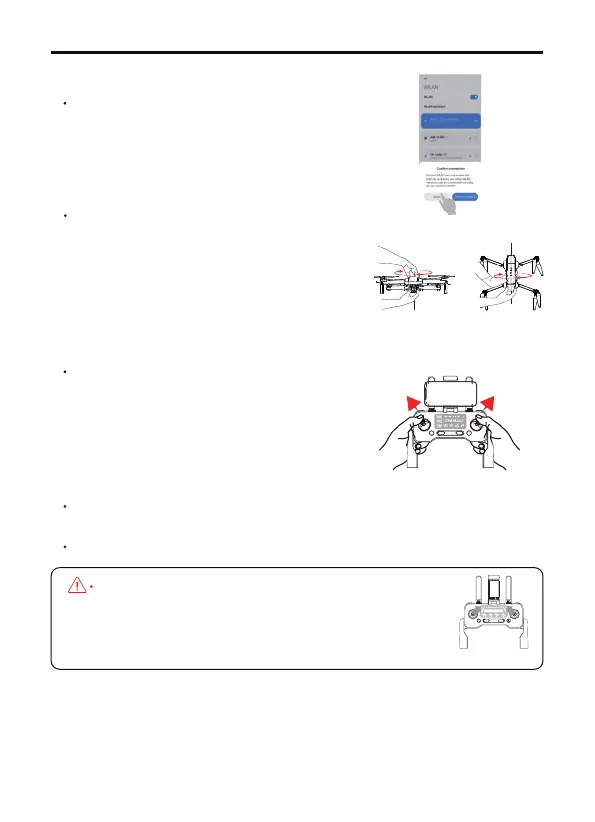
Step 3: Connect the app
Open the phone's WiFi list, connect the drone's
WiFi which names "RUKO-GIM-XXXX", open the
"RUKO DRONE" app.
Stpe 4: Complete compass calibration
Pick up the drone and hold it levelly, rotate
the drone in one full circle (360°), until hear
a "beep" sound reminder. Hold the drone
vertically with camera facing to the sky,
rotating a full circle (360°), there are two
"beep" sound reminder.
Step 5: Complete the gyroscope calibra-
tion
Put the drone on a level surface, push the
left and right joysticks to the 11' and 1'
o'clock positions, lights flashing white and
blue quickly.
Drone searches for GPS signal automatically, when lights turn to solid
blue and white, drone is ready to fly.
App drone status: "Fly" is displayed in the app, drone is ready to fly.
When it is needed to manually trigger the compass
calibration to adapt to the enviroment, please push
the joystick to 1 & 11 o'clock position, follow the
above steps to rotate the drone.



 To Next Page