U11Pro User Manual
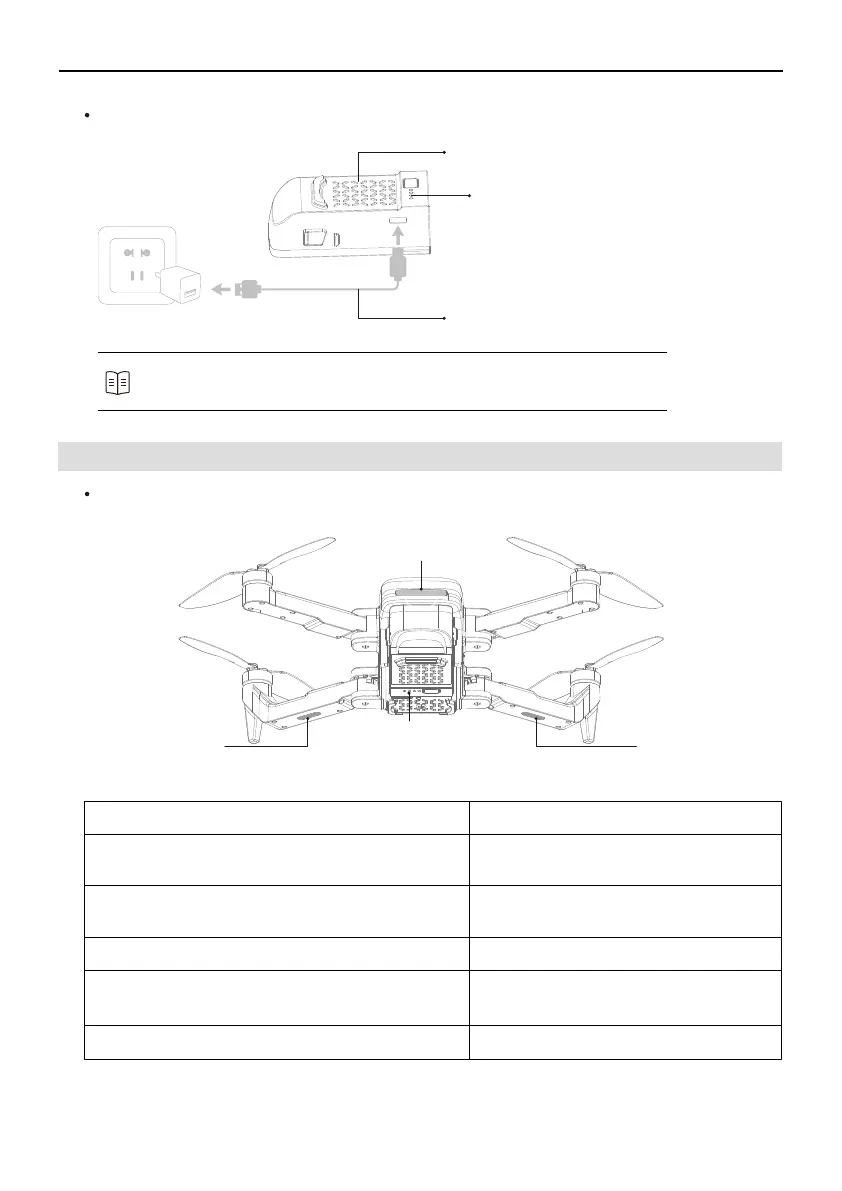
Precautions for Charging
5V/2A~3A
Battery
LED lights are flashing when it's charging
All lights stay on when it's fully charged
Original USB cable
Refer to the Ruko U11 Pro Disclaimer & Safety Guidelines before use.
Users take full responsibility for all usage and operations.
Refer to the following table to understand the status of the different indicators.
3.5 Drone Status Indicator
①
②
③
Front LED Light
④
Front LED Light
Battery LED Light
Rear LED Light
Indicator status Meaning
The Front LED light (Red) is flashing slowly,
Rear Led light (Green) stays on and then goes off
The Rear LED light (Green) is flashing slowly,
Front LED lights (Red) stay on
All LED lights are flashing alternately
First, all LED lights are flashing quickly, then all
LED lights are flashing alternately
All LED lights stay on during outdoor
The power of the drone is turned on
Horizontal calibration is completed
Vertical calibration is completed
Gyroscope calibration is completed
The searching GPS signal is successful
Copyright ©2021 Ruko All Rights Reserved.
9



 To Next Page