Copyright ©2021 Ruko All Rights Reserved.
8
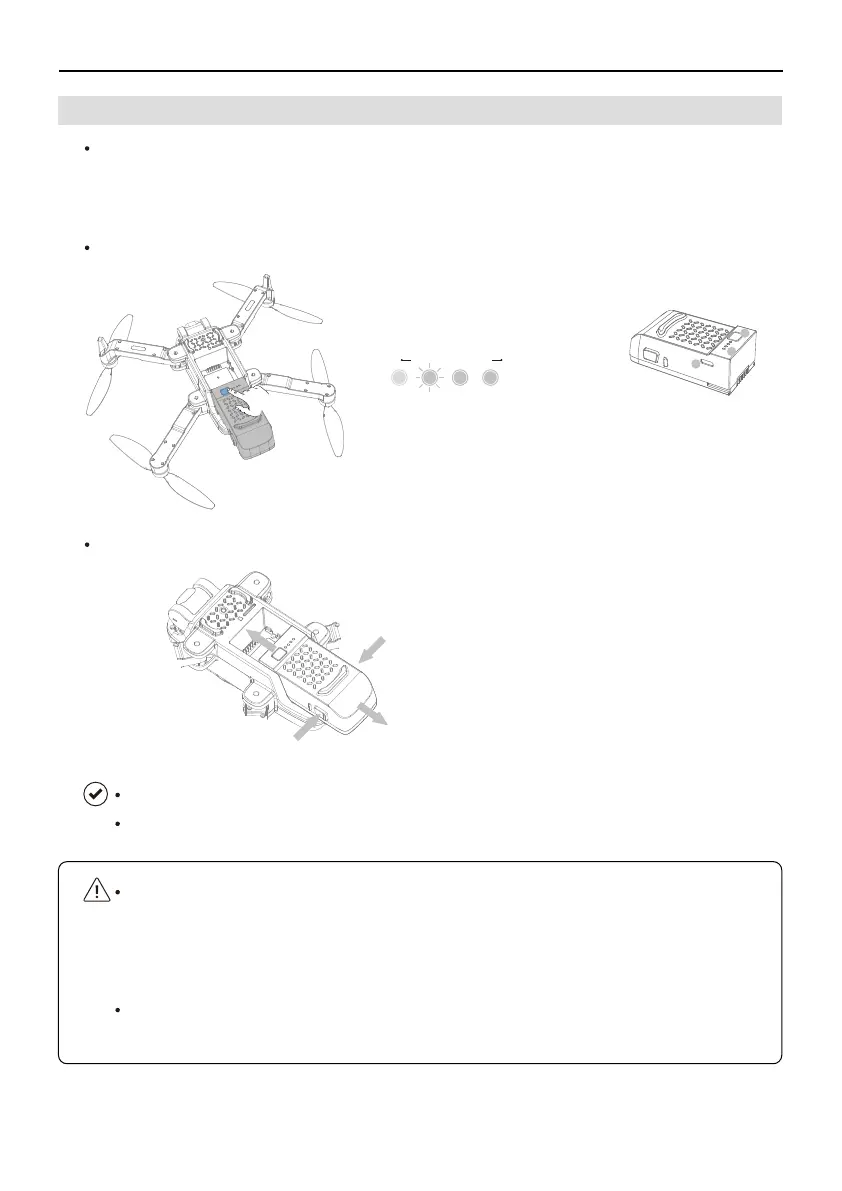
Installing: Install the Intelligent Flight Battery in the drone before use. Insert the
battery in the battery compartment and secure the battery clamp. A clicking sound
indicates the battery is fully engaged. Make sure that the battery is fully inserted
and the battery cover is secure in place.
Removing: Press the battery clamp and detach the battery from the battery
compartment to remove it.
The Ruko U11 Pro Intelligent Flight Battery is a 7.6 V, 1900 mAh battery with smart charging
and discharging functionality. Refer to the Ruko U11 Pro Disclaimer & Safety Guidelines on
the battery before use.
U11Pro User Manual
Battery Diagram
Installing/Removing the Battery
3.4 Intelligent Flight Battery
Low Electricity High
①
Power on/off
②
Battery LED Light
③
Type-C charging port
Tips: Press the power button for 3 seconds to power on/off.
1
3
2
①
Press the clamp
Press the clamp
①
②
Remove it
Installing: Insert it in the battery compartment
Removing:
Make sure that the battery is mounted firmly before flying.
DO NOT detach the battery when the drone is powering on.



 To Next Page