U11Pro User Manual
Copyright ©2021 Ruko All Rights Reserved.
18
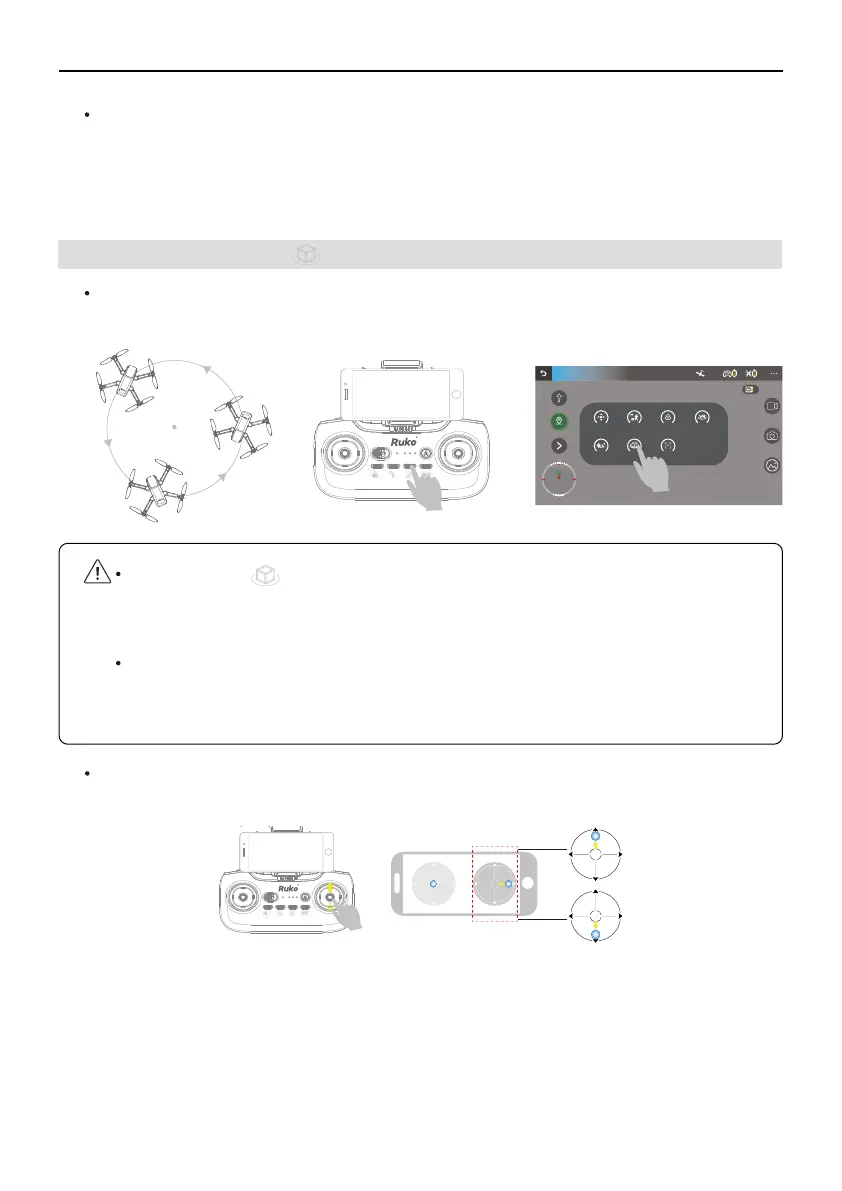
Point of Interest is initiated either by tapping in RUKO GPS APP or by pressing
the Point of Interest button on the remote controller. And the remote controller
sounds beeps to start the Point of Interest Mode.
The White LED Light(No.4 Light) of remote control stays on while in Point of Interest
Mode. Exit Point of Interest by tapping in RUKO GPS or by pressing the Point of
Interest button on the remote controller.
The aircraft tracks the static subject in a circle based on the radius and flight speed that is
set, such as building, lighthouse, etc.
Failsafe RTH
If the GPS mode was successfully open, Failsafe RTH automatically activates after the remote
controller signal is lost for more than 5 seconds, it will automatically cancel the Failsafe RTH
when the remote controller receives the signal from the drone, you can continue operating it.
GPS Mode
Joystick GPS follow Filters VR
WayPoint Orbit Camera Angle
D:0.0m H:0.0m VS:0.0m/sDS:0.0m/s
8
N
S
M E
5.3 Point of Interest
How to adjust the circle radius and flight speed?
①
You can push the Right Joystick up or down to adjust the the circle radius.



 To Next Page