U11PRO User Manual
Copyright ©2023 Ruko All Rights Reserved.
10
5.1 Wi-Fi Guidelines
5 Problems You May Encounter
The required Operating System of the phone must be iOS 9.0 or later
/ Android 5.0 or later. This drone will be compatible with the phones
which’s WLAN function supports dual-band Wi-Fi (2.4GHz and 5.8
GHz).
For iOS system:
Connect the Wi-Fi “RUKO-U11PRO-******” with your phone.
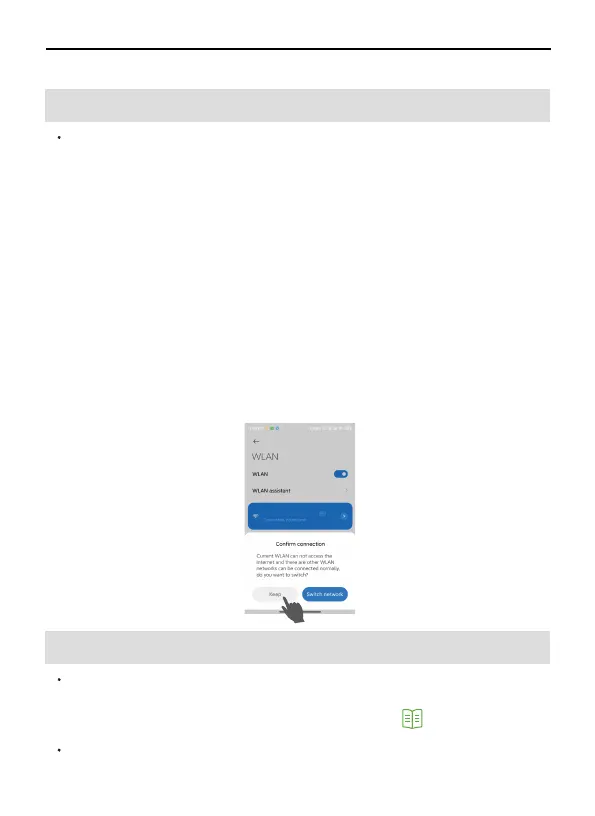
For Android system:
①After connecting with the drone’s Wi-Fi “RUKO-U11PRO-******”
please wait for about 10-30 seconds.
②Note if there is any option popping up about internet settings,
Please keep connected, otherwise, there is no picture after entering
APP.
③If still without a Wi-Fi connection, please turn on your phone's
airplane mode for a few seconds, then turn off the airplane mode
and open the Wi-Fi list to connect it again.
*Note: Need to turn off the VPN, VPN will affect Wi-Fi connection.
5.2 Remote Controller Guidelines
After a full charge, if it shows a low battery of controller on App,
please try to re-pair the remote controller first with the drone, then
connect Wi-Fi and access to the APP to check. (Refer to page
32 on User Manual) .
The remote control can't work during charging.
RUKO-U11 PRO-XXXXXX



 To Next Page