MAINTENANCE SCHEDULE
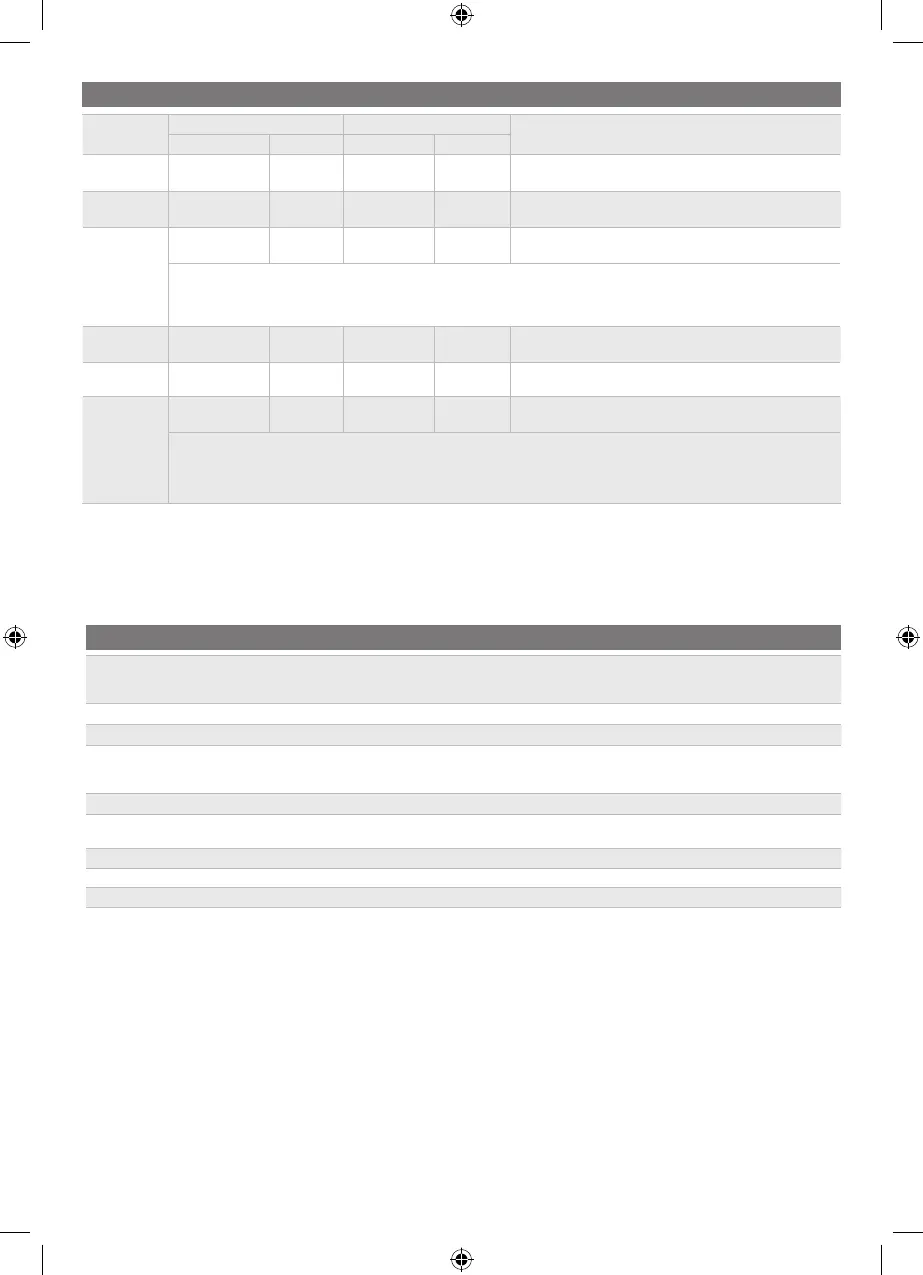
Inspect before
each use
Every
25
hours
Every
50 hours
or yearly
Before
storage
Once a month
during storage
Check the brake operation. x
Check the tyre pressure. x
Check side discharge chute and
operator presence safety interlock
systems.
x
Check for loose fasteners. x x
Remove all foreign materials from the
product.
x x
Check / Replace mulching blades. x x
Clean battery terminals. x
Check and charge the battery. x x
NOTE: Maintenance should be performed more frequently when the product is used in dusty areas.
When the product has exceeded the maximum gures specied in the table, maintenance should still be cycled according to the intervals of
time or hours stated herein.
If you are unsure how to perform any of the maintenance items listed above, have the product serviced by an authorised service centre only.
CHARGER LED INDICATOR
Charger
status
Connected to LED
Status
Power supply Mower Charger Mower
Standby Yes No On O Ready to charge battery pack
Charging Yes Yes On
Slow
ashing
—
Charger error
Yes Yes O Fast ashing
Battery temperature, battery capacity, or charger may be
faulty.
If the LED status shows error, wait for about 15 minutes to allow the battery and charger to cool down.
If the LED status repeats a second time, reset the charger or reinsert the battery.
If a dierent charger charges normally, the charger may be defective.
If a dierent battery charges normally, battery capacity may be faulty.
Fully charged Yes Yes On On Fast charging is complete; charger maintains charge mode.
Interlock No Yes O Fast ashing
The plug is still connected to the mower. The mower cannot
be started.
Defective
Yes Yes On Fast ashing The battery pack could be defective.
If the LED status shows defective, reset the charger or reinsert the battery.
If the LED status repeats a second time, try charging a dierent battery.
If a dierent battery charges normally, dispose of the defective pack (see maintenance section).


 To Next Page