PSI
04/97-0753
Programming the SID:
Connect
ISAT
and program SID as described below. When completed, affix new label to
page
72
of
1995900
Owner3
Manual or Page 7 in 1995 900 Convertible Owner’s Manual.
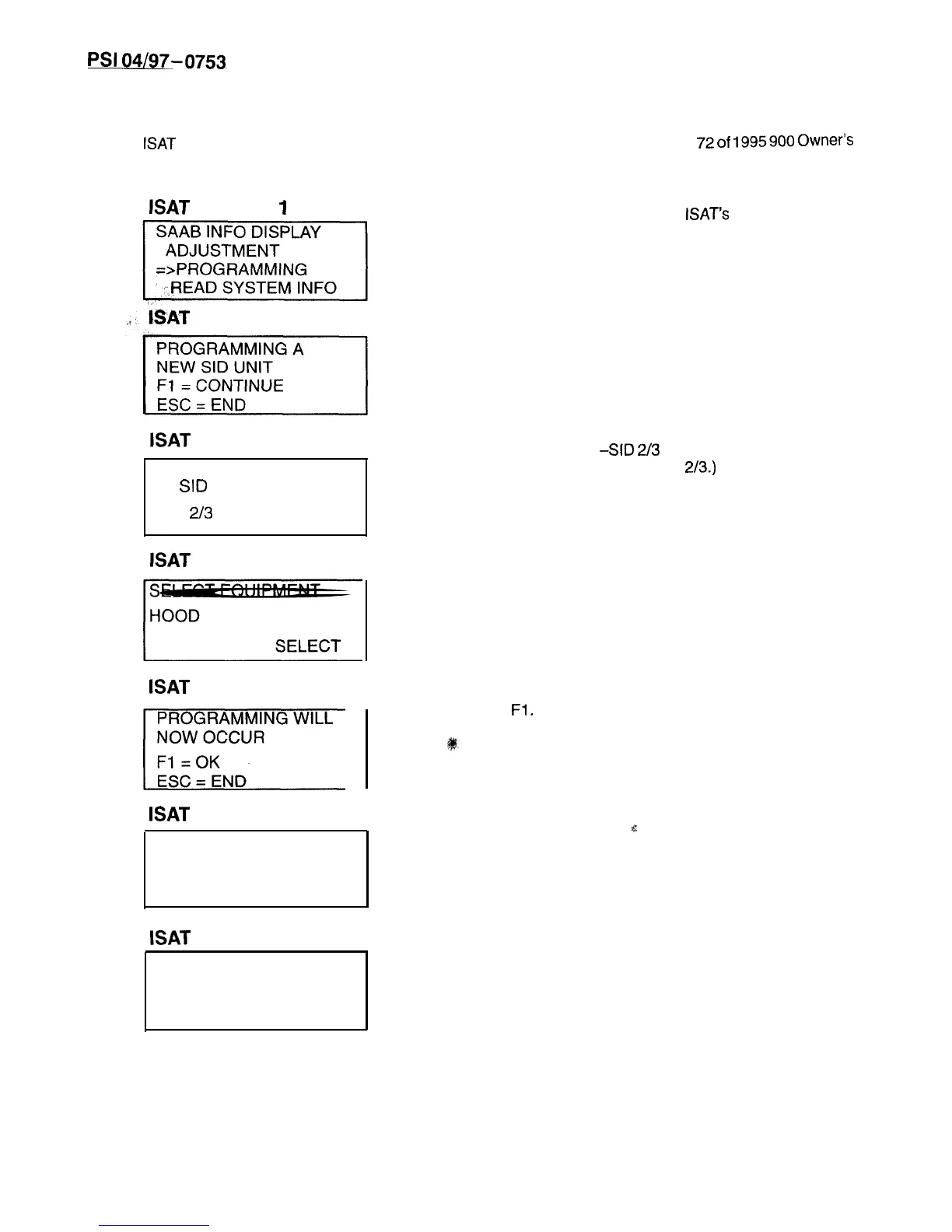
lSAT
DISPLAY
1
BAT
DISPLAY 2
ISAT
DISPLAY 3
SELECT TYPE OF
SID
UNIT.
SID
213
SELECT
ISAT
DISPLAY 4
ISAT
DISPLAY 5
yEgF=
ISAT
DISPLAY 6
PROGRAMMING
CARRIED OUT
ISAT
DISPLAY 7
PROGRAMMING
INTERRUPTED
1.
Select PROGRAMMING in
ISAT’s
SAAB INFO
DISPLAY menu.
2.
Proceed to the programming phase or end.
3.
Enter SID type
-SID
2/3
.
(All U.S. models select SID
2/3.)
4. Specify equipment: HOOD.
5.
Program the instrument with the entered data.
Press
Fl.
6.
This menu confirms that programming is com-
pleted.
,I:
7.
This menu is displayed if programming is inter-
rupted with ESC.
8.
End communications with SID.
9.
Close latches. Attempt to lower top with ROOF
switch. Check that SID displays “CHECK
LATCHES” messages.
Page 20 of 24



 To Next Page