5-16 Audio
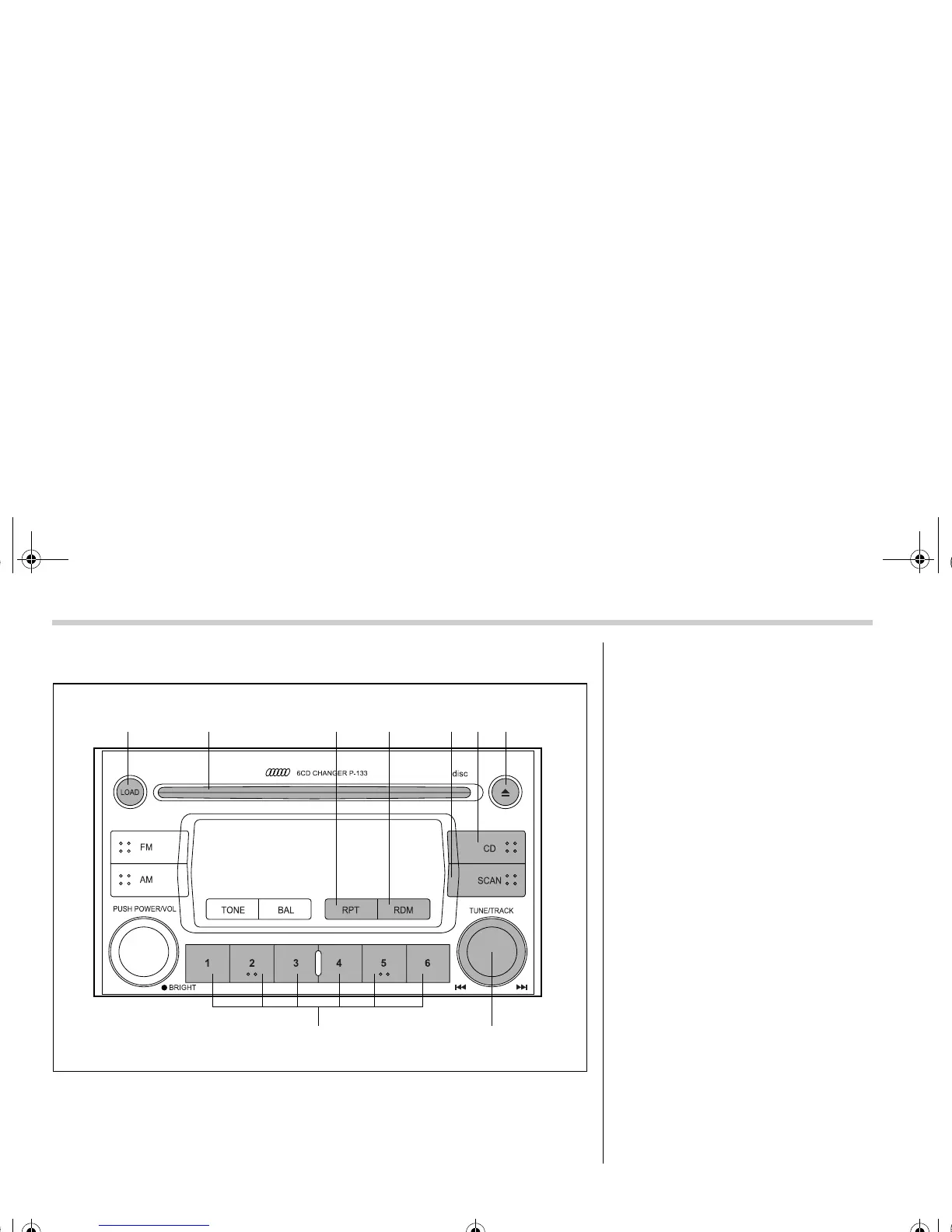
¢ Built in CD changer operation
(9)
(17) (16)
(12)(11)(10) (13) (14) (15)
500249
(9) LOAD button
(10) Disc slot
(11) Repeat button
(12) Random button
(13) SCAN button
(14) CD button
(15) Eject button
(16) Fast-forwarding/Fast-reversing and
track UP/DOWN knob
(17) Disc select button
NOTE
Make sure to always insert a disc
with the label side up. If a disc is insert-
ed with the label side down, it might be
ejected or the player might shut off.
Certain CD-Rs and CD-RWs cannot
be played.
q How to insert a CD(s)
s Inserting a CD
1. Press “LOAD” button (9). If the maga-
zine in the player has an open position
where you can insert a disc, the “DISC” in-
dicator associated with the open position
will blink. The capacity is 6 discs.
If no indicator blinks, it means that there is
no open position in the magazine.
2. As soon as the “DISC” indicator begins
to blink, the “LOAD” will appear on display
for a period of 15 seconds. Insert a disc
A1910BE-A-GSAAB.book Page 16 Tuesday, September 6, 2005 8:37 AM



 To Next Page