US English
8
40
8 PROGRAMMING MENU
This chapter contains
instructions on how to set
and change the
programming parameters
of the appliance.
Therefore it is necessary to
carefully read it and to
understand the exact
sequence of operations
before performing them.
All the operations
described in this chapter
must be performed
exclusively by the service
provider or a specialised
technician, who shall
organise all the operating
steps and use only suitable
means to ensure strict
compliance with the safety
regulations in force.
The specialised technician or the service provider can
change some of the machine operating parameters to suit
the needs of the users.
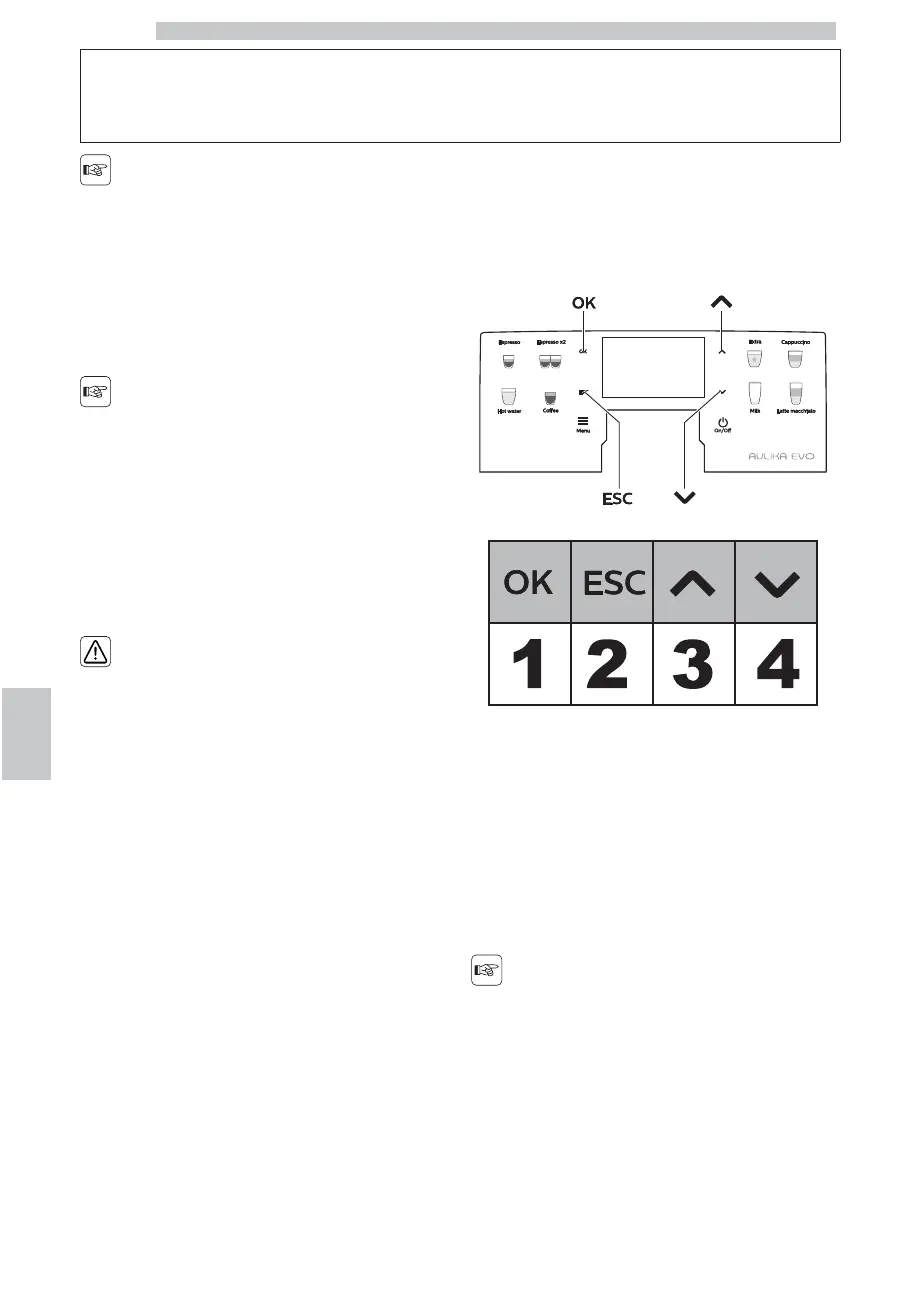
8.1 Button Description in
Programming Mode
Use the buttons described below to scroll the appliance
menus.
Button 1: OK
This button allows you to:
• select the function to display;
• confirm the parameter/value when it is made editable.
Button 2: Esc
This button allows you to exit without changing the
parameter edited or selected.
press it repeatedly to exit
programming mode.
Button 3: Up
This button allows you to:
• browse the pages within a menu;
• change the parameters when they are made editable using
the "OK" button.






 To Next Page