US English
9
77
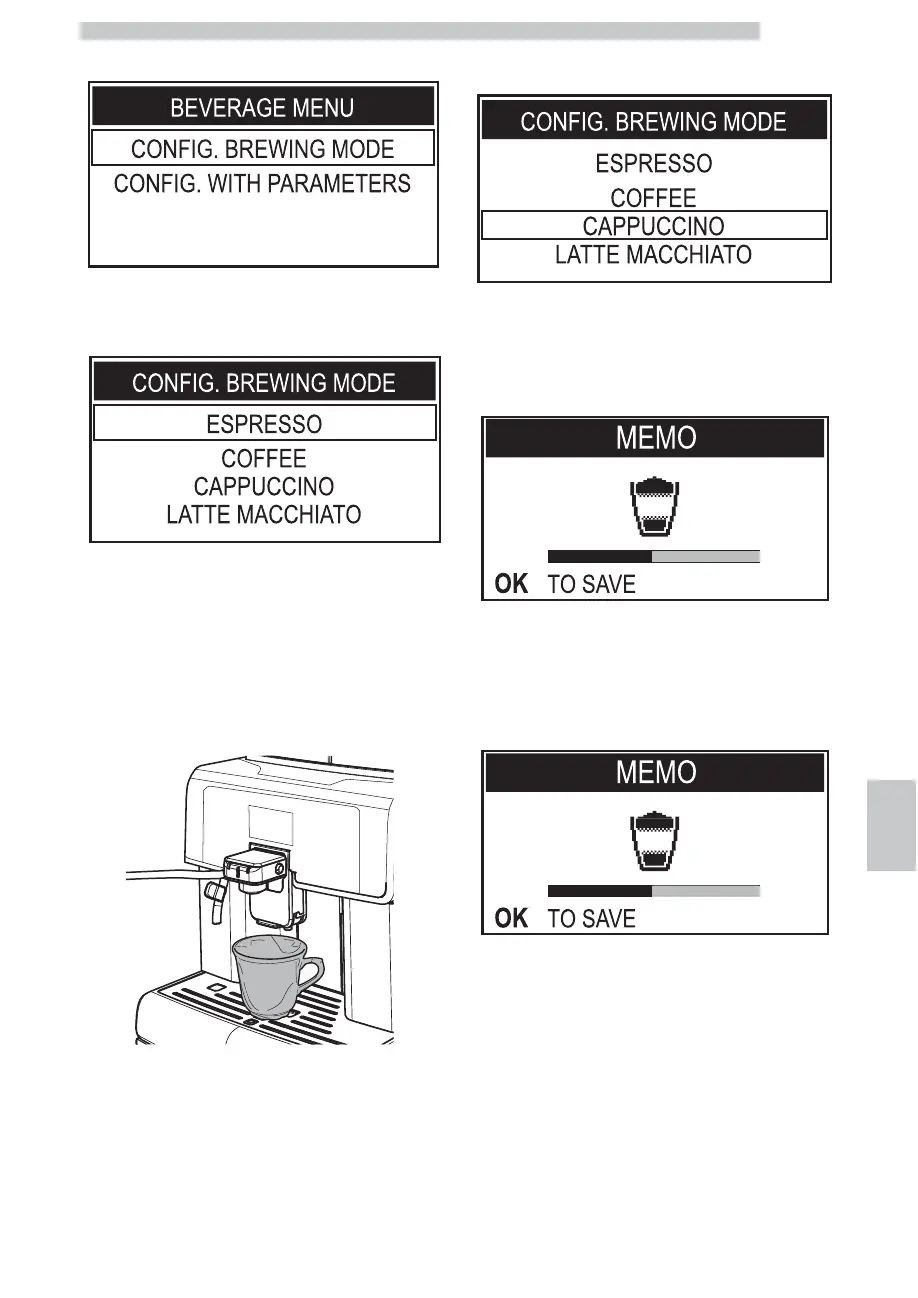
Press the "OK" button to enter.
Press the "OK" button to access the CONFIG. BREWING
MODE menu.
Select the beverage that you wish to program and stop the
brewing process when desired, as shown on the display.
The procedure for programming a cappuccino is explained as an
example. Before carrying out the programming procedure, prepare
the machine as described in section "Brewing a Cappuccino".
Place a cup under the dispensing spout.
To select the "Cappuccino" option, press the "DOWN"
button multiple times.
Press the "OK" button to enter. The machine is now in
programming mode. The machine starts the milk
dispensing phase. The "OK TO SAVE" message appears on
the display.
Press the "OK" button when the desired amount of milk is
reached in the cup.
The machine immediately begins the coffee brewing phase.
The "OK TO SAVE" message appears on the display.
Press the "OK" button when the desired amount of coffee
is reached in the cup. Now the "Cappuccino" button is
programmed. Each time it is pressed, the machine will
brew the same amount that was just programmed.






 To Next Page