US English
9
80
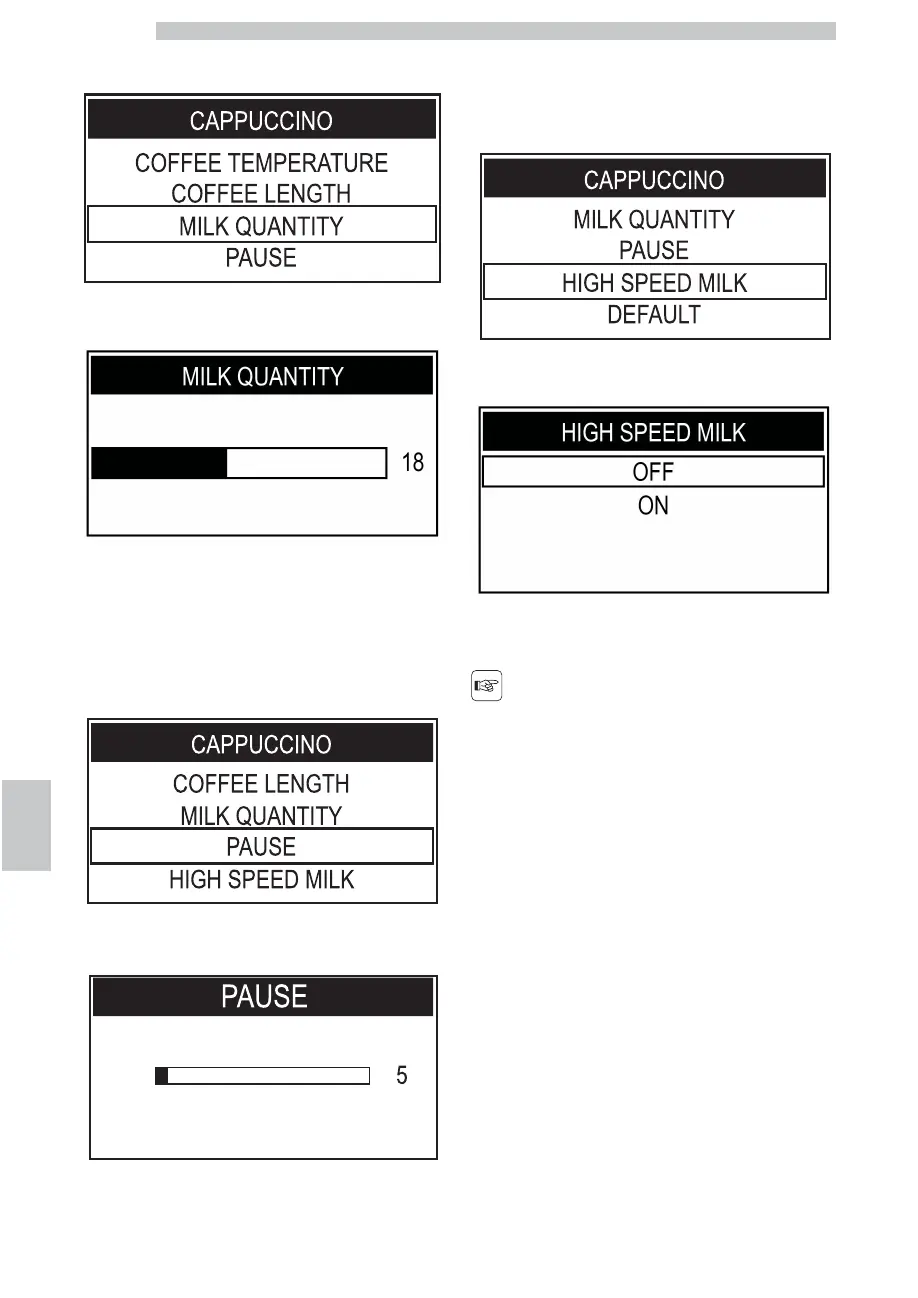
Press the "DOWN" button to select the "MILK
QUANTITY" menu.
Press the "OK" button to enter.
Press the "DOWN" button or the "UP" button to move
the bar and select the desired value; the number on the
side identifies the bar value (in seconds). Then press the
"OK" button to confirm and exit.
Press the "DOWN" button to select the "PAUSE" menu.
Press the "OK" button to enter.
Press the "DOWN" button or the "UP" button to select
the desired value.
Press the "DOWN" button to select the "HIGH SPEED
MILK" menu.
Press the "OK" button to enter.
Press the "DOWN" button or the "UP" button to select
the desired value.
By activating this function,
milk and coffee are
dispensed at the same
time.
Then press the "OK" button to confirm and exit.
When this phase has been completed, the beverage is
programmed. It is recommended to perform a visual check
of the result. To restore the factory settings of a single
beverage, proceed as follows.






 To Next Page