JUL 2023 | R1.7© Safe Fleet | All rights reserved
3. Monitor Calibration
FOCUS H2 Installation Guide
p. 19
3. Monitor Calibration
Upon bootup of the FOCUS H2 for the rst time, it will ask for calibration of the monitor. Please follow the steps below for
the monitor calibration procedure.
NOTE: Monitor Compatibility
Please note that you could not connect a FOCUS H1 monitor back to a FOCUS H1 device of v2.x if it was connected and
calibrated to a FOCUS H2 device.
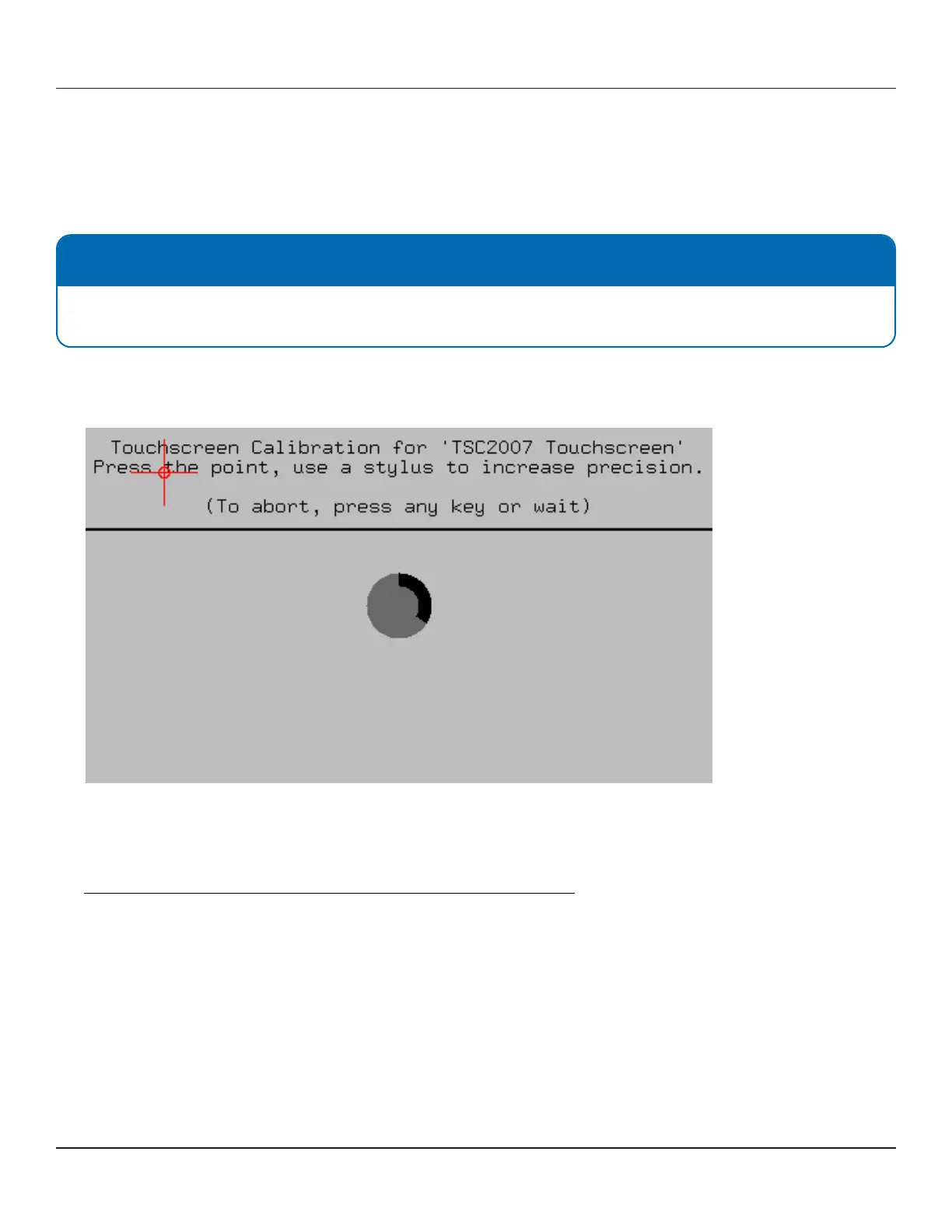
1. Upon rst bootup, the following calibration screen will pop up on the LCD.
Tap the calibration targets (center of the red crosshair) as precisely as possible for all 4 corners.
2. If the countdown circle timer for calibration times out, you will be redirected to the login screen uncalibrated.
Please power cycle the FOCUS H2 device to go through the calibration process again.
3. If your screen is misaligned after calibration, please refer to the following article for recalibration:
https://community.safeeet.net/kb_article/focus-h2-monitor-calibration/



 To Next Page