JUL 2023 | R1.7© Safe Fleet | All rights reserved
2. Installing FOCUS H2 In-car Video System
FOCUS H2 Installation Guide
p. 4
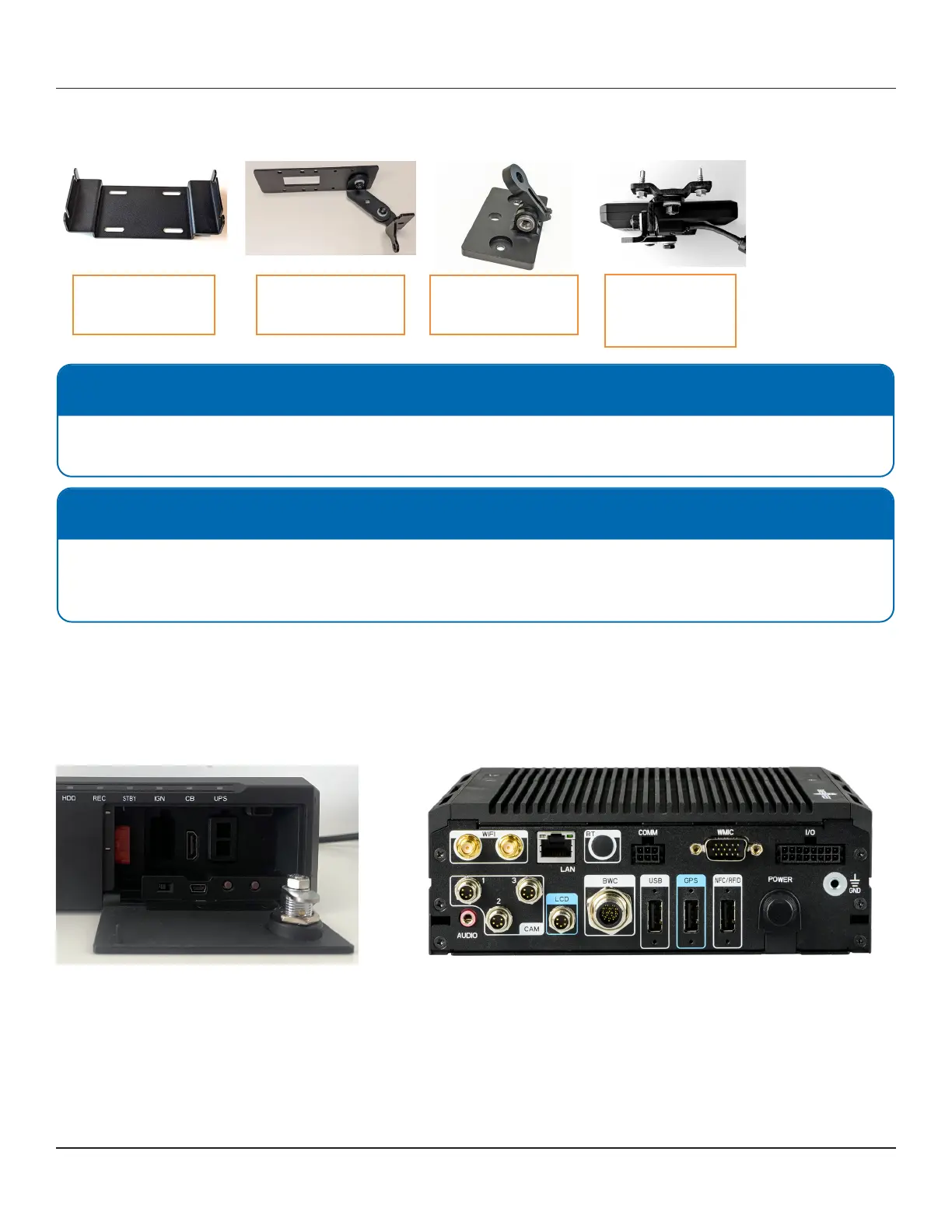
2.2 Mounting Parts List
CPU mount
P/N: FOCUS-04-02
Front camera mount
P/N: FOCUS-05-14
Rear camera mount
P/N: FOCUS-05-09
Monitor mount
(universal mount)
P/N: FOCUS-06-05
2.3 Mounting the FOCUS H2 CPU
To mount the CPU, follow these steps:
1. Choose a dry location with air ow.
2. Fasten the CPU mounting bracket to the vehicle. There are two ways to fasten the CPU mounting bracket depending
whether a rack is present for installation.
NOTE: CPU Mount
CPU mount includes carriage bolts which should be used instead of self-drilling screws when possible.
There are two mounting options: forward holes and mid holes for the CPU in the bracket.
NOTE: Monitor Mount
The universal monitor mount is used when installing the monitor on the center console or on vehicle that does not have
a vehicle specic mount. (Vehicle specic mounts are available for 2020+ Ford Explorer Utility, 2018-2020 Tahoe, and
2021+ Tahoe).
The following images show the front and the back of the FOCUS H2 CPU respectively.



 To Next Page