JUL 2023 | R1.7© Safe Fleet | All rights reserved
2. Installing FOCUS H2 In-car Video System
FOCUS H2 Installation Guide
p. 6
2.4 Mounting the Monitor
To mount the FOCUS H2 monitor, follow these steps:
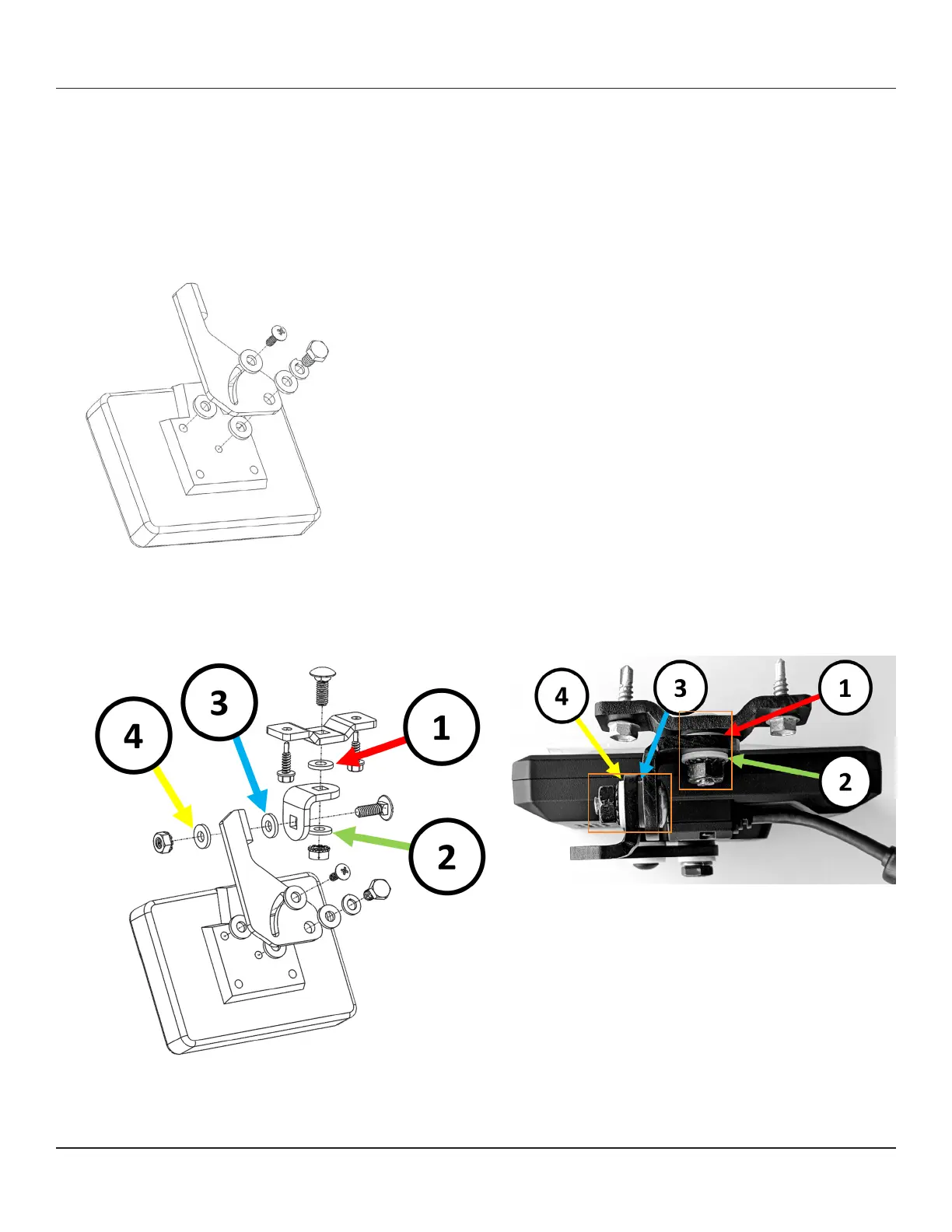
1. Attach the Swivel mount backing plate to the back of the FOCUS H2 monitor. Secure it via the center hole with a 1/4"-20
screw, 2 at washers, and a split lock washer, and secure via the top-left hole with a #8-32 screw and 2 at washers as
shown in the gure below.
2. Assemble the Swivel mount base and the angle plate with a carriage bolt, 2 at washers (Label 1 & 2), and a lock nut as
shown in the gure below. Then, secure the mount base and angle plate assembly to the backing plate in Step 1 using a
carriage bolt, 2 at washers (Label 3 & 4), and a lock nut.
3. Mount the monitor assembly to the vehicle using 2 self-tapping screws, and adjust the monitor to the desired position.



 To Next Page