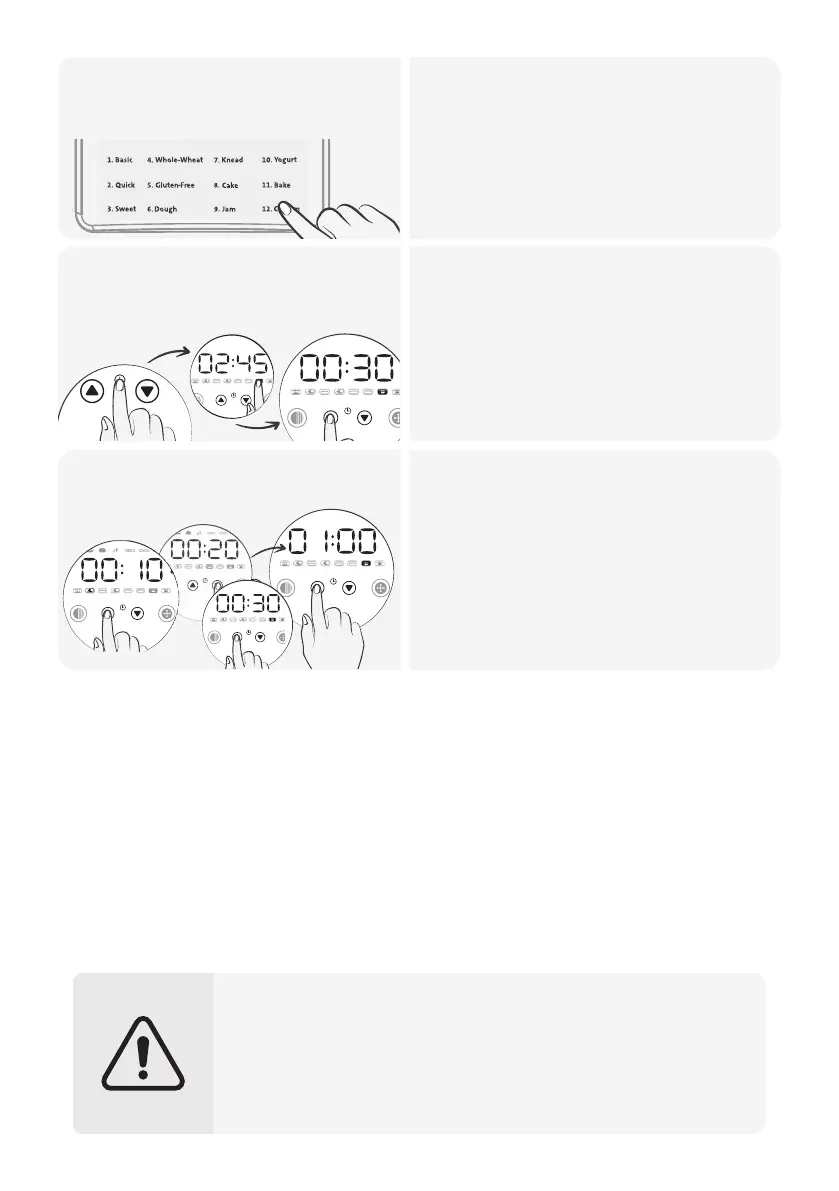
Select the Program 12
(Custom).
2.
• Choose Program 12 (Custom).
• Use the COLOR button to set crust
darkness at the beginning or end of
your settings.
MENU COLOR TIME + TIME - SIZE START / STOP
• Set the baking cycle time by using
the TIME buttons when the time
digits are flashing.
• Press the SIZE button to confirm the
set time and proceed to the next
preparation stage.
• Follow the same method to select all
your desired settings.
Customize the baking
stages
3.
• After selecting and confirming the
time for the final baking stage, the
time digits will stop flashing, and the
total program duration will be
displayed on the screen.
• The display indicates the selected
stage.
• Please note that in this program, you
cannot adjust the size of the loaf.
• Remember to unplug the appliance from the electrical outlet once
the bread is done.
• The machine will be hot after baking, so wear oven mitts to protect
yourself from burns.
• Avoid placing ingredients in the machine that exceed the baking
pan capacity. Overloading the machine can lead to overflow,
burning, and the production of burnt odors and smoke.
+
+
39
Start baking4.


 To Next Page