OPERATION
Revised 5/19/2010 4.1
Initial Start-Up
To start the Tissue-Tek
®
AutoTEC
®
manually, such as
when using it for the first time, follow this procedure:
1. Use the main power switch located on the lower-right
side panel to turn the AutoTEC on. The computer will
start automatically. After the software has completed
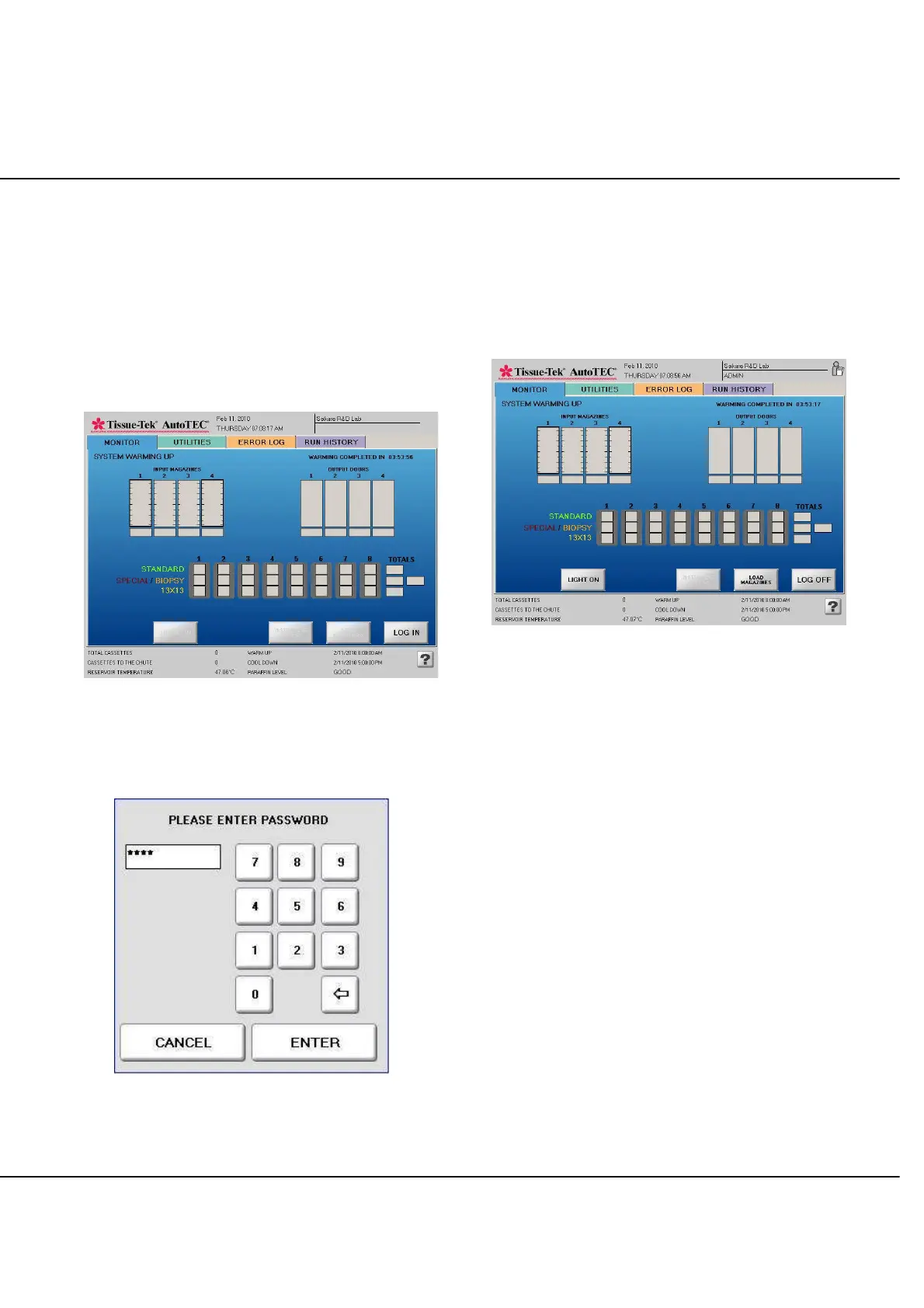
the loading process, the Monitor screen will display
(Figure 4-A).
Figure 4-A: System Start Up screen
2. Select the LOG IN button to access the ENTER
PASSWORD screen (Figure 4-B).
Figure 4-B: Log In screen
NOTE: Refer to page 3.14, User Accounts to set up the
passwords.
3. Use the keypad display to type in the password.
4. Select ENTER when done.
5. The Monitor screen is displayed with a LOG OFF
button (Figure 4-C).
Figure 4-C
Typical Operating Sequence
A typical operating sequence for the Tissue-Tek AutoTEC
is as follows:
Warm Up
System perform automatic self checks
Operation
Preliminary checks
Verify the proper placement of Paraform
cassettes into the magazines
Insert magazines inside the input door
Embed Paraform Cassettes
Remove output doors containing embedded
blocks
Prepare for the next run
End of operations
Review Reports
Perform maintenance as required
Cool Down



 To Next Page