Revised 5/19/2010 4.7
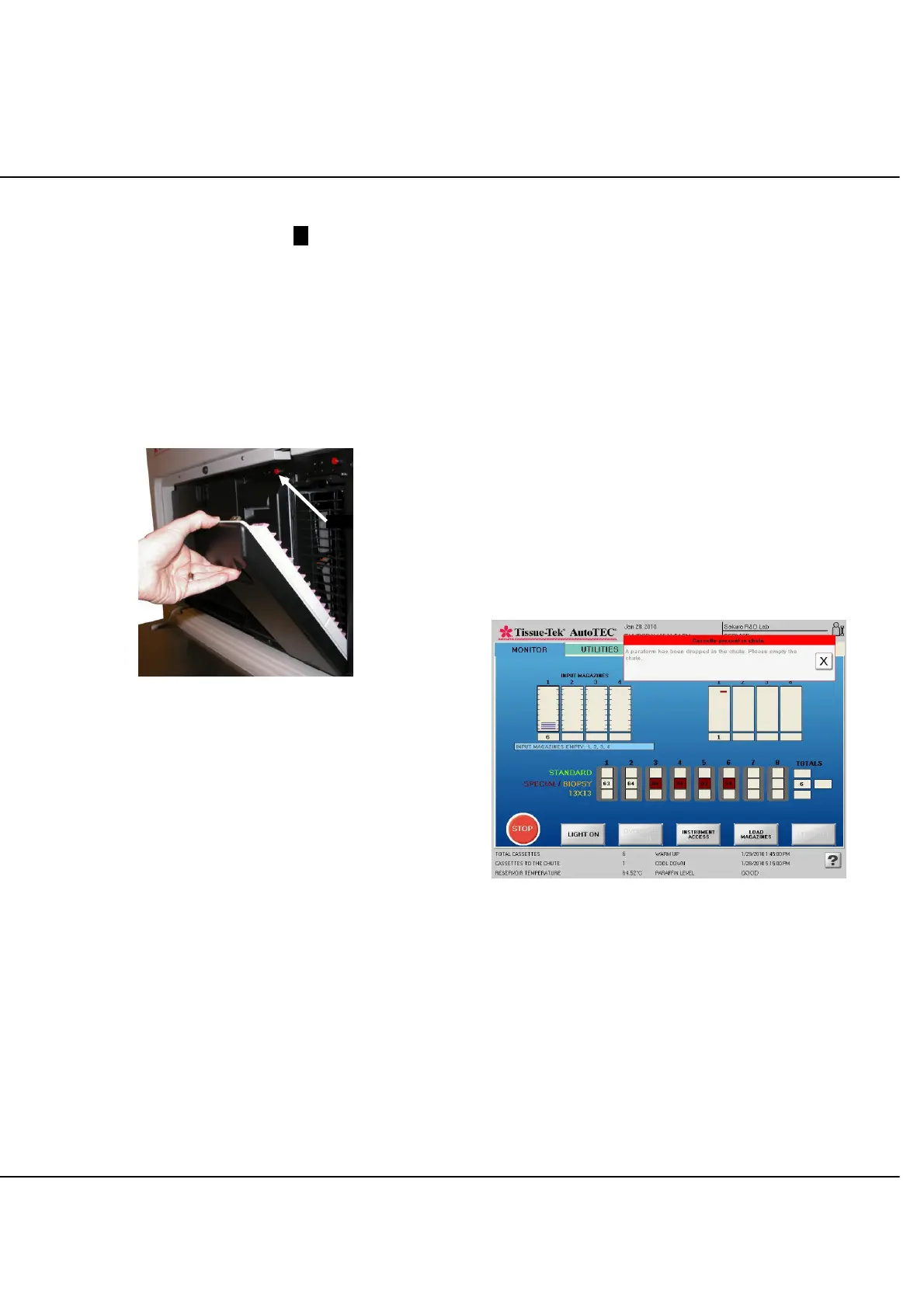
To remove one or more doors:
1. Push the small red button .1. located above the
upper-right corner of the output door to release the
latch (Figure 4-M).
2. Grip the door handle and firmly pull the door away
from instrument.
3. To replace, place the bottom edge of the empty door
in the channel and push the door towards the
instrument until it latches with a distinct click. The
click is required for the instrument to recognize the
door is in place.
Figure 4-M: Removing an Output Door
Add Paraffin
If the paraffin level falls below a certain point, an on-
screen message and audible alarm will prompt the user to
add paraffin to the reservoir. At this point, the system has
sufficient paraffin to embed at least 128 more cassettes,
or four full magazines.
NOTE: While the system is running, only molten paraffin
should be added; while it is in its warming cycle, pellets
may be added to the reservoir.
NOTE: Use only Tissue-Tek Paraform Processing/
Embedding Medium, Formula 3 (product code #7052).
NOTE: When the paraffin reservoir temperature drops
below an acceptable range the instrument will restart after
the user acknowledges the displayed message.
Cassette Recovery Chute
In certain instances, an improperly assembled Paraform
frame and cassette will be placed in the cassette recovery
chute. The chute is located behind a spring-loaded hinged
door on the left side panel. The system will continue to
process cassettes, and prompt the operator to remove the
Paraform Cassette from the chute. Touch to confirm
that the cassette has been removed.
The gripper is programmed to attempt to pick a framed
cassette from a magazine in three attempts. The gripper
may miss the cassette on the first attempt but move to the
chute and then return for another attempt which is
successful. If the cassette type check sensor validation
fails for the paraform cassette coming from the magazine
in the input door, the gripper will place that cassette in the
chute and return to the input door to grab the next
cassette. “CASSETTES SENT TO CHUTE” count on
screen will be incremented each time the chute sensors
detects cassette/frame dropping to the chute (Figure 4-N).
Figure 4-N: Cassette Recovery Message



 To Next Page