OPERATION
4.6 Revised 5/19/2010
Embedding Cassettes
Once loaded with magazines, the AutoTEC will start
automatically and embedding will begin after the system
checks and 15-minute magazine warm up period are
complete. During system operation it is possible to
continually replace empty magazines with loaded
magazines and full output doors with empty ones.
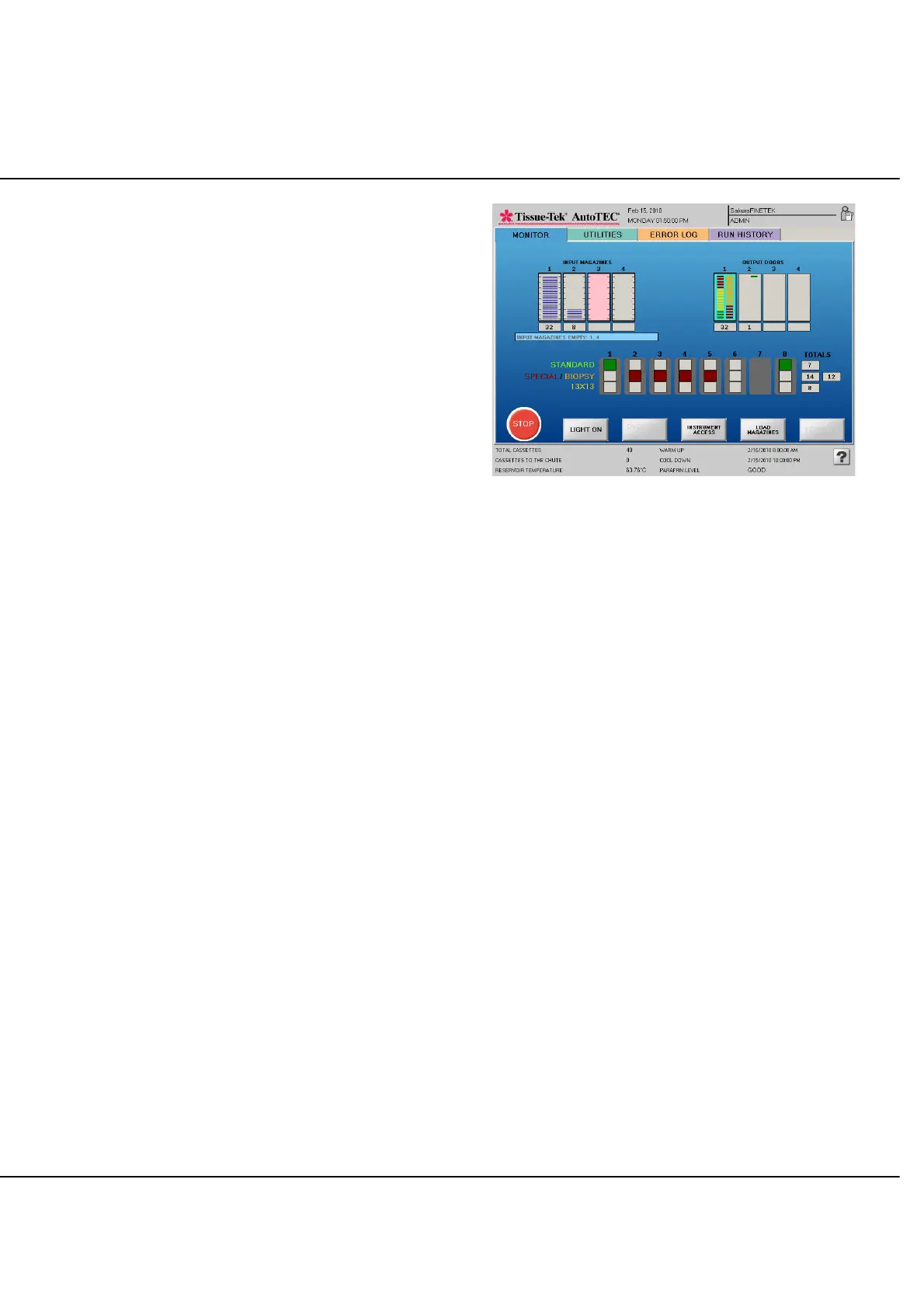
The Run screen shows the progress of the embedding
process for each cassette in the run. An example is shown
below.
NOTE: Cassettes are transferred to the output doors in
the exact sequence they are taken out from the input
magazines. For example, if input magazine #1 contained
14 cassettes, these cassettes will be embedded and 14
blocks will be placed in output door #1. If the next ready
magazine is in position #4 and contains 5 cassettes, the 5
completed blocks will be found in output door number #4.
An empty slot will be left in the output door, when a
cassette or an embedded block is dropped to the chute.
The Embedding Run screen in Figure 4-L shows that
magazine #1 was loaded at full capacity and that all 32
cassettes have been removed, embedded, and
transferred to output door #1. 8 cassettes have been
pulled out from input door #2, 1 embedded block is
already inserted to the output door #2 and 6 cassettes are
on the base molds. Base mold #7 is disabled for some
reason. Input magazine #3 (in pink) has completed 15
minutes warm up time and is waiting to be processed
next. There is no cassette in Input #4 magazine. A total of
14 specialty, 12 biopsy, 7 standard cassettes, and 8-
13x13 biopsy have been embedded so far.
The TOTALS are incremented every time a cassette is
placed in a base mold. They are sorted by cassette type.
The TOTALS are reset whenever a new user logs in, the
system shuts down, or the count exceeds 9,999. These
counts are recorded in the statistics.
Figure 4-L: Run screen, Magazines Heated
NOTE: The input door sensor system is able to detect the
presence of magazines and if they contain cassettes or
are empty. However, it cannot tell in advance how many
cassettes are present in a given magazine when first
loaded. The system counts cassettes as they are removed
from each magazine and displays that total below the
input magazine graphic.
End of Run and Removing Output Doors
By definition, a run consists of all cassettes in a magazine.
Once the cassettes initially loaded into a magazine are all
embedded and transferred to an output door, an audible
alarm sounds and a prompt will appear in the message
area at the bottom of the screen indicating that the run is
complete for that magazine. Within 1-2 seconds the
completed output door will be highlighted. When the
output doors have been removed, the display will update
the status of the output door within 1-3 seconds. If no
cassettes are being embedded, and as the last door is
removed, it then takes 30 seconds to update the door
status. When the door is removed the count beneath is
also reset simultaneously and the message at the bottom
of the screen now only reflects the current status. If all
output doors are removed, there will be no old message
left to clear the output door. Remove all specimen blocks,
from the output door or use the output door as transport
tray.



 To Next Page