Revised 5/19/2010 4.5
Run Screen Layout
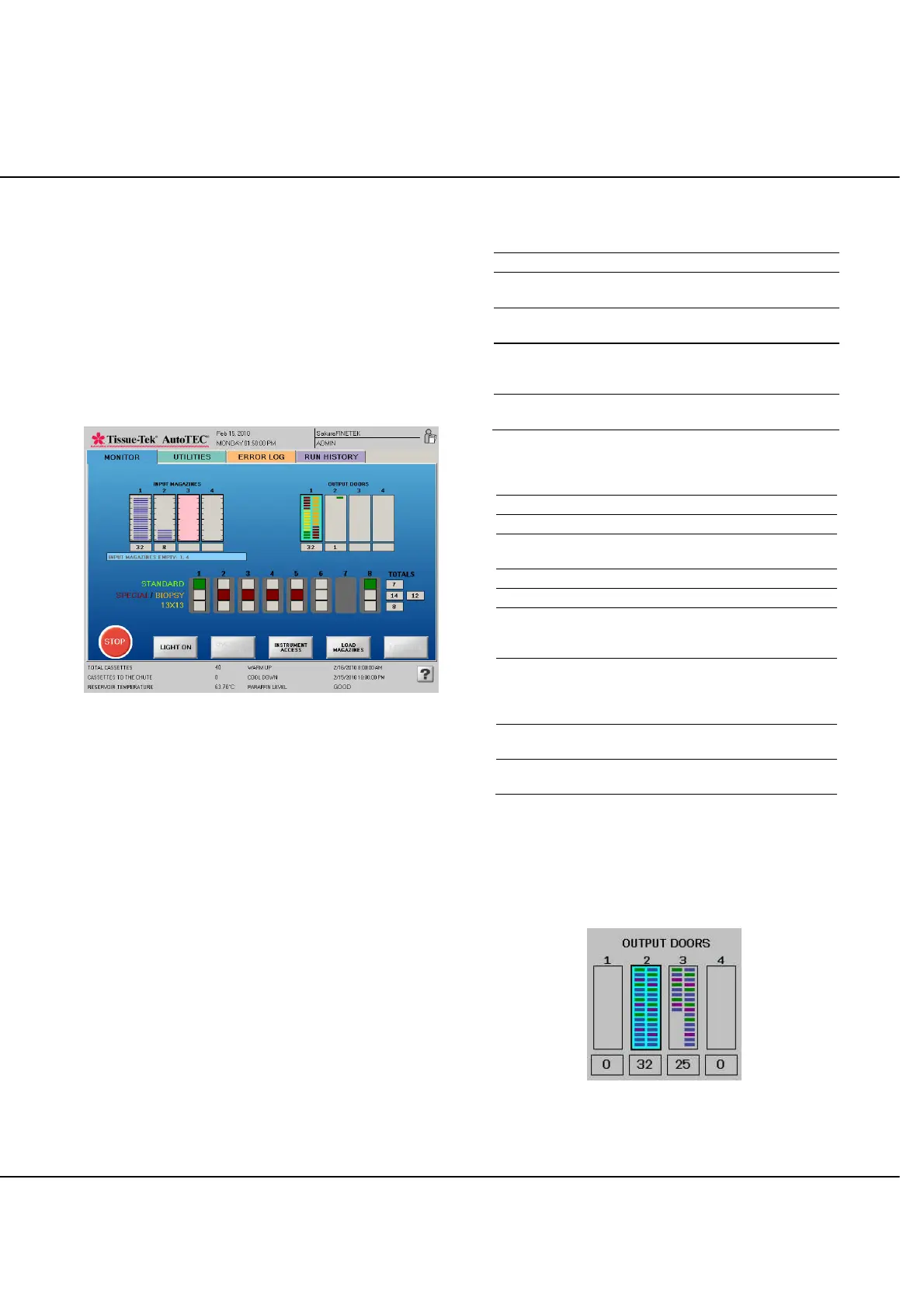
The Run Screen layout is consistent through all phases of
system embedding. As shown in figure 4-J, the four input
magazines are shown on the left, while the four output
doors are shown on the right; reflecting the same physical
view as if the operator was standing in front of the system.
The three banks of base molds are depicted below the
magazines and doors. The totals shown on the right of the
base molds indicate how many of each type of cassettes
have been embedded so far.
Figure 4-J: Run screen layout
Run Screen Color-Coding
The Run screen displays the status of the magazines, base
molds, and output doors using the following color-coding:
NOTE: As a general rule for the input magazines and
output doors, a dark border indicates that the magazine
can either be removed and/or a new one can be inserted,
and that the output door can be removed and an empty
one placed.
Input Magazines
Color Code Information
Red Magazine is in the15-minute warm up period.
Pink
Magazine warm up period is complete.
System is ready to embed.
Dark blue bars
with dark border
Magazine emptied. The number of cassettes
processed displays below the graphic.
Dark blue bars,
dark border
Cassettes are being taken out of the magazine.
The number of cassettes displayed is incremented
each time a cassette is taken from the magazine.
Gray, with light
border, no bars
No magazine is detected.
Base Molds and Output Doors
Color Code Information
Green Standard Cassettes
Orange 26 x 19mm Biopsy Cassettes
Maroon
Specialty cassettes (Orientation,
Core, Shaved)
Gold 13 x 13mm Biopsy Cassettes
Blue Undefined (treated as a standard)
Door has blue background,
colored bars, dark border
Output door ready to be
removed. The number of blocks
is shown below the graphic.
Door has gray background,
colored bars, light border
The output door is being filled
with blocks. The number of
blocks shown is incremented
each time one block is added.
Door has gray background
and light border
Output door is empty waiting to
receive blocks.
Door has gray background
with dark red border
Output door is not present.
For example, in Figure 4-K, output doors 1 and 4 are
empty and ready to accept cassettes, output door 2 is full
and ready to be removed, while door 3 is being filled with
cassettes. The colored bars show the types of cassettes
present.
Figure 4-K: Output Door Color Codes



 To Next Page