Home
Salus
Relays
SR600
Page 32
Salus SR600 - Page 32
40 pages
Manual
Save Page as PDF
To Next Page
To Next Page
To Previous Page
To Previous Page
Loading...
32
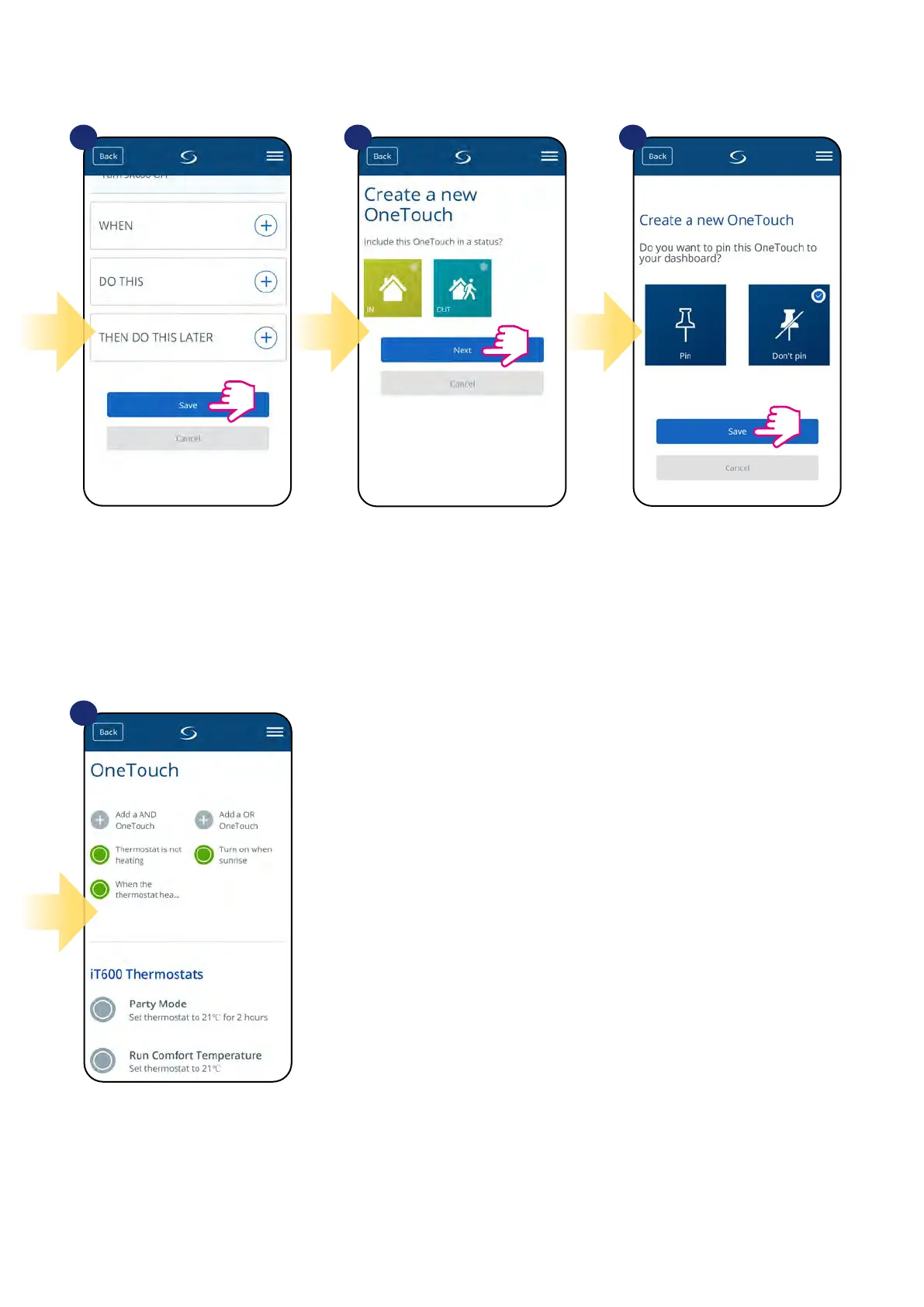
Save y
our One
T
ouch rule.
Decide if you want t
o add your
One
T
ouch rule to creat
ed Status.
As an option One
T
ouch rule tile can
be pinned to the dashboar
d.
Newly crea
ted One
T
ouch rule tile can be
found under One
T
ouch main menu.
13
14
15
16
31
33
Table of Contents
Main Page
Default Chapter
2
Table of Contents
2
1 Introduction
4
Product Compliance
4
Safety Informations
4
2 Product Overview
5
Package Content
6
3 Connection Description
7
4 About Zigbee Network
8
Zigbee Network - Creation and Work
8
5 Before You Start (First Power Up)
9
Button Operation
9
LED Indication
9
6 Installation by SALUS Smart Home Application (ONLINE MODE)
10
General Informations about SALUS Smart Home Application
10
Pairing with UGE600 Universal Gateway
11
7 OPERATING in ONLINE MODE (by App)
13
General Informations
13
App Icons Description
13
Change Device's Name (Pencil Icon)
14
Switching on / off Smart Relay Using Salus Smart Home App (Manual Mode)
15
Schedule Mode
16
Temporary Override Mode
19
Identification Mode
20
Pinning/Unpinning SR600 To/From Application Dashboard
21
Advanced Settings
22
Onetouch Rules (Add/Edit)
24
Error Codes (Exclamation Mark in App)
33
Wireless Signal Strength Test
34
Factory Reset (Removing Device from the App and Zigbee Network)
35
8 Cleaning and Maintenance
37
9 Technical Informations
37
10 Warranty
38
Other manuals for Salus SR600
Quick Guide
2 pages


 To Next Page