20 EB 3136 EN
Operation
6 Operation
6.1 Adjusting the set point
6.1.1 Flow rate
Î Completely open the control and shut-off
valves or the bypass valve in the plant.
To adjust or change the ow rate set point,
proceed as follows:
Always adjust the set point based on a
closed restriction.
Risk of damage to the restriction stem
through one-side loading while turning the
set point screw clockwise.
First turn the handwheel of the electric actua-
tor to completely close the restriction.
1. To close the restriction (11), de-energize
the electric actuator (16).
2. Turn the manual adjuster (19) clockwise
() as far as it will go to close the re-
striction.
3. Use a suitable tool (Allen key, SW4) to
turn the set point screw (13) clockwise
() as far as it will go.
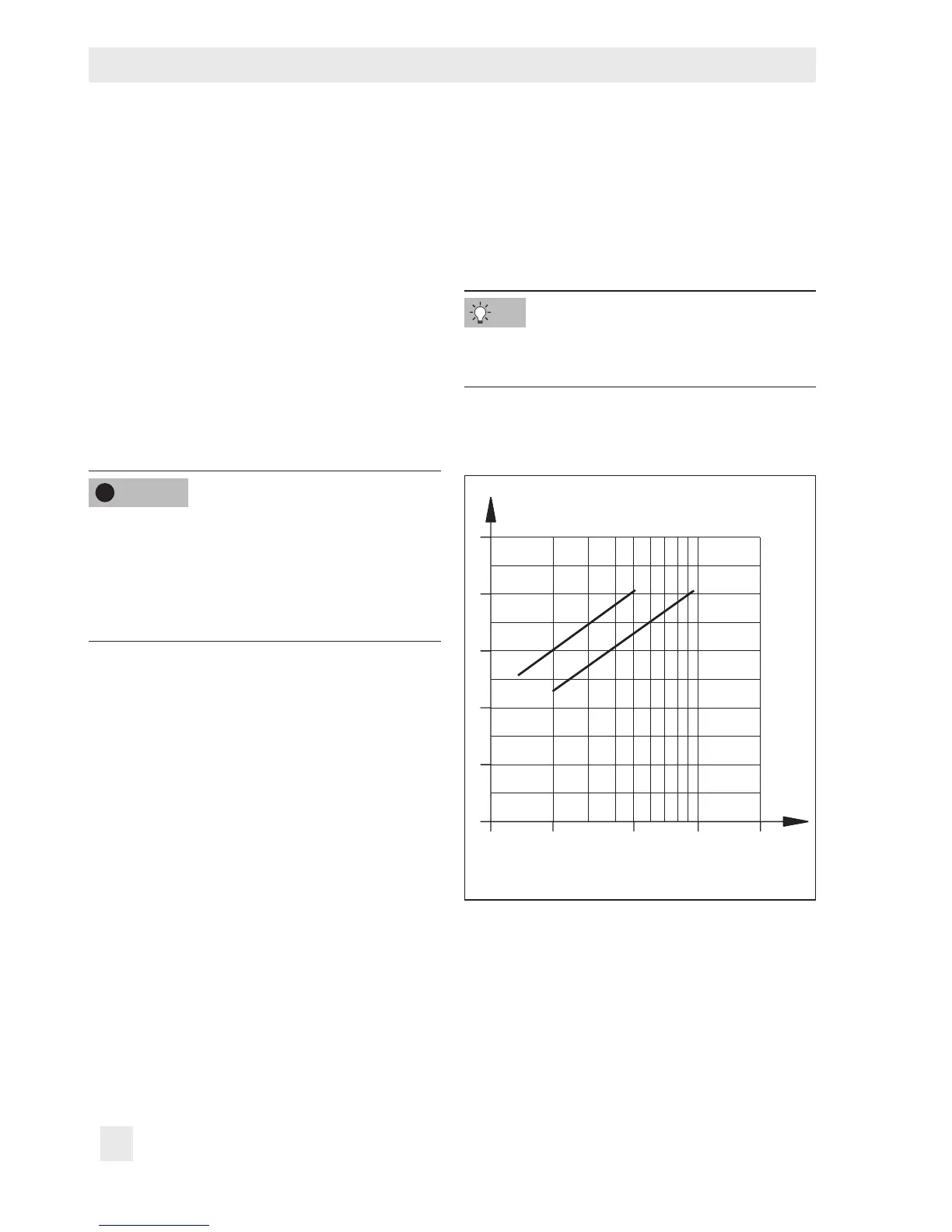
4. Refer to Fig.6 to nd out how many
turns are required to set the ow rate.
5. Use a suitable tool (Allen key, SW4) to
turn the set point screw (13) by the re-
quired number of turns. Turn it counter-
clockwise () to open the restriction. The
ow rate rises.
NOTICE
!
6. Guide the wire through the lead-seal
hole and lead-seal it to x the adjusted
ow rate.
7. Reconnect the power supply to the elec-
tric actuator (16).
For exact adjustment, verify adjusted value
with a heat or ow meter.



 To Next Page