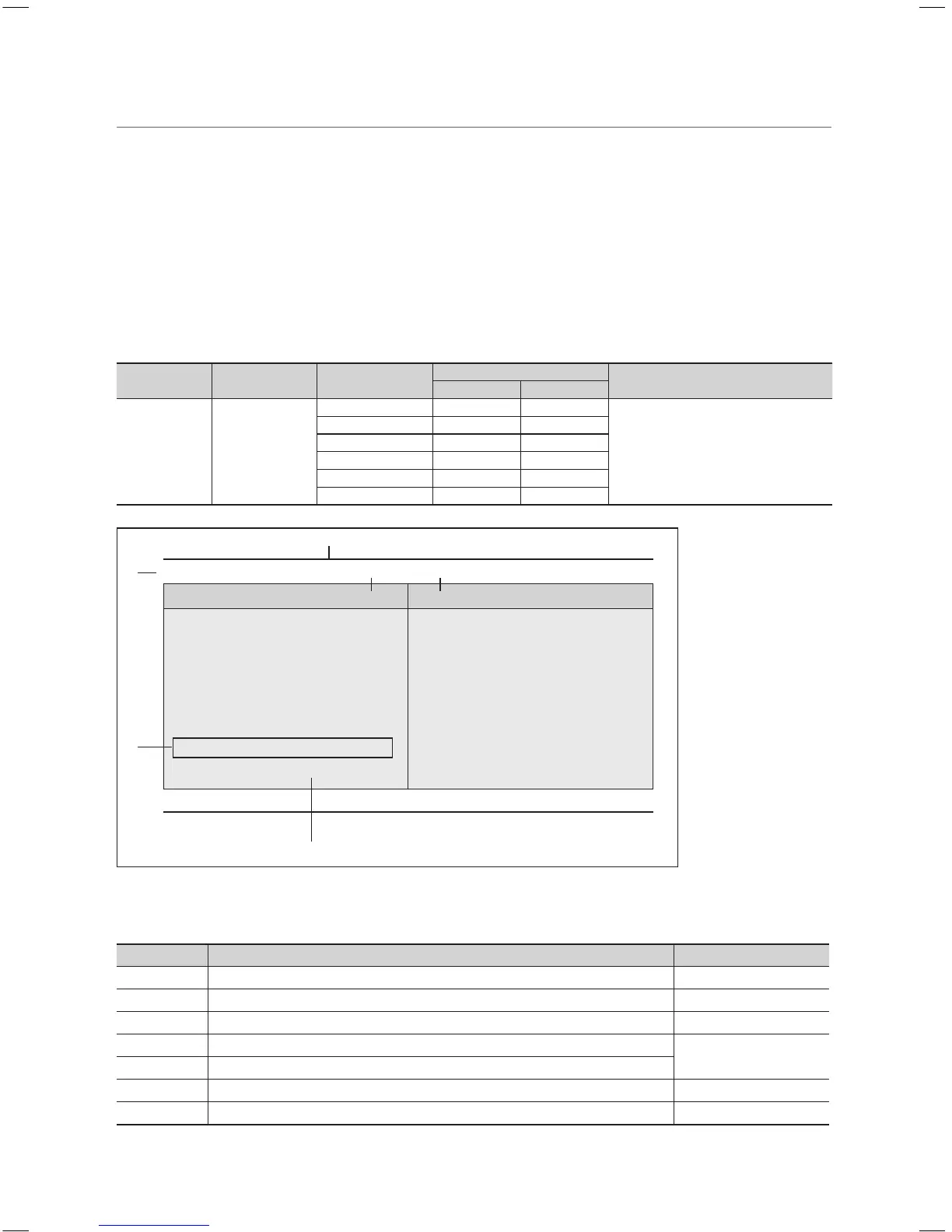
¦ My Channel
Determines the country and genre for the channels provided by the hotel, and if the user selects a country and genre, shows
the corresponding channels.
y You must select the country first, or you cannot set a genre.
y If you select the genre that not added any channels, the Channel list displays all channels.
y My Channel works in Standalone mode only.
y SI Vendor in Standalone mode: This does not work if Smoovie is selected.
y This is in the Hotel Options in the Hotel Menu > Service Mode and can be turned on or off.
y This option only works when it is set to On.
y This function is only available in the countries below;
AUSTRIA, BELGIUM, CHINA, DENMARK, FINLAND, FRANCE, GERMANY, GREECE, ITALY, JAPAN, NETHERLANDS,
NORWAY, PORTUGAL, RUSSIA, SOUTH KOREA, SPAIN, SWEDEN, TURKEY, UK, USA.
Channel Composition [Genre Mode]
Standard Category Ch. Mode
Antenna Mode Activation
Description
Air/Cable Satellite
Hotel Genre
All (Default) O O
Provides a genre channel mode
for each country that master has
managed in factory mode.
News O O
Radio O O
Entertainment O O
Sport O O
Hotel O O
My Channel
Current status : All Country / All
Country Genre
All Country All
Austria News
Belgium Radio
China
Entertainment
Denmark
Sports
Finland
Hotel
▼
(Blue) Keep Previous (U/D/L/R)Move (En)Enter
* For the number of items to be displayed in the list, refer to the design document.
Key Guide
Button Action Nav. Help
BLUE Returns to the screen. (Genre setup: Last Country & Genre) Keep Previous
ENTER Selects an item. Enter
<
CH
>
Move the highlight by page. (No Guide)
▲/▼
Navigates each country, genre list (in a circular manner).
Move
►
Selects the highlighted item and then moves the highlight to the Genre section.
RETURN Returns to the screen. (Genre setup: Last Country & Genre) (No Guide)
EXIT Returns to the screen. (Genre setup: Last Country & Genre) (No Guide)
1
8
3
6
7
2
4 5
[HB460-XC]Install Guide-ENG.indd 26 2013-04-03 �� 3:27:10



 To Next Page