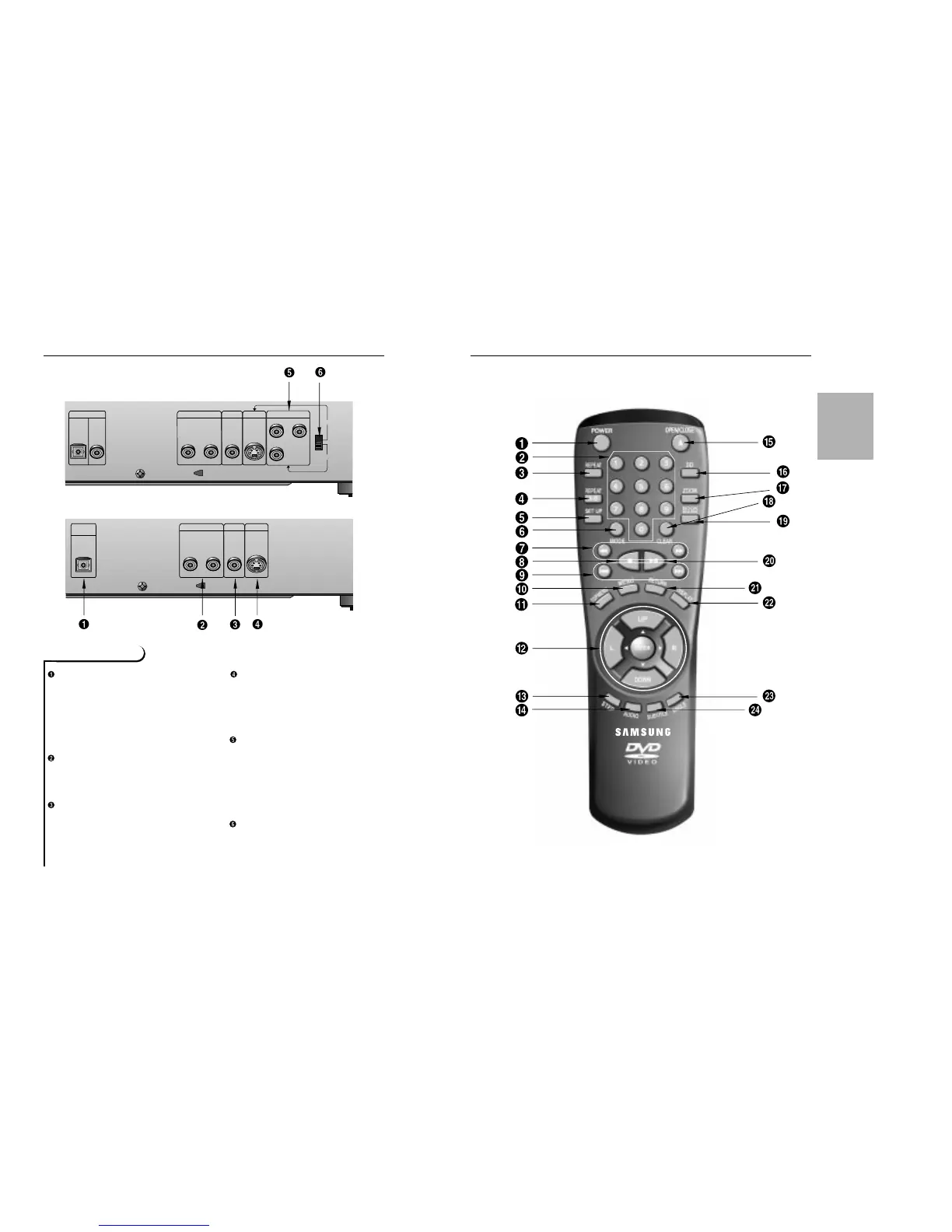
DIGITAL AUDIO OUT JACK
• Use either an optical or coaxial digital
cable to connect to a compatible
Dolby Digital receiver. Use to connect
to an A/V Amplifier that contains a
Dolby Digital decoder or DTS
decoder. (For DVD-511, coaxial audio
out jack not built-in.)
ANALOG AUDIO OUT JACKS
• Connect to the Audio input jacks of
your television, audio/video receiver,
or VCR.
VIDEO OUT JACK
• Use a video cable to connect to the
Video input jack on your television.
S-VIDEO OUT JACK
• Use the S-Video cable to connect this
jack to the S-Video jack on your tele-
vision for a higher quality picture.The
S-Video must be selected in the
VIDEO OUT SELECT.
COMPONENT VIDEO OUT JACKS
• Use these jacks if you have a TV with
Component Video in jacks.These
jacks provide Pr, Pb and Y video.
Along with S-Video, Component Video
provides the best picture quality. The Y,
Pb, Pr must be selected in the VIDEO
OUT SELECT.
VIDEO OUT SELECT SWITCH
• Use the switch to set video out.
• If Y, Pb or Pr is selected, S-Video may
not work. If S-Video is selected, Y, Pb
or Pr may not work.
SETUP
DVD-611
DVD-511
*
*
* : only DVD-611


 To Next Page