English - 7
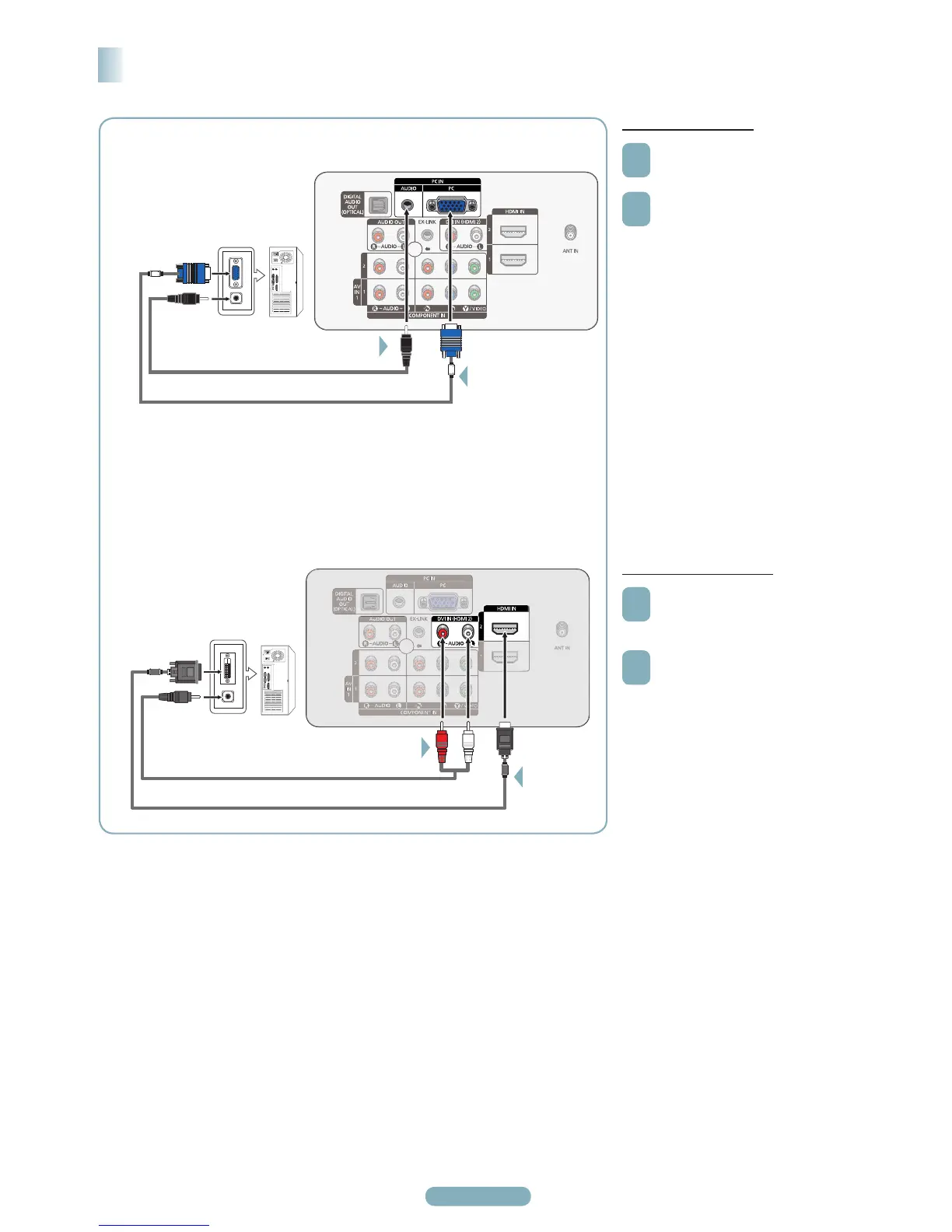
Using the D-Sub Cable
1
Connect a D-Sub cable between the
PC IN [PC] jack on the TV and the
PC output jack on your computer.
2
Connect a PC Audio cable between
the PC IN [AUDIO] jack on the TV
and the Audio Out jack of the sound
card on your computer.
®
When connecting a PC match the
color of the connection terminal to the
cable.
Connecting a PC
Using the HDMI/DVI Cable
1
Connect a HDMI/DVI cable between
the [HDMI IN 2] jack on the TV
and the PC output jack on your
computer.
2
Connect a 3.5 mm Stereo plug to
2 RCA cable between the DVI IN
(HDMI IN 2) [R-AUDIO-L] jacks on
the TV and the Audio Out jack of the
sound card on your computer.
®
When connecting a PC match the
color of the connection terminal to the
cable.
®
Each PC has a different back panel configuration.
®
When using an HDMI/DVI cable connection, you must use the HDMI IN 2 terminal.
PC
TV Rear Panel
PC Audio Cable (Not supplied)
D-Sub Cable (Not supplied)
Using the D-Sub Cable
1
2
Using the HDMI/DVI Cable
TV Rear Panel
PC
3.5 mm Stereo plug to 2 RCA Cable (Not supplied)
HDMI/DVI Cable (Not supplied)
2
1






 To Next Page