English - 52
Time Setting
Setting the Time
Setting the clock is necessary in order to use the various timer features of the TV. Also, you can check the time
while watching the TV. (Just press the INFO button.)
Option 1: Setting the Clock Manually
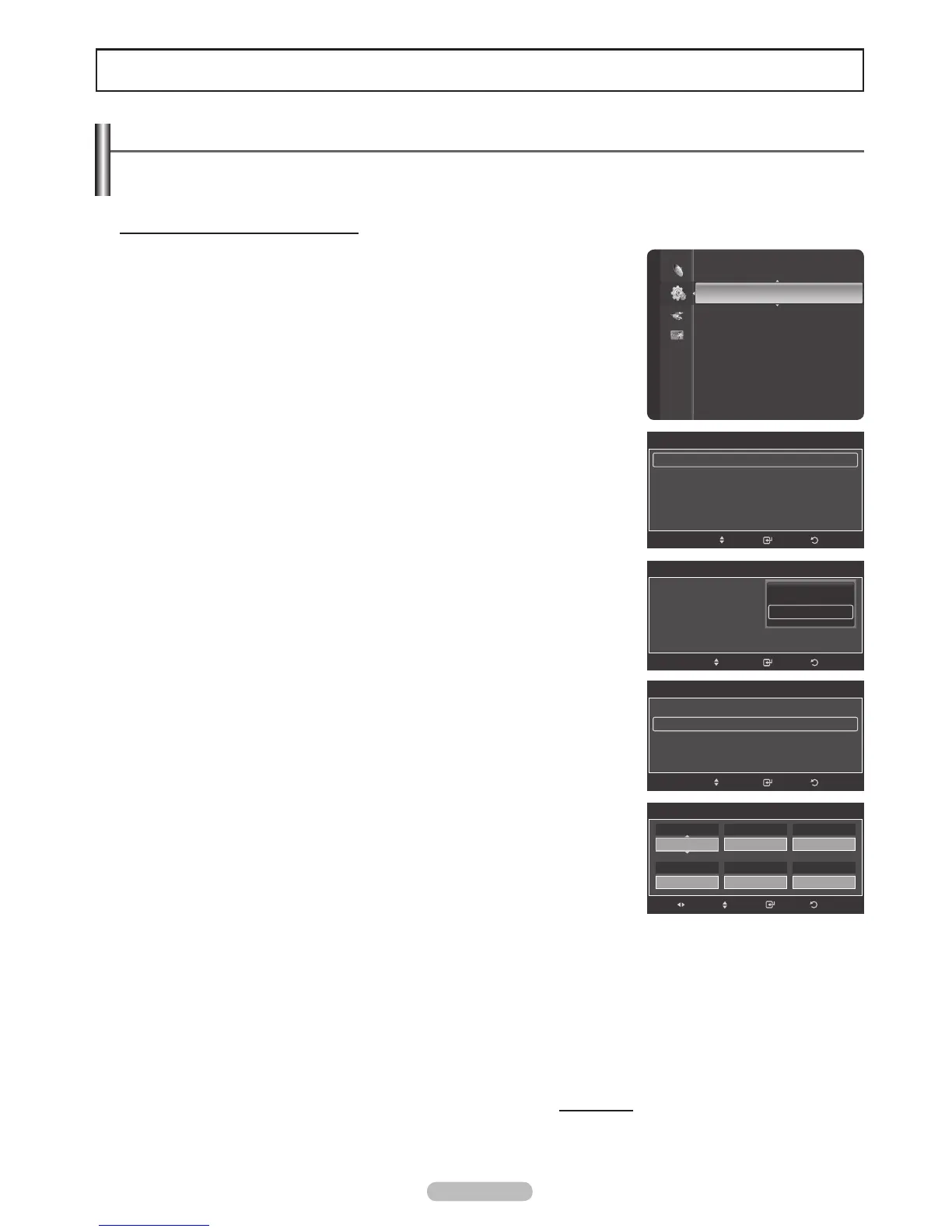
1 Press the MENU button to display the menu.
Press the or button to select Setup, then press the ENTER button.
Press the or button to select Time, then press the ENTER button.
2 Press the ENTER button to select Clock.
3 Press the ENTER button to select Clock Mode.
Press the or button to select Manual, then press the ENTER button.
4 Press the or button to select Clock Set, then press the ENTER button.
5 Press the or button to move to Month, Day, Year, Hour, Minute, or am/
pm. Set the date and time you want by pressing the or button, then press
the ENTER button.
Press the EXIT button to exit.
®
The current time will appear every time you press the INFO button.
®
You can set the Month, Day, Year, Hour, and Minute directly by pressing
the number buttons on the remote control.
Continued...
Setup
Plug & Play
Language : English
Time
V-Chip
Caption
External Settings
Entertainment : Off
Energy Saving : Off
PIP
SW Upgrade
Clock
Clock : 7 : 30 am
Sleep Timer : Off
Timer 1 : Inactivated
Timer 2 : Inactivated
Timer 3 : Inactivated
ReturnEnter
Move
Clock Set
Adjust
Move
Enter Return
01
Day
2008
Year
am
am/pm
30
Minute
01
Month
07
Hour
Clock
Clock Mode : Auto
Clock Set
Time Zone
DST : Off
ReturnEnter
Auto
Manual
Move
Clock
Clock Mode : Manual
Clock Set
Time Zone
DST : Off
ReturnEnter
Move







 To Next Page