English - 67
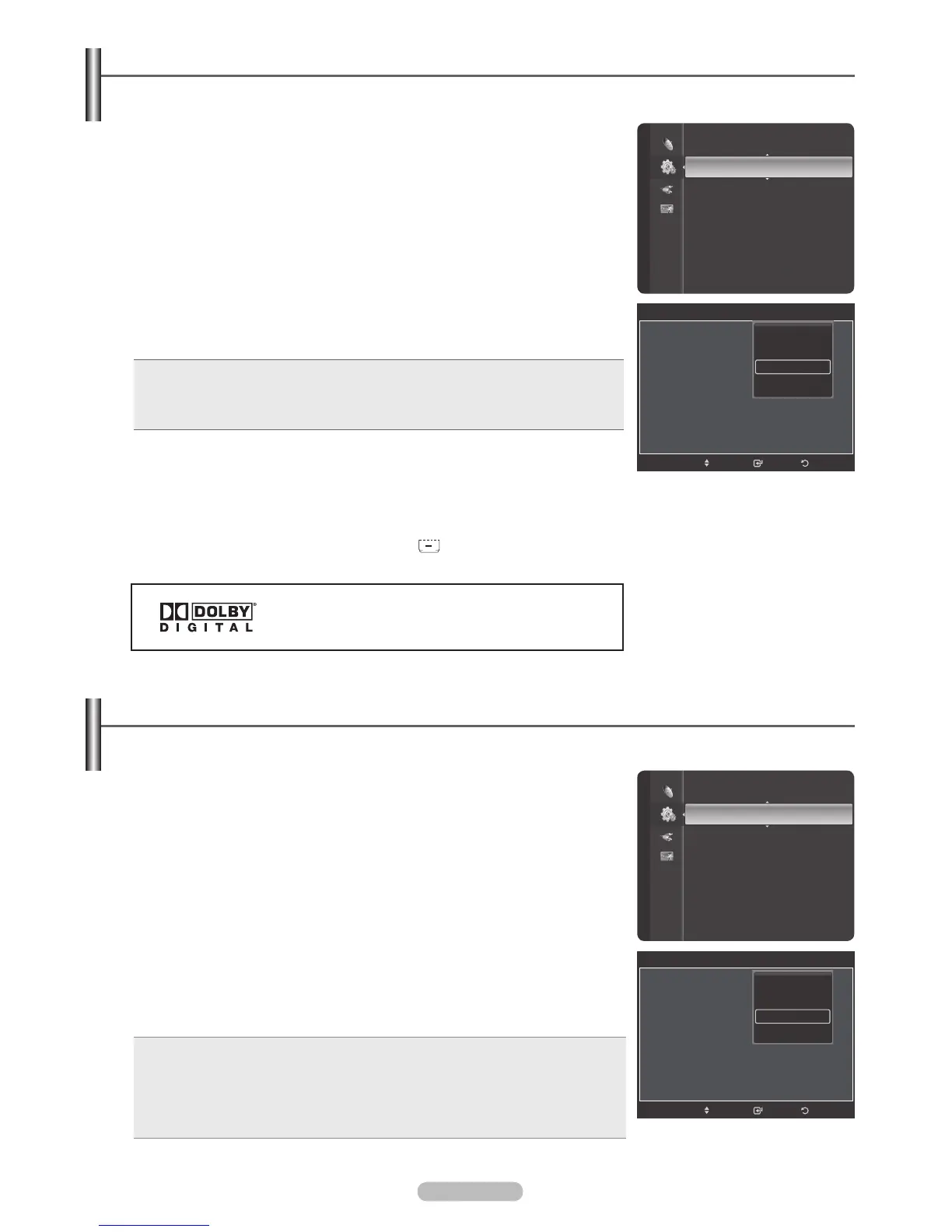
Setting the Light Effect
You can turn the blue LED on the front of your TV on/off.
1 Press the MENU button to display the menu.
Press the or button to select Setup, then press the ENTER button.
2 Press the or button to select External Settings, then press the ENTER
button.
3 Press the ENTER button to select Melody.
Press the or button to select Off, Low, Medium, or High, then press the
ENTER button.
Adjusting the TV On/Off Melody Sound
The TV power on/off melody sound volume can be adjusted.
Manufactured under license from Dolby Laboratories.
Dolby and the double-D symbol are trademarks of Dolby
Laboratories.
• Off: Turns off the melody function.
• Low: Sets the melody volume to low.
• Medium: Sets the melody volume to medium.
• High: Sets the melody volume to high.
Press the EXIT button to exit.
®
The Melody does not play
- When no sound is output from the TV because the MUTE button has been
pressed,
- When no sound is output from the TV because you have reduced the
volume to minimum by pressing the VOL
button.
- When the TV is turned off by Timer function.
1 Press the MENU button to display the menu.
Press the or button to select Setup, then press the ENTER button.
2 Press the or button to select External Settings, then press the ENTER
button.
3 Press the or button to select Light Effect, then press the ENTER button.
Press the or button to select Off, In Standby, In Watching TV, or Always,
then press the ENTER button.
Press the EXIT button to exit.
• Off: The LED is always off.
• In Standby: The LED lights while in Standby mode and it turns off when your TV
is turned on.
• In Watching TV: The LED lights when watching TV and it turns off when your TV
is turned off.
• Always: The LED is always lit.
®
Set the Light Effect to Off to reduce power consumption.
V-Chip
Caption
External Settings
Entertainment : Off
Energy Saving : Off
PIP
SW Upgrade
Setup
External Settings
Melody : On
Light Effect : Default
Wall-Mount Adjustment
ReturnEnter
Move
Off
Low
Medium
High
V-Chip
Caption
External Settings
Entertainment : Off
Energy Saving : Off
PIP
SW Upgrade
Setup
External Settings
Melody : On
Light Effect : Default
Wall-Mount Adjustment
ReturnEnter
Move
Off
In Standby
In Watching TV
Always







 To Next Page