English - 33
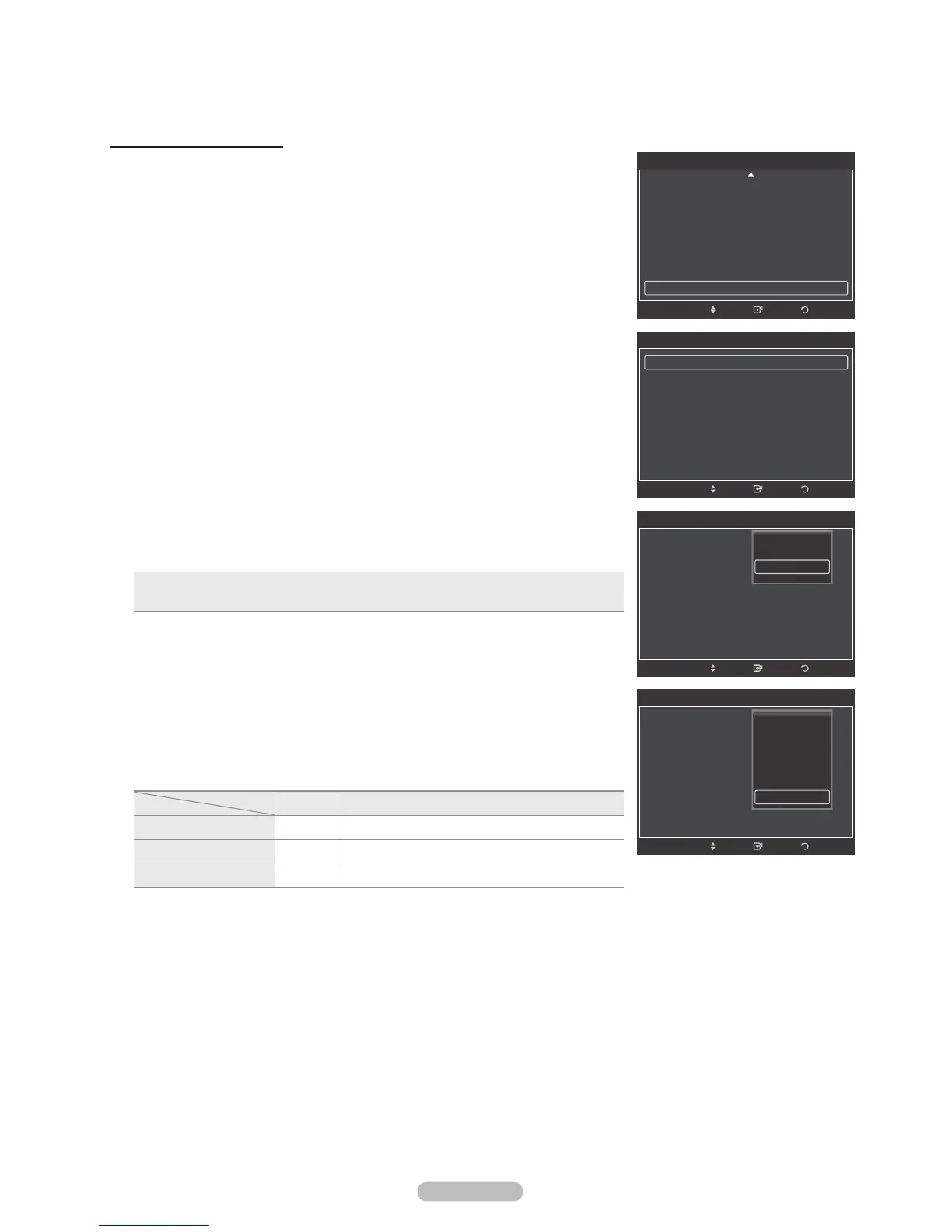
Preventing Screen Burn-in
To reduce the possibility of screen burn, this unit is equipped with screen burn
prevention technology. This technology enables you to set picture movement up/
down (Vertical Line) and side to side (Horizontal Dot).
The Time setting allows you to program the time between movement of the picture
in minutes.
1 Follow the Activating Picture Options instructions numbers 1 and 2.
(Refer to page 27)
2 Press the or button to select Screen Burn Protection, then press the
ENTER button.
3 Press the ENTER button to select Pixel Shift, then press the ENTER button.
Pressing the or button will alternate between On and Off.
You will also see the items Horizontal Dot, Vertical Line and Time.
• Pixel Shift: Using this function, you can minutely move pixels on the PDP in the
horizontal or vertical direction to prevent after-images on the screen.
4 Press the or button to select the item you wish to change, then press the
ENTER button.
Press the or button to change the value of the item, then press the ENTER
button.
• Optimum condition for pixel shift;
PC TV/AV1/AV2/S-Video/Component/HDMI
Horizontal Dot 22
Vertical Line 22
Time(min) 22
Press the EXIT button to exit.
ReturnEnter
Picture Options
Size : 16:9
Digital NR : Auto
DNle : Off
HDMI Black Level : Normal
Film Mode : Off
Blue Only Mode : Off
Screen Burn Protection
Move
ReturnEnter
Screen Burn Protection
Pixel Shift
All White
Scrolling
Side Gray : Light
Move
ReturnEnter
Pixel Shift
Pixel Shift :
Horizontal Dot :
Vertical Line :
Time : 2min
Move
Off
On
ReturnEnter
Screen Brun Project
Pixel Shift :
Horizontal Dot :
Vertical Line :
Time : 2min
Move
0
1
2
3
4






 To Next Page