English - 35
Air/Cable
5 Press the or button select Antenna, then press the ENTER button.
Press the or button to select Air or Cable, then press the ENTER button.
®
Air: Air antenna signal.
Cable: Cable antenna signal.
Changing the PIP Channel
6 Press the or button to select Channel, then press the ENTER button.
Press the or button at the bottom of the remote to select the desired
channel in the PIP window, then press the ENTER button.
Press the EXIT button to exit.
®
You can select only analog TV broadcasts on the PIP screen (sub-picture).
Easy Setting
1 Press the TOOLS button on the remote control.
2 Press the or button to select PIP, then press the ENTER button.
3 Press the or button to select a particular item.
4 Press the or button to select the required option.
5 Press the EXIT or TOOLS button to exit.
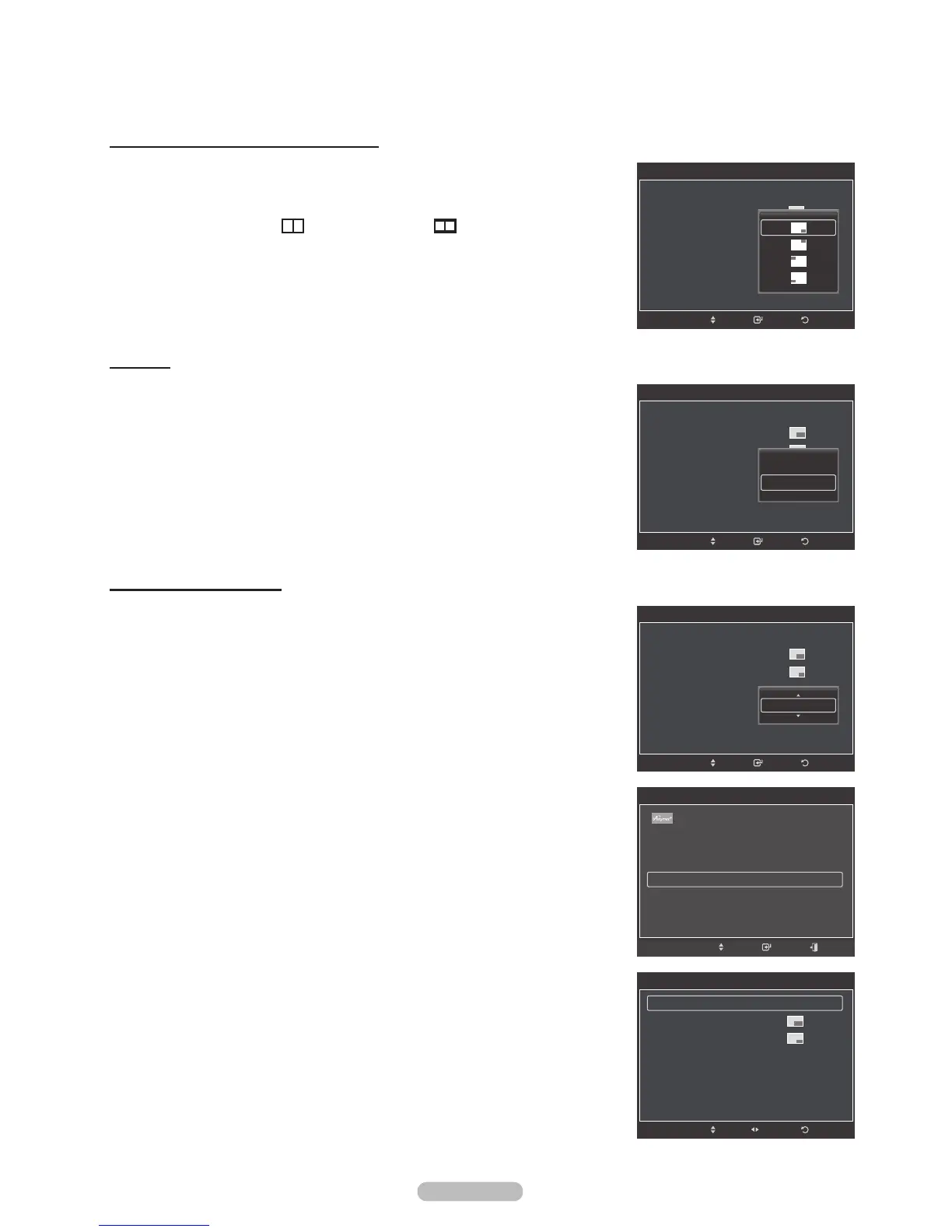
Changing the Position of the PIP Window
4 Press the or button to select Position, then press the ENTER button.
Press the or button to select the desired PIP window position, then press
the ENTER button.
®
In Double Window (
) and Double Wide (
) modes, Position cannot
be selected.
ReturnEnter
PIP
PIP : On
Size :
Position :
Air/cable : C
able
Channel : Cable 3
Move
Air
Cable
ReturnEnter
PIP
PIP : On
Size :
Position :
Air/cable : Cable
Channel : Cable 3
Move
Return
PIP
PIP On
Size :
Position :
Air/Cable : Cable
Channel : Cable 3
Move
Adjust
PIP
PIP : On
Size :
Position :
Air/cable : Cable
Channel :
Cable 3
ReturnEnterMove
Cable 11
TOOLS
Device List
Picture Mode : Standard
Sound Mode : Custom
PIP
Move Enter Exit






 To Next Page