English - 43
Setting Your Favorite Channels
You can set channels you watch frequently as favorites.
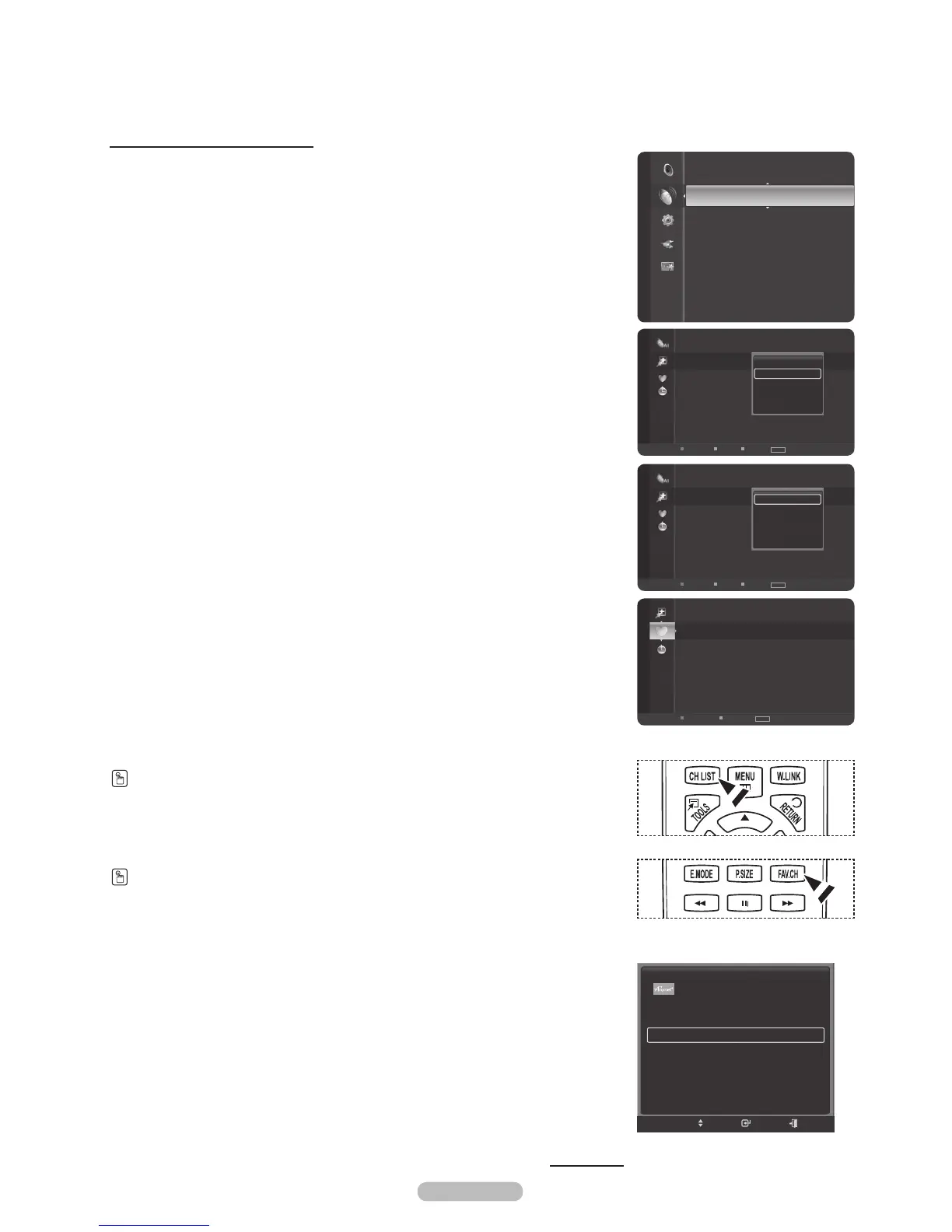
1 Press the MENU button.
Press the or button to select Channel, then press the ENTER button.
Press the or button to select Channel List, then press the ENTER button.
2 Press the button to select Added Channels.
3 Press the or button to select All Channels, then press the ENTER button.
Shows all currently available channels.
4 Press the or button to select a channel as a favorite channel, then press
the TOOLS button.
5 Press the or button to select Add to Favorite, then press the ENTER
button.
The “” symbol will be displayed and the channel will be set as a favorite.
6 To cancel your favorite channel selection, press the TOOLS button when a
favorite channel is selected. Press the or button to select Delete from
Favorite, then press the ENTER button. The channel is deleted from Favorites
and the “” mark disappears.
Press the EXIT button to exit.
®
You can also Add or Delete a channel from Favorites in the Added
Channels menu in the same manner.
®
All favorite channels will be shown on Favorite menu.
Press the CH LIST button on the remote control to bring up the channel lists.
To select the favorite channels you have set up, press the FAV.CH button on the
remote control.
Easy Setting
1 Press the TOOLS button on the remote control.
2 Press the or button to select Add to Favorite or Delete from Favorite,
then press the ENTER button.
®
The current channel is added to or deleted from Favorites.
Continued...
6-1 SBS
7-1 KBS D-2
9-1 KBS D-1
10-1 EBS DTV
11-1 MBCDTV
Favorite
Air
Antenna
Zoom
Option
TOOLS
Channel
Antenna : Air
Auto Program
Channel List
Clear Scrambled Channel
Fine Tune
Signal Strength
6-1 SBS
7 Air
7-1 KBS D-2
9 Air
9-1 KBS D-1
10 Air
10-1 EBS DTV
11-1 MBC DTV
19 Air
22 Air
Added Channels
Air
Antenna
Zoom
Select Option Next Program
TOOLS
Delete
Add to Favorite
Timer Viewing
Channel Name Edit
Auto Program
6-1 SBS
7 Air
7-1 KBS D-2
9 Air
9-1 KBS D-1
10 Air
10-1 EBS DTV
11-1 MBC DTV
19 Air
22 Air
Added Channels
Air
Antenna
Zoom
Select Option Next Program
TOOLS
Delete
Delete from Favorite
Timer Viewing
Channel Name Edit
Auto Program
Device List
Picture Mode : Standard
Sound Mode : Custom
Add to Favorite
Switch to Air
TOOLS
Move Enter Exit






 To Next Page