English - 45
Confirming a Viewing Reservation
You can view, modify or delete a reservation.
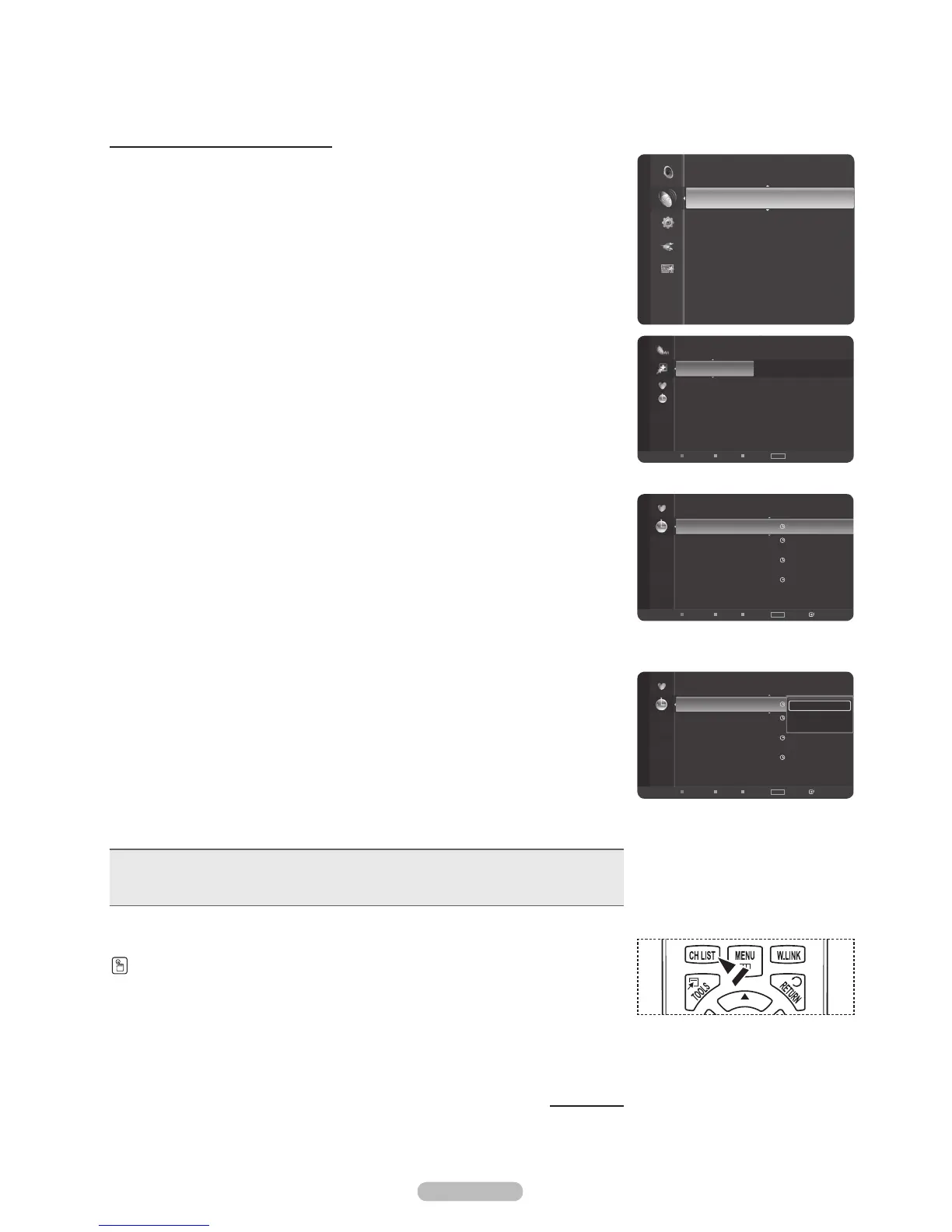
1 Press the MENU button.
Press the or button to select Channel, then press the ENTER button.
Press the or button to select Channel List, then press the ENTER button.
2 Press the button to select Added Channels.
3 Press the or button to select Programmed, then press the ENTER button.
You can view the program reservations.
Modifying a viewing reservation
4 To select a reservation item to be modied, press the or button and then
press the TOOLS button.
5 Press the ENTER button to select Change Info.
6 Press the /// buttons to change a reservation setting and then press the
ENTER button.
The reservation modication is applied.
Canceling a reservation
4 To select a reservation item to be canceled, press the or button, and then
press the TOOLS button.
5 Press the or button to select Cancel Schedules, then press the ENTER
button.
6 Press the or button to select OK, then press the ENTER button.
The viewing reservation has been canceled.
Press the EXIT button to exit.
Programmed Menu
• Change Info: Select to change a viewing reservation.
• Cancel Schedules: Select to cancel a viewing reservation.
• Information: Select to view a viewing reservation.
Continued...
Press the CH LIST button on the remote control to bring up the channel lists.
Channel
Antenna : Air
Auto Program
Channel List
Clear Scrambled Channel
Fine Tune
Signal Strength
2007/2/3
3:15 am
6-1 Air
No Program Name
4:15 am 6-1 Air No Program Name
2007/2/4
2:14 am 6-1 Air No Program Name
2007/2/5
2:15 am 6-1 Air No Program Name
Programmed
Air
Antenna
Zoom
Select Option
Information
TOOLS
6 Air
6-1
Air
7 Air
7-1 Air
9 Air
9-1 Air
10 Air
10-1 Air
11 Air
Added Channels
Air
Antenna
Zoom
Select Option
TOOLS
Programmed
2007/2/3
3:15 am
6-1 Air
No Program Name
4:15 am 6-1 Air No Program Name
2007/2/4
2:14 am 6-1 Air No Program Name
2007/2/5
2:15 am 6-1 Air No Program Name
Change Info
Cancel Schedules
Information
Air
Antenna
Zoom
Select Option
Information
TOOLS







 To Next Page