English - 58
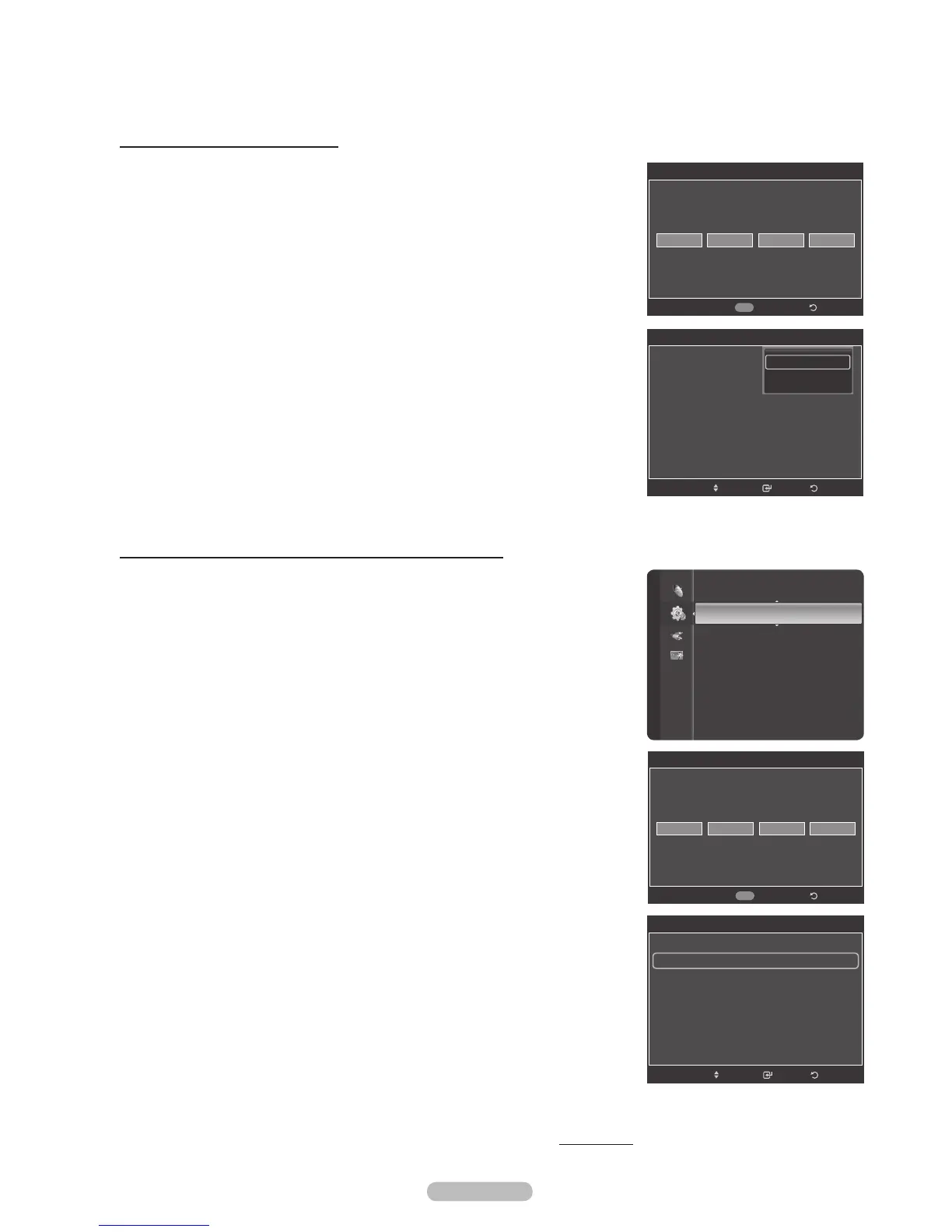
How to Enable/Disable the V-Chip
1 Press the MENU button to display the menu.
Press the or button to select Setup, then press the ENTER button.
2 Press the or button to select V-Chip, then press the ENTER button.
The message Enter PIN will appear. Enter your 4 digit PIN number.
3 The V-Chip screen will appear.
To enable the V-Chip feature, press the ENTER button so that the V-Chip Lock
field is On. (Pressing the or button will alternate between On and Off.)
Press the ENTER button.
Press the EXIT button to exit.
How to Set up Restrictions Using “TV Parental Guidelines”
First, set up a personal identification number (PIN), and enable the V-Chip.
(See previous section.) Parental restrictions can be set up using either of two
methods: The TV guidelines or the MPAA rating.
1 Press the MENU button to display the menu.
Press the or button to select Setup, then press the ENTER button.
2 Press the or button to select V-Chip, then press the ENTER button.
The message Enter PIN will appear. Enter your 4 digit PIN number.
3 The V-Chip screen will appear. Press the or button to select TV Parental
Guidelines, then press the ENTER button.
Continued...
V-Chip
Enter PIN
* ***
Return
0~9
Enter PIN
V-Chip
V-Chip Lock : Off
TV Parental Guidelines
MPAA Rating
Canadian English
Canadian French
Downloadable U.S. Rating
Change PIN
Off
On
ReturnEnter
Move
V-Chip
V-Chip Lock : On
TV Parental Guidelines
MPAA Rating
Canadian English
Canadian French
Downloadable U.S. Rating
Change PIN
ReturnEnter
Move
Language : English
Time
V-Chip
Caption
External Settings
Entertainment : Off
Energy Saving : Off
PIP
SW Upgrade
Setup
V-Chip
Enter PIN
* ***
Return
0~9
Enter PIN






 To Next Page