Disassembly and Reassembly _ 13
Part Figure Description
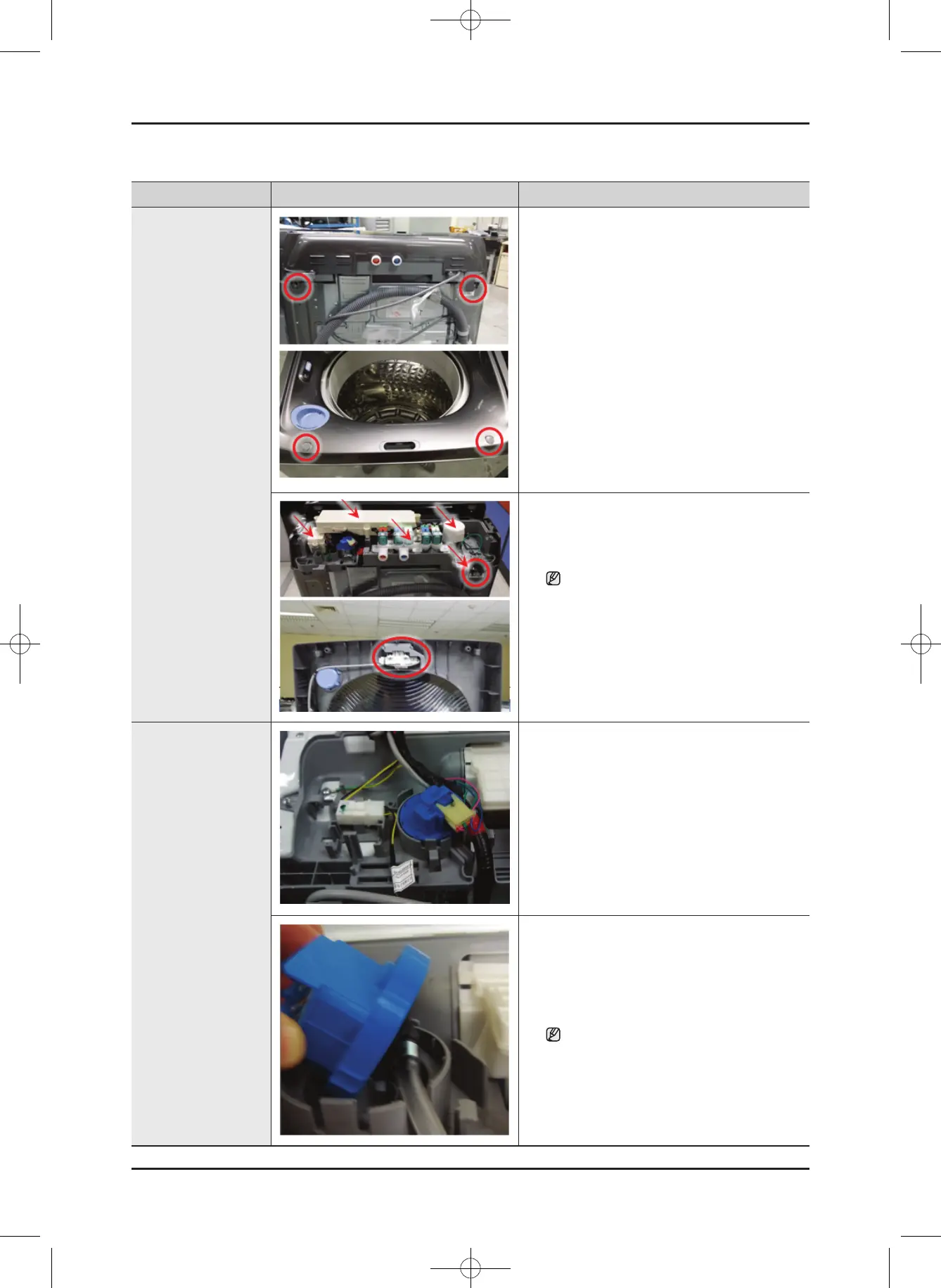
Top Cover Assembly
/ Door Switch
1. Remove the 2 screws from the cover plate.
2. Remove the 2 screws from the cover top.
3. SeparatetheAssyValveWater,themain
PBA,HeaterPBA,theAssySensorPressure,
CoverWireandthelterEMIhousing.
Separate the housing and Cover Wire
to prevent stress and damage to the
wireharness.
4. Separate the top cover assembly by lifting
and pushing ahead the top part of the
assembly.
5. youcancheckthedoorswitchIfturntheTop
cover upside down.
Sensor Pressure
Switch
1. Disassemble the control panel assembly.
2. Separate the pressure switch housing.
3. Beforeseparatingthehose,releasetheclip.
Whenreleasingtheclip,takecarethat
you do not tear the hose.
WA8700K Washer.indb 13 2016/2/4 16:56:13
This document can not be used without Samsung's authorization.
SAMSUNG PROPRIETARY. DO NOT COPY OR DISTRIBUTE WITHOUT PERMISSION





 To Next Page