20
Cleaning and maintaining the air conditioner
For the best performance of your air conditioner, clean it periodically. When
When cleaning, make sure to disconnect power for user’s safety.
Cleaning the exterior
Wipe the surface of the unit with a slightly wet or dry cloth when needed.
Wipe off dirt of odd-shaped area by using a soft brush.
•Do not use Benzene or Thinner. They
may damage the surface of the air
conditioner and can create a risk of fi re.
CAUTION
Cleaning air lter and grille
When cleaning air fi lter and grille, make sure to unplug the unit. No special
tools are needed to clean it.
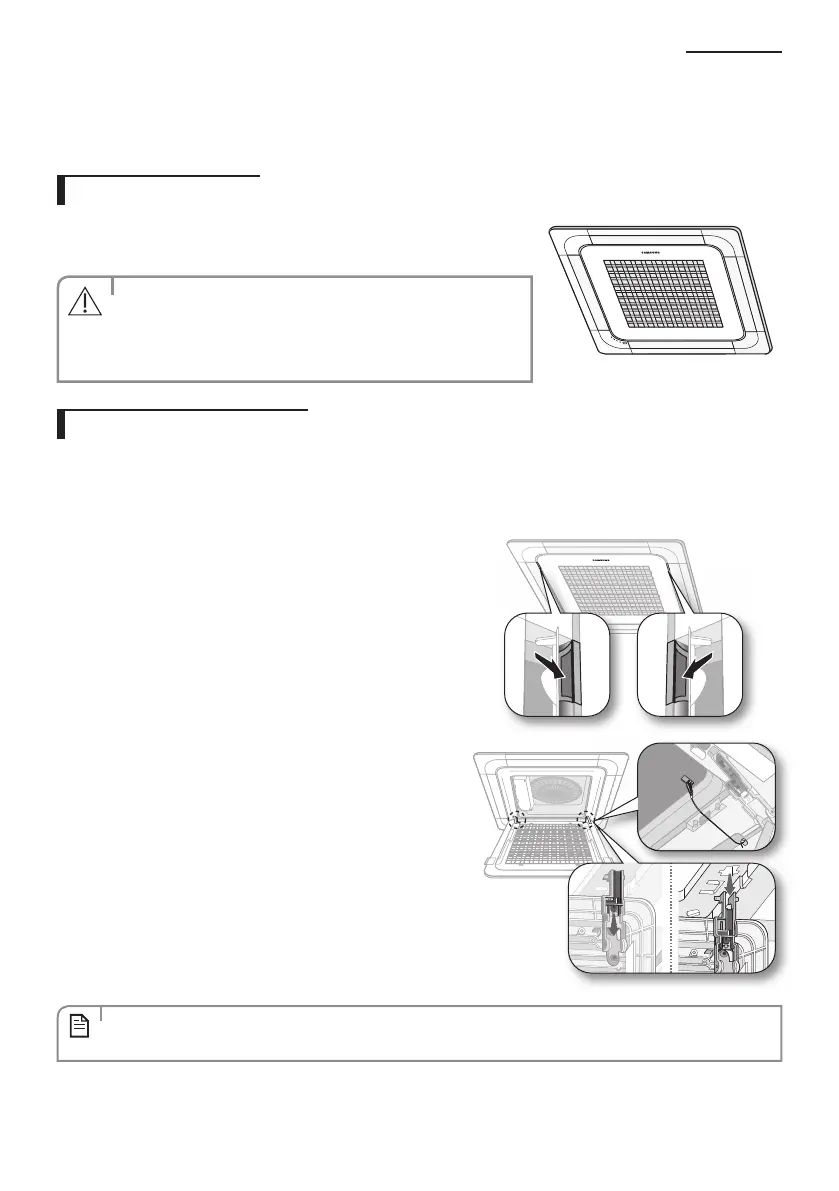
1. Open the front grille.
• Open the blades on the left and right side of the Samsung
logo. Press both of the levers and pull the grille downward.
Two safety clips are mounted to the front grille to prevent
it from dropping.
2. Detach the front grille.
• Remove the safety clip fi rst and then remove the hinge.
Pull the green switch on the hinge part down and then
press and pull the hinge part to remove the grille. There are
two hinges on the grille and you must apply this step on
both of them to remove the grille.
• If you want to clean the fi lter only, you do not have to detach the grille. Follow step 4 and 5
NOTE



 To Next Page