24
Appendix
Troubleshooting
Refer to the following chart if the air conditioner operates abnormally. This
may save time and unnecessary expenses.
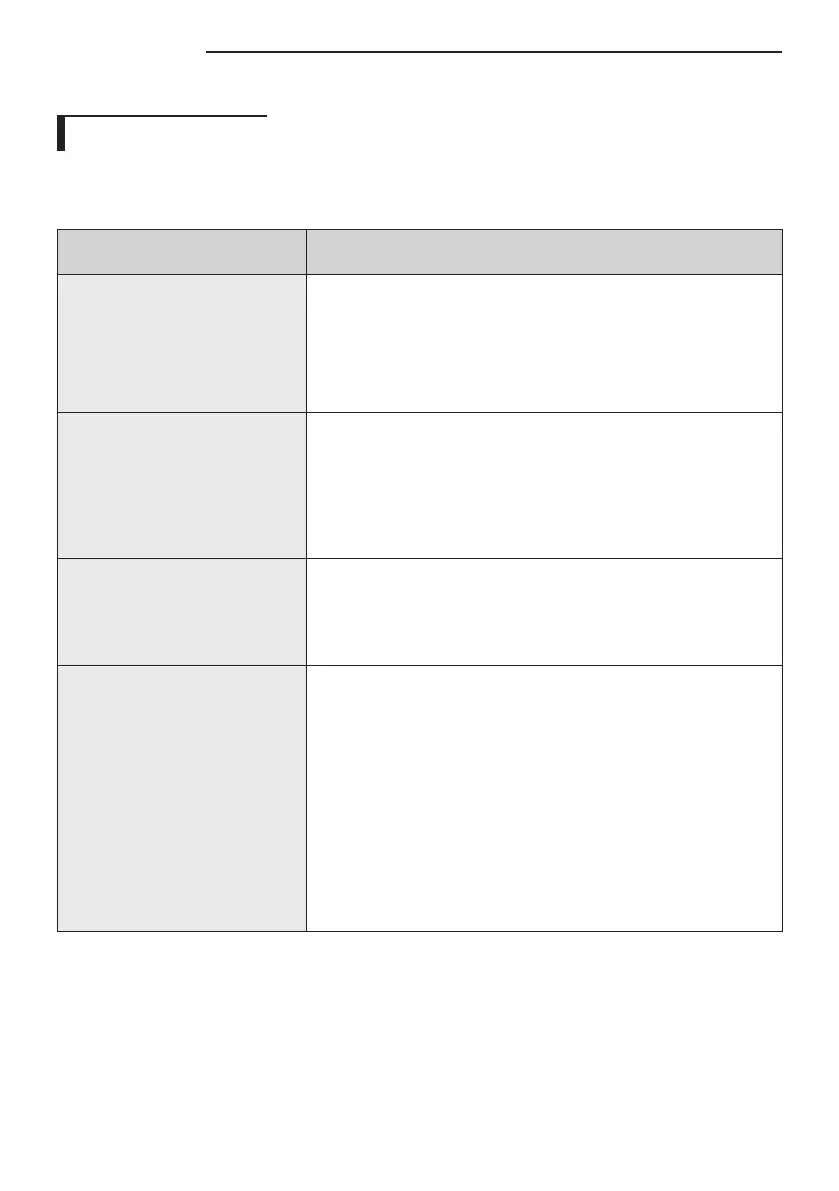
PROBLEM SOLUTION
The air conditioner does
not operate immediately
after it has been
restarted.
•Because of the protective mechanism, the
appliance does not start operating immediately
to keep the unit from overloading. The air
conditioner will start in 3minutes.
The air conditioner does
not work at all.
•Check that the unit has power.
•Check if the circuit breaker is switched off.
•Check if there is a power failure.
•Check your fuse. Make sure it is not blown out.
The temperature does
not change.
•Check if you selected Fan mode. Press the Mode
button on the remote control to select another
mode.
Cool/warm air does
not come out of the air
conditioner.
•Check if the set temperature is higher (lower)
than the current temperature. Press the
Temperature button on the remote control
to change the set temperature. Press the
Temperature button to decrease or increase
the temperature.
•Check if the air filter is blocked by dirt. Clean
the air filter every two weeks.



 To Next Page