27
ENGLISH
PROBLEM SOLUTION
The indicators on the
digital display flashes.
•Press the Power button on the remote control
to turn the unit off and switch the circuit
breaker off. Then, switch it on again.
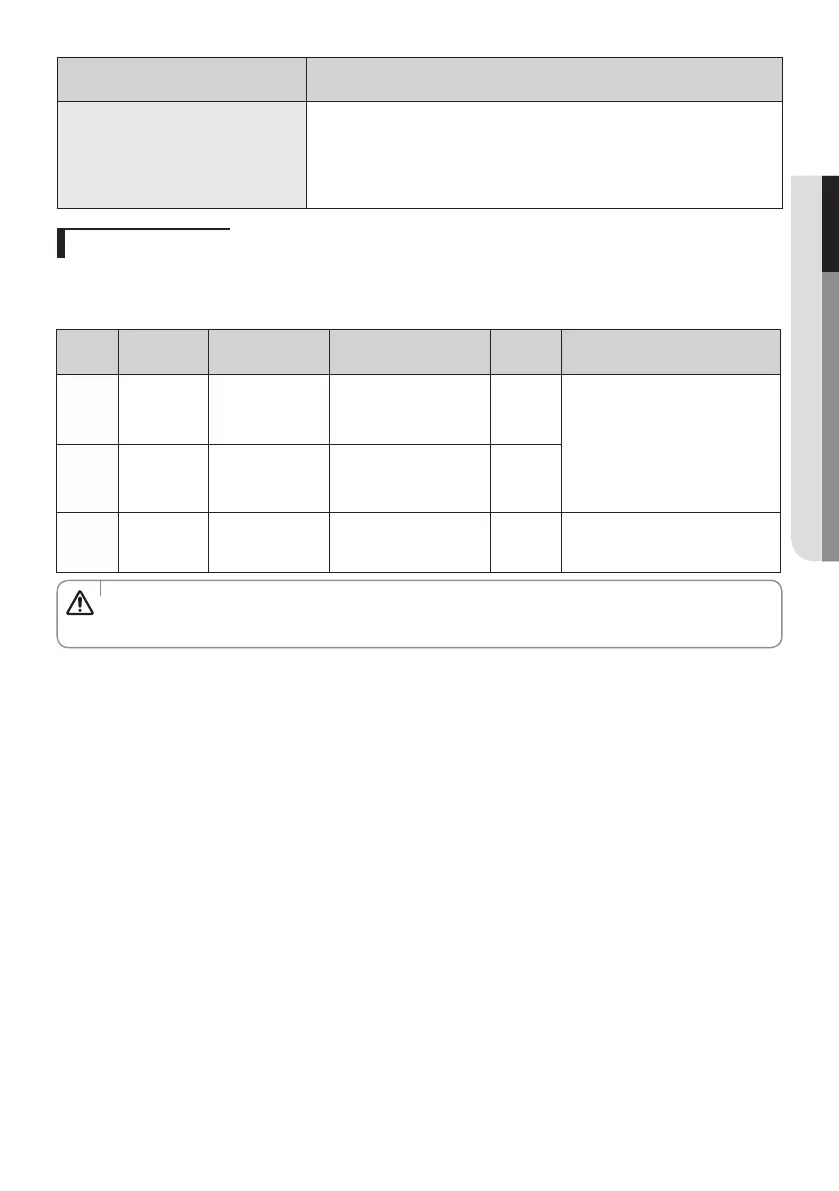
Operation ranges
The table below indicates the temperature and humidity ranges the air
conditioner can be operated within. Refer to the table for efficient use.
•
Be sure to install the unit under circumstances within the allowable range of
temperature.(Extended operation range down to -25°C/-13°F in heating)
CAUTION
MODE
Indoor
temperature
Outdoor
temperature
Outdoor temperature
(AC030/036JXSCCH/AA)
Indoor
humidity
IF OUT OF CONDITIONS
Cooling
18°C to 32°C
(64°F to 90°F)
-18°C to 46°C
(-0.4°F to 114.8°F)
-20°C to 46°C
(-4°F to 114.8°F)
80% or
less
Condensation may occur on the
indoor unit with risk to have either
water blow off or drops on the floor.
Internal protection triggers and the
air conditioner will stop.
Drying
18°C to 32°C
(64°F to 90°F)
-18°C to 46°C
(-0.4°F to 114.8°F)
-20°C to 46°C
(-4°F to 114.8°F)
-
Heating
30°C(86°F) or
less
-20°C to 24°C
(-4°F to 75°F)
-25°C to 24°C
(-13°F to 75°F)
-
Internal protection triggers and the
air conditioner will stop.



 To Next Page