46
Setting indoor unit installation options
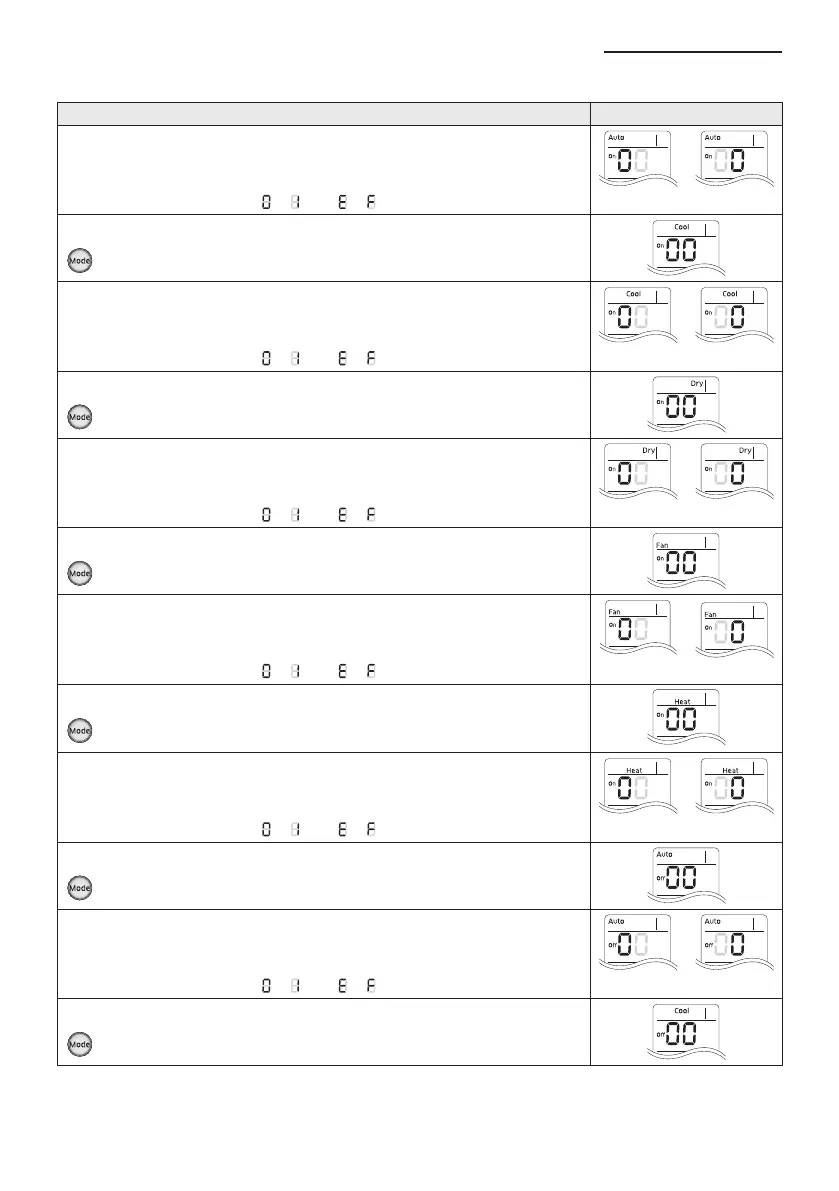
Option setting Status
1. Setting SEG2, SEG3 option
Press Low Fan button(∨) to enter SEG2 value.
Press High Fan button(∧) to enter SEG3 value.
Each time you press the button,
… will be selected in rotation.
SEG2 SEG3
2. Advance to next “page”
Press Mode button to advance (“Cool”, “On” on display)
3. Setting SEG4, SEG5 option
Press Low Fan button(∨) to enter SEG4 value.
Press High Fan button(∧) to enter SEG5 value.
Each time you press the button,
… will be selected in rotation.
SEG4 SEG5
4. Advance to next “page
Press Mode button to advance (“Dry”, “On” on display)
5. Setting SEG6, SEG8 option
Press Low Fan button(∨) to enter SEG6 value.
Press High Fan button(∧) to enter SEG8 value.
Each time you press the button,
… will be selected in rotation.
SEG6 SEG8
6. Advance to next “page”
Press Mode button to advance (“Fan”, “On” on display)
7. Setting SEG9, SEG10 option
Press Low Fan button(∨) to enter SEG9 value.
Press High Fan button(∧) to enter SEG10 value.
Each time you press the button,
… will be selected in rotation.
SEG9 SEG10
8. Advance to next “page”
Press Mode button to advance (“Heat”, “On” on display)
9. Setting SEG11, SEG12 option
Press Low Fan button(∨) to enter SEG11 value.
Press High Fan button(∧) to enter SEG12 value.
Each time you press the button,
… will be selected in rotation.
SEG11 SEG12
10. Advance to next “page”
Press Mode button to advance (“Auto”, “Off” on display)
11. Setting SEG14, SEG15 option
Press Low Fan button(∨) to enter SEG14 value.
Press High Fan button(∧) to enter SEG15 value.
Each time you press the button,
… will be selected in rotation.
SEG14 SEG15
12. Advance to next “page”
Press Mode button to be change to Cool mode in the OFF status.



 To Next Page