51
ENGLISH
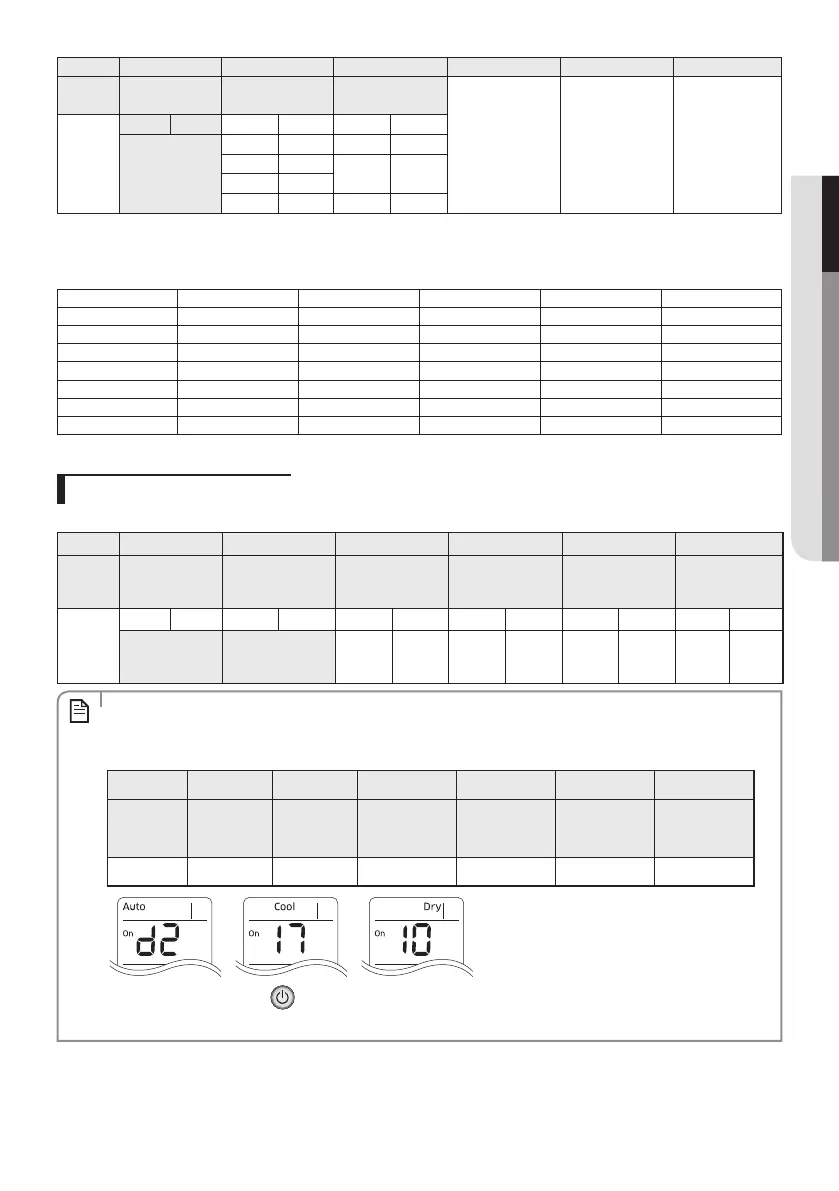
Option SEG19 SEG20 SEG21 SEG22 SEG23 SEG24
Explanation PAGE
Wireless controller
address
Heating setting
compensation
RESERVED RESERVED RESERVED
Setting/
Details
Indication Details Indication Details Indication Details
3
0 or 1 Indoor 1 0 Disuse
2 Indoor 2
1 2 °C
3 Indoor 3
4 Indoor 4 2 5 °C
* SEG8: For 4-way cassettes this setting is always 2. If any other setting is entered, it will be ignored.
If you input a number other than 0~4 on for SEG 20, the indoor is set as “Indoor 1”.
Example) If you want to set “External temperature sensor: USE, External control: USE, Filter reminder: 2000hr”.
SEG1 SEG2 SEG3 SEG4 SEG5 SEG6
0 2 - 1 0 -
SEG7 SEG8 SEG9 SEG10 SEG11 SEG12
1 0 - - - -
SEG13 SEG14 SEG15 SEG16 SEG17 SEG18
2 1 0 - 0 6
SEG19 SEG20 SEG21 SEG22 SEG23 SEG24
3 0 - - - -
assign option codes except SEG 1, 7, 13, 19 which are page options (page number).
Changing a single option
You can change a single option without having to enter all 20 option settings like shown in previous section.
Option SEG1 SEG2 SEG3 SEG4 SEG5 SEG6
Explanation PAGE MODE
The option mode you
want to change
The tens’ digit of an
option SEG you will
change
The unit digit of an
option SEG you will
change
The changed value
Details
Indication Details Indication Details Indication Details Indication Details Indication Details Indication Details
0 D
Option
mode
0~F
Tens’ digit
of SEG
0~9
Unit digit of
SEG
0~9
The
changed
value
0~F
• When changing a digit of an indoor unit address setting option, set the SEG3 as ‘A’.
• When changing a digit of indoor unit installation option, set the SEG3 as ‘2’.
Ex) When setting the ‘buzzer control’ into disuse status.
Option SEG1 SEG2 SEG3 SEG4 SEG5 SEG6
Explanation PAGE MODE
The option mode
you want to
change
The tens’ digit of
an option SEG
you will change
The unit digit of
an option SEG
you will change
The changed
value
Indication 0 D 2 1 7 1
• After entering, press the power button two times while pointing the remote control at the indoor
unit.
NOTE



 To Next Page