Troubleshooting
Samsung Electronics 4-13
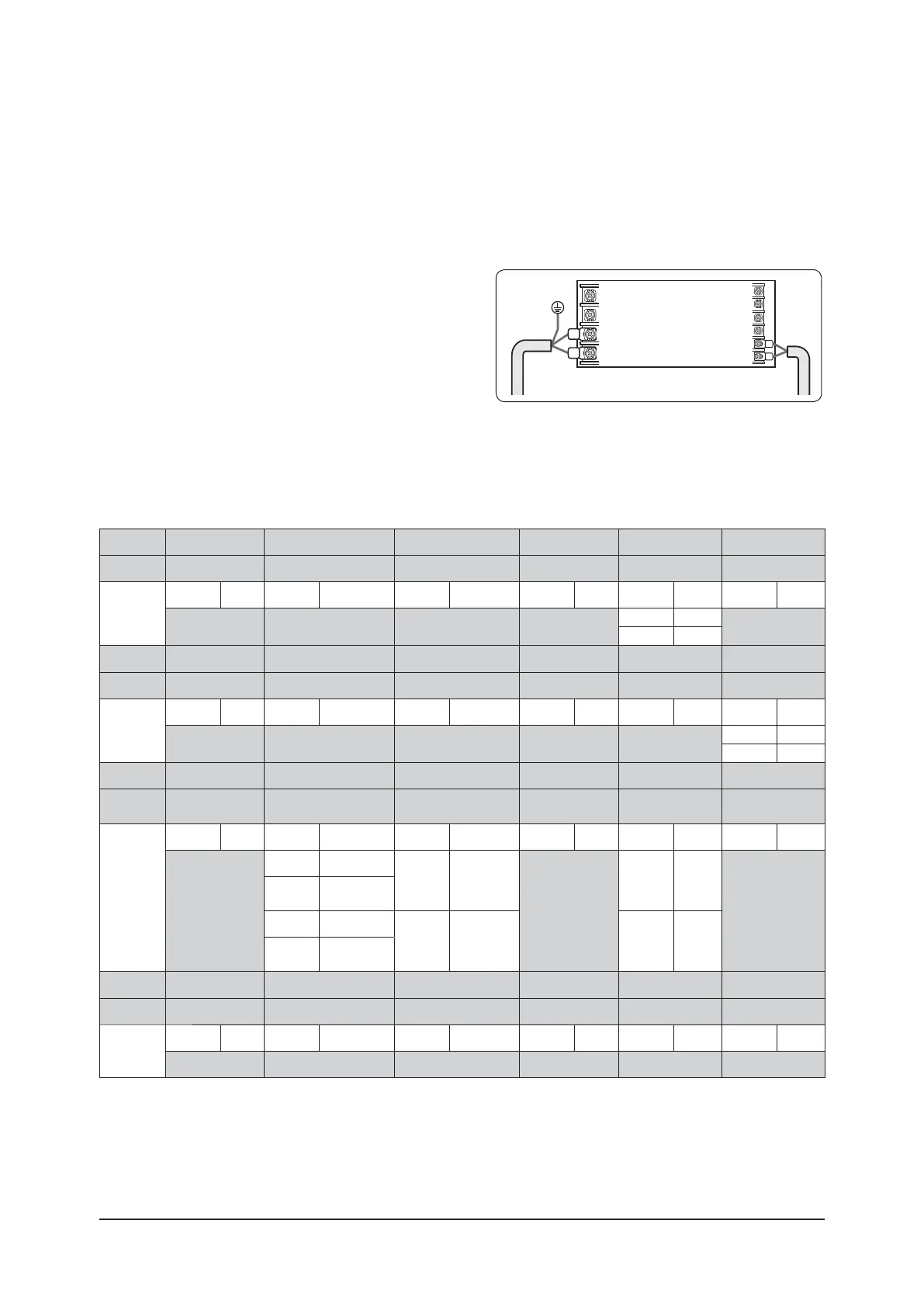
ߢ Check whether power is supplied or not.
ࣚǮ˵ʪϩ˵ʪʒͱͱθЇϩϑͱϩΧЇ˝˝ʪʒࡡϩ˵ʪθʪϑ˵ͱЇʒɵʪ
additional power supply in the indoor unit.
ߣ The panel(display ) should be connected to an indoor unit
to receive option.
ߤ Before installing the indoor unit, assign an option to the
indoor unit according to the air conditioning system plan.
ࣚƟ˵ʪʒʪ˙ɇЇϩϑʪϩϩ˝ͱ˙ɇʒͱͱθЇϩϑϩɇɇϩͱͱΧϩͱϑࣨߡߣߡߡߡࣗߢߡߡߡߡߡࣗߣߡߡߡߡߡࣗߤߡߡߡߡߡࣩࢋ
ࣚÃʒЭʒЇɇʀͱϩθͱͱ˙ɇθʪͱϩʪʀͱϩθͱʪθ࣍Ɗkߣߡ࣎ϑƟ˵ʪ˙Їʀϩͱϩ˵ɇϩʀͱϩθͱϑɇʒͱͱθЇϩʒЭʒЇɇци˵ʪ
there is more than one indoor unit.
ߥ Set the indoor unit option by wireless remote controller.
- When entering Address option, connect remote controller receiver.
ĮΧϩͱ
SEG1 SEG2 SEG3 Ɗkߥ SEG5 SEG6
Explanation
Page Mode Central control
Indication
and details
Indication Details Indication Details Indication Details Indication Details Indication Details Indication Details
02 00
0 No Use
0
1Use
ĮΧϩͱ
Ɗkߨ Ɗkߩ Ɗkߪ Ɗkߢߡ SEG11 SEG12
Explanation
Page Master / Slave
Indication
and details
Indication Details Indication Details Indication Details Indication Details Indication Details Indication Details
10 000
0 Slave
1Master
Option
SEG13 SEG14 SEG15 SEG16 SEG17 SEG18
Explanation
Page External control
External control
output
Buzzer
Indication
and details
Indication Details Indication Details Indication Details Indication Details Indication Details Indication Details
2
0No use
0 Thermo ON
0
0Use
0
1
On/Off
control
2 Off control
1
Operation
ON
1 No Use
3
Window On/
Į˙˙ʀͱϩθͱ࣑ࠞ
Option
SEG19 SEG20 SEG21 SEG22 SEG23 SEG24
Explanation
Page
Indication
and details
Indication Details Indication Details Indication Details Indication Details Indication Details Indication Details
30 0000
࢘
If you input a number other than 0~4 of the individual control of the indoor unit(SEG20), the indoor is set as “indoor 1”.
• The window on/off function applies to the following unit
ࣚŵ66
4-3-4 Setting an indoor unit installation option
(suitable for the condition of each installation location)
Indoor Unit
1(L)
2(N)
F2
F1
ǮɇͱЇϩʪʒ



 To Next Page