Troubleshooting
4-36 Samsung Electronics
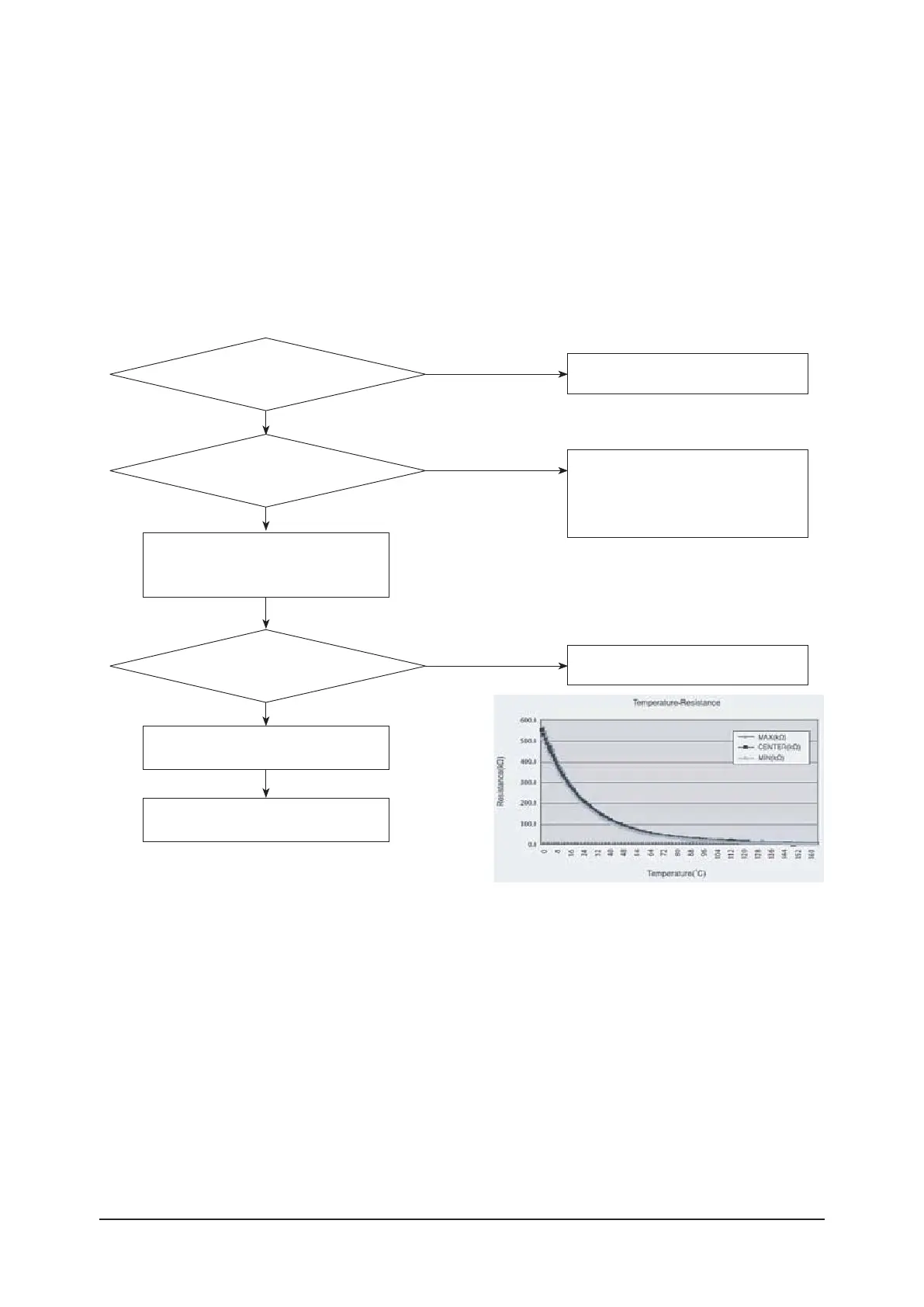
1. Check items
1) Is the sensor connected correctly?
2) Is the sensor placed correctly?
ߤ࣎Uͱʪϑϩ˵ʪɵͱϩ˵ϩʪθɇͱ˙ϑʪϑͱθϑɇϩϑ˙цϩ˵ʪθʪϑϑϩɇʀʪЭɇЇʪɇʀʀͱθʒɇʀʪиϩ˵ϩʪΧʪθɇϩЇθʪࢌ
4) Is the resistance value of sensor connection pull-up correct?
2. Check procedure
Yes
Reconnect the sensor connector.
No
Is the sensor connector
connected correctly in accordance with
a color?
Yes
No
Sensor Replace
ƊʪϑͱθθʪϑϑϩɇʀʪЭɇЇʪࡠߣߡইAࣗߣߥߣͱ˵
30°C - 166kohm
35°C - 138kohm
40°C - 115kohm
Exchange the Outdoor PBA.
No
Yes
Is the sensor resistance
ЭɇЇʪߣߡߡͱ˵ߤɇϩϩ˵ʪθͱͱϩʪΧʪθɇϩЇθʪ
of 25°C?
9ʪͱиߡࢋߦǤͱθĮЭʪθߥࢋߦǤࢌ
Yes
Connect the sensor to PBA connector
ϑЇΧΧцΧͱиʪθɇʒʪɇϑЇθʪϩ˵ʪЭͱϩɇ˝ʪͱ˙
sensor in the connector.
Micom error or connector check.
Exchange the Outdoor PBA.
ߥࣗߧࣗߨA˵ʪʀ˝ƟʪΧʪθɇϩЇθʪϑʪϑͱθ
ߥࣗߧࣗߨࣗߢA˵ʪʀ˝ƟʪΧʪθɇϩЇθʪϑʪϑͱθ



 To Next Page