18 English
Getting Started
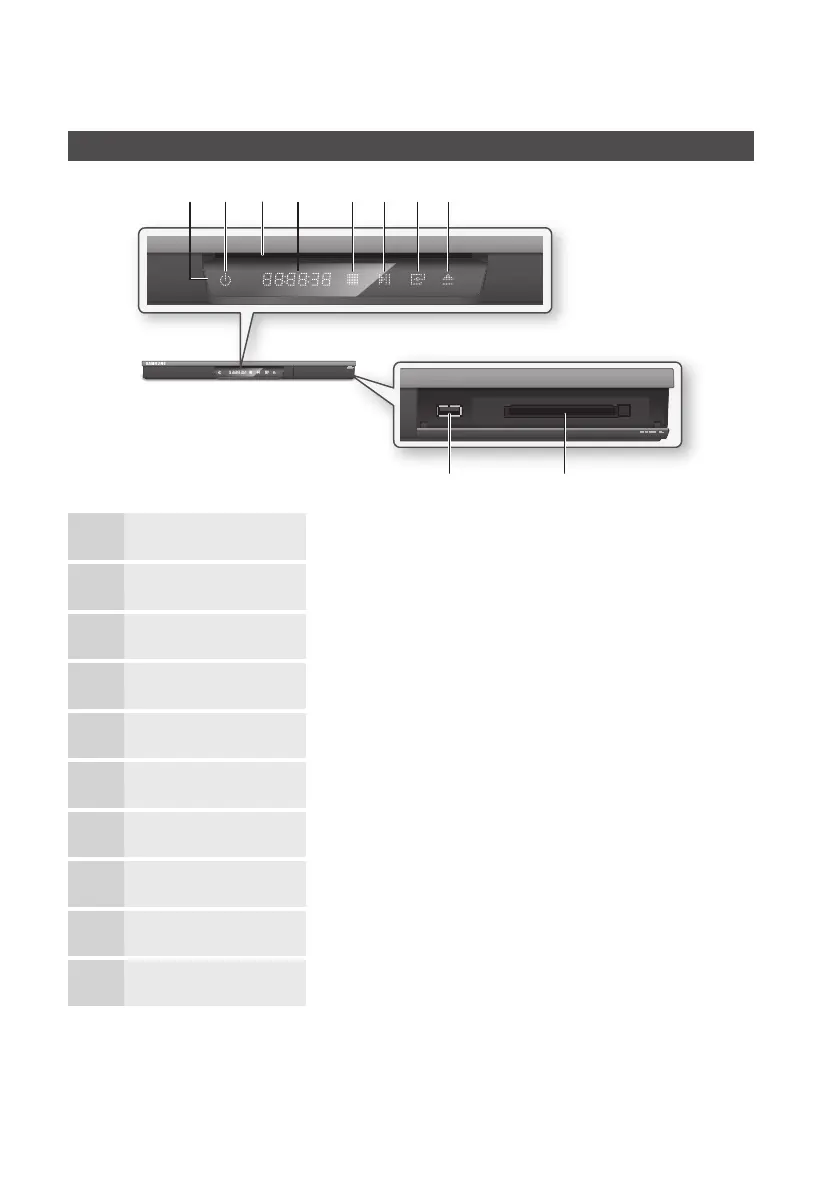
Front Panel
1
REMOTE CONTROL SENSOR Detects signals from the remote control.
2
POWER BUTTON Turns the product on and off.
3
DISC SLOT Inserts a disc.
4
DISPLAY Displays the playing status, time, etc.
5
STOP BUTTON Stops disc playback.
6
PLAY/PAUSE BUTTON Plays a disc or pauses playback.
7
ENTER BUTTON Selects menu items or starts a disc.
8
EJECT BUTTON Ejects a disc.
9
COMMON INTERFACE SLOT To watch paid channels, insert the CI CAM with CI or CI+ CARD.
10
USB HOST It can be used for software upgrades and MP3/JPEG/DivX/MKV/MP4 playback.
✎
NOTE
`
When the product displays the Blu-ray Disc menu, you may not start the movie by pressing the Play button on the
product or the remote. To play the movie, you must select Play Movie or Start in the disc menu, and then press the
ENTER button.
`
You must obtain a “CI CAM with CI or CI+ CARD” from a local cable service provider.
b d ef g
h
ij
ca











 To Next Page