English 29
04 Connections
Connecting to the Network
This product lets you use network based services (See pages 69~78) such as Smart Hub and BD-LIVE,
and software upgrades when it is connected to a network. We recommend using an AP (Access Point)
or IP router for the connection. For more information on router connections, refer to the user manual of
the router or contact the router manufacturer for technical assistance.
Cable Network
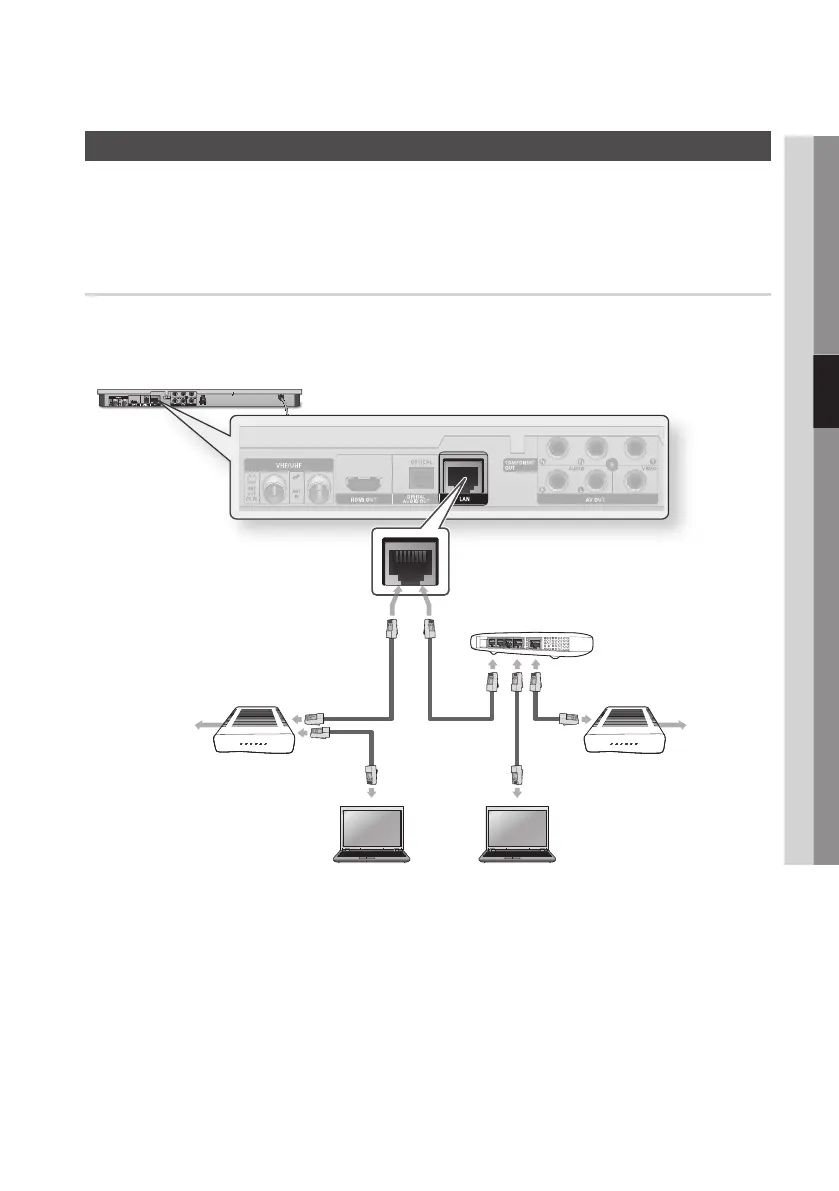
1. Using the Direct LAN Cable (UTP cable), connect the LAN terminal of the product to the LAN terminal
of your modem or router.
2. To set the network options, see pages 43~47.
✎
NOTE
`
Internet access to Samsung’s software update server may not be allowed, depending on the router you use or
your
ISP’s policy. For more information, contact your ISP (Internet Service Provider).
`
For DSL users, please use a router to make a network connection.
`
To use the AllShare function, you must connect your PC to your network as shown in the figure.
The connection can be wired or wireless.
Broadband
service
Broadband modem
(with integrated router)
Router
Broadband modem
Broadband
service
Or
Networking with PC for
AllShare function











 To Next Page