English 57
06 Basic Functions
Setting BONUSVIEW
h
The BONUSVIEW feature allows you to view
additional content (such as commentaries) in a
small screen window while the movie is playing.
This function is only available if the disc has the
BONUSVIEW feature.
1. During playback, press the TOOLS button.
2. Press the ▲▼ buttons to select BONUSVIEW
Video or BONUSVIEW Audio.
3. Press the ◄► buttons to select the desired
BONUSVIEW.
✎
NOTE
`
If you switch from BONUSVIEW Video, BONUSVIEW
Audio will change automatically in accordance with
BONUSVIEW Video.
`
2D contents are playing convert into 3D, bonusview
function is not available. (Depending on discs, black
outline may be shown)
Listening to Music
ow
Playing an Audio CD (CD-DA)/MP3
1. Insert an Audio CD (CD-DA) or an MP3 Disc.
• For an Audio CD (CD-DA), the first track
plays automatically.
• For an MP3 disc, press the ▲▼ buttons
to select Music, then press the ENTER
button.
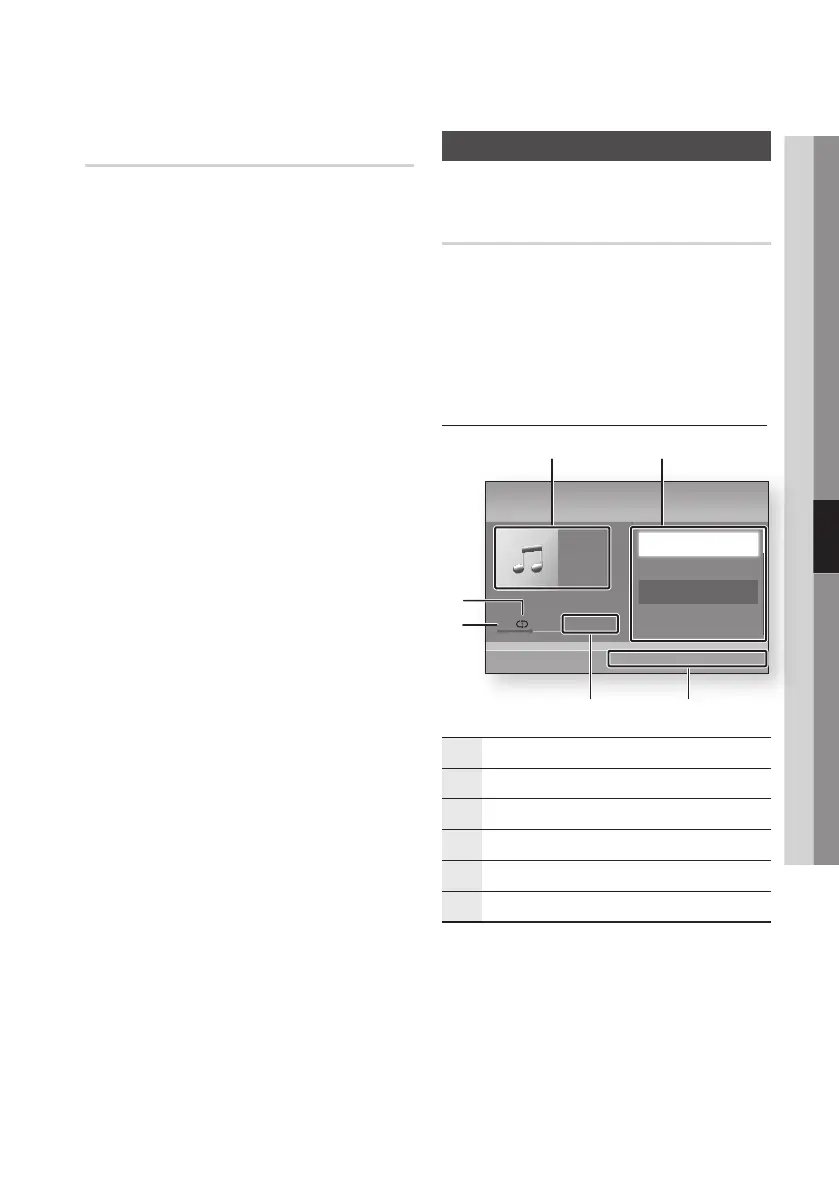
Audio CD (CD-DA)/MP3 Screen Elements
1
Displays the music information.
2
Displays the playlist.
3
Displays buttons available.
4
Shows the current play time/total play time.
5
Displays the current playback status.
6
Displays the repeated playback status.
2. Press the ▲▼ buttons to select the track
you want to play, and then press the ENTER
button.
+ 00:13 / 00:43
TRACK 001
Music
Audio CD " Enter < Page / Tools ' Return
1
5
4
6
3
2
TRACK 001
00:43
TRACK 002
03:56
TRACK 003
04:41
TRACK 004
04:02











 To Next Page