English 63
07 DTV Functions
• Subtitle : You can set it to On or Off.
If you select On, the Subtitle Mode and
Subtitle Language will be activated.
• Subtitle Mode : Select the desired subtitle
mode.
• Subtitle Language : Select the desired
subtitle language.
Viewing the Guide Screen
The EPG (Electronic Programme Guide) information
is provided by broadcasters. Using channel
schedules provided by broadcasters, you can
specify channels you want to watch in advance
so that the channel automatically changes to the
selected channel at the specified time. Channel
entries may appear blank or out of date depending
on a channel status.
You can also operate this function by
pressing the GUIDE button on the
remote control.
1. Press the MENU button.
The home menu will be displayed.
2. Press the ◄► buttons to select the Watch
TV.
3. Press the ▲▼ buttons to select the Guide,
then press the ENTER button.
The guide screen will be displayed.
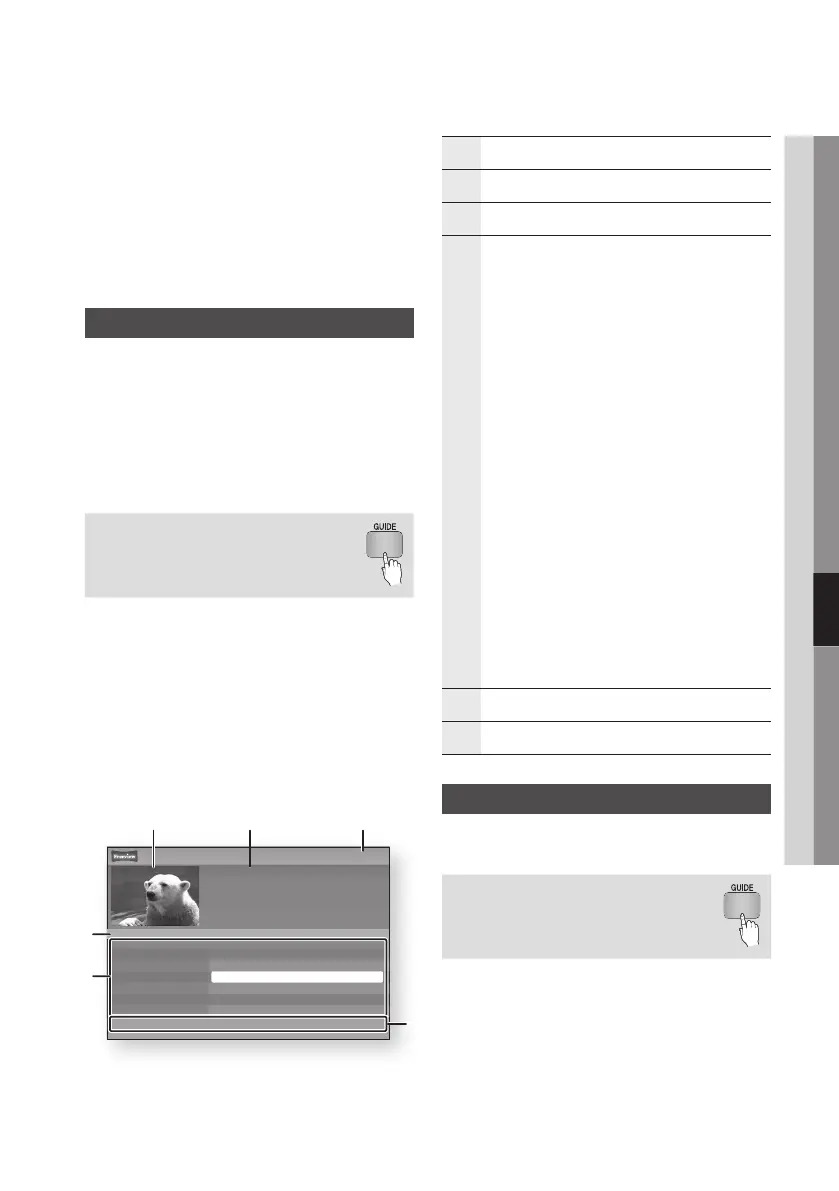
• Guide Screen
1
Displays the channel screen.
2
Displays the channel information.
3
Displays the current date and time.
4
Nevigation Help : Displays remote control buttons
available.
• RED (A) : To set the programme schedule.
• YELLOW (C) : It displays channel from now to 24
hours after.
If you select YELLOW (C) button, GREEN (B)
button will be displayed. Press this to display the
list of channels before 24 hours.
• BLUE (D) :
To change the Channel View (All, TV,
Radio, Data/Other, Favourites 1,2,3...)
• PROG (
,
/
.
) buttons :
Go to previous page or
next page.
• ENTER button
- When you select a programme currently
being broadcast, you can watch the selected
channel in the full screen.
- When you select a programme scheduled to
broadcast, you can set the Timer viewing or
Timer recording. Press the ◄► button to
select the Timer viewing or Timer recording,
then press the ENTER button again. The Timer
icon appears on the guide screen.
5
Displays the Stored channels.
6
Displays view mode.
Schedule Manager
Make sure that clock must be set before operating
this function. (See page 47)
You can also operate this function by
pressing the GUIDE button on the
remote control.
1. Press the MENU button.
The home menu will be displayed.
2. Press the ◄► buttons to select the Watch
TV.
3. Press the ▲▼ buttons to select the Guide,
then press the ENTER button.
The guide screen will be displayed.
a Sche.Mgr +24 Hours d Ch. Mode ƒ Page " Watch
7:11 Sat 1 Jan
Guide
No Information
DTV Air 814 Discovery
Channel View - All
814 Discovery
▲
812 Class News No Information
813 Coming Soon No Information
814 Discovery No Information
815 DiscoveryH&L No Information
816 five No Information
▼
817 heat No Information
4
1 2 3
5
6
15:00Today 15:30 16:00 16:30











 To Next Page