72 English
Advanced Functions
Press the ENTER button at the starting point.
The image and starting point time is displayed
in the section deletion starting point window.
Select the start and end points of the
section you want to delete using the
playback related buttons.
Press the ENTER button at the end point.
The image and end point time is displayed in
the Section deletion ending point window.
Press the ENTER button to select Delete.
Press the ◄► buttons to select OK, then
press the ENTER button.
NOTE
The minimum length of delete section should be
longer than 10 seconds.
Copy
Copying Videos, Music or Photos
Contents
HDD/DISC/
AllShare
USB
DISC/USB/
AllShare
HDD
HDD/DISC/
USB
AllShare
Music
Supported Supported Supported
Photos
Supported Supported Supported
Videos
Supported Supported Supported
Disc (CD-DA/CD-R/CD-RW, DVD±R(Finalise)/
DVD+RW/DVD-RW(Finalise))
;
HDD or USB
PTP USB is not available when you copy to
USB.
The copy function is not supported if the device
is formatted with NTFS.
The broadcast signal can be recorded on HDD
but copy feature is not supported.
Press the MENU button.
The home menu will be displayed.
In Stop mode, connect the USB storage
device to the USB port on the front panel of
the product.
Press the ENTER button.
Press the ▲▼◄► buttons to select the
Music, then press the ENTER button.
2.
•
3.
4.
5.
✎
▪
•
•
•
•
1.
2.
3.
4.
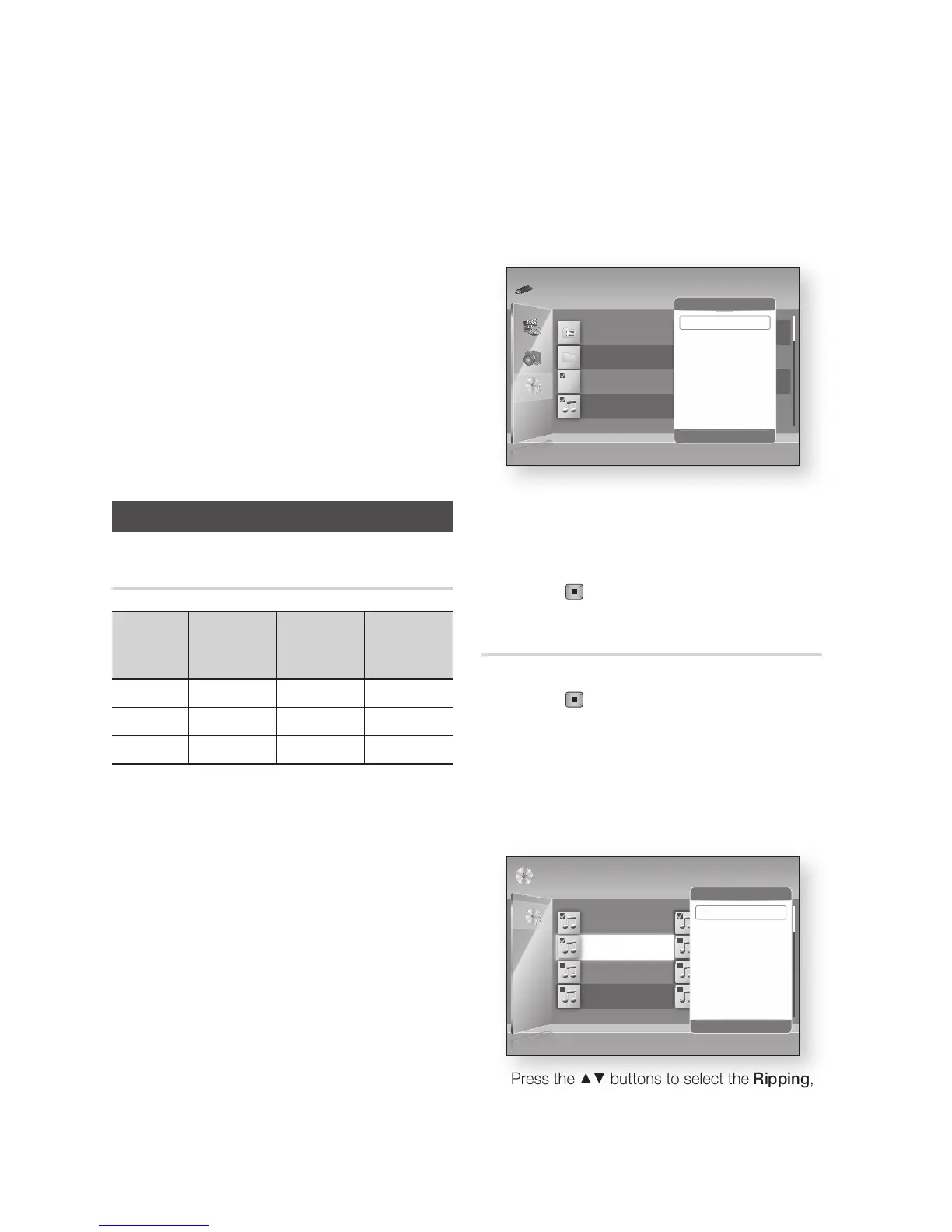
Press the YELLOW (C) button to display the
check box.
Press the ENTER button to check desired
track.
Press the TOOLS button.
Press the ▲▼ buttons to select the Copy,
then press the ENTER button.
Press the ENTER button again.
To cancel the copying in progress, press the
STOP ( ) button.
Ripping from a Audio CD (CD-DA)
Insert an Audio CD (CD-DA), then press the
STOP ( ) or RETURN button to move to
the Music List.
Press the YELLOW (C) button to display the
check box.
Press the ENTER button to check desired
track.
Press the TOOLS button.
Press the ▲▼ buttons to select the Ripping,
then press the ENTER button.
5.
6.
7.
8.
9.
1.
2.
3.
4.
5.
TRACK 002
03:56
TRACK 004
04:02
TRACK 006
03:40
TRACK 008
03:52
1/2 Page
Audio CD | Music
Close Edit Mode
( )
Page
/
Tools
"
Select
'
Return
TRACK 001
00:43
TRACK 003
04:41
TRACK 005
03:43
TRACK 007
04:06
Selected Items : 3
Tools
"
Enter
'
Return
Play Selected
Ripping
Select All
Deselect All
TRACK 002
03:56
TRACK 004
04:02
TRACK 006
03:40
TRACK 008
03:52
1/2 Page
m80 | Music
Play Mode
d
Sorting
"
Select
( )
Page
/
Tools
'
Return
My Playlist (0)
tmp
TRACK 001
xxxxx
TRACK 002
xxxxx
Selected Items : 31 file selected Title Search
Tools
"
Enter
'
Return
Add to My Playlist
Play Selected Contents
Copy
Select All
Deselect All











 To Next Page