2.ProductSpecications
NOTE
•TheproductmaynotplaycertainCD-RW/RandDVD-Rbecauseofthedisctypeorrecordingconditions.
•IfaDVD-RW/-RhasnotbeenrecordedproperlyinDVDvideoformat,itwillnotbeplayable.
•YourproductwillnotplaycontentthathasbeenrecordedonaDVD-Ratabit-ratethatexceeds10Mbps.
•YourproductwillnotplaycontentthathasbeenrecordedonaBD-RorUSBdeviceatabitratethatexceeds25Mbps.
2.1.4.HDDRecording
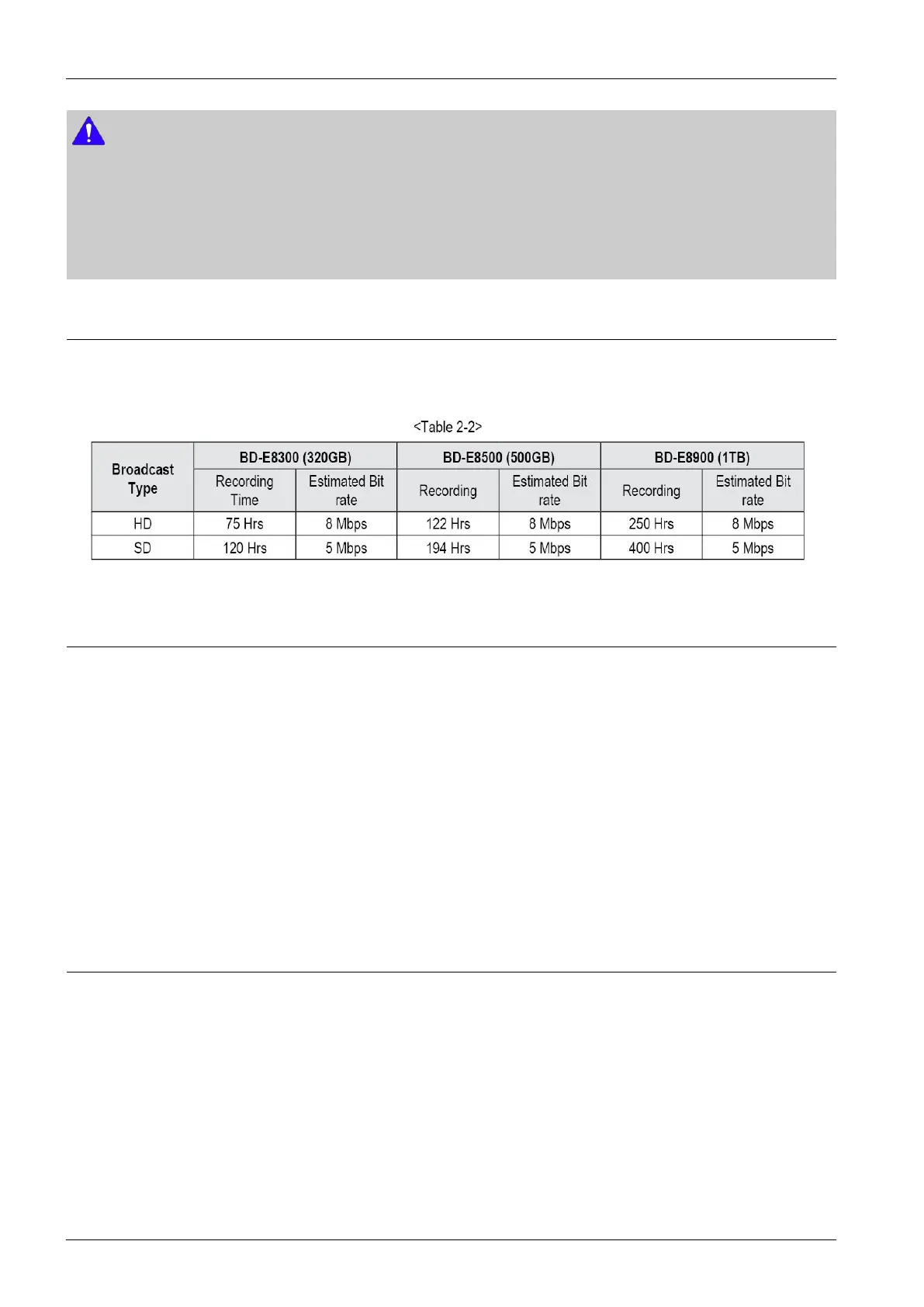
YoucanrecorddigitalbroadcastontheinternalHDDasbelow.Dependingonthebitrateofactualbroadcastprogramme,
availablerecordingtimemaybedecreasedorincreased.
2.1.5.Disctypesyourproductcannotplay
•HDDVD
•DVD-RAM
•DVD-RW(VRmode)
•3.9GBDVD-RforAuthoring.
•DVD-ROM/PD/MVDisc,etc
•SuperAudioCD(exceptCDlayer)
•CVD/CD-ROM/CDV/CD-G/CD-I/LD(CD-Gsplayaudioonly,notgraphics.)
2.1.6.Regioncode
Boththeproductandthediscsarecodedbyregion.Theseregionalcodesmustmatchinordertoplaythedisc.Ifthecodes
donotmatch,thediscwillnotplay.TheRegionNumberforthisproductisdescribedontherearpaneloftheproduct.
2-4Copyright©1995-2012SAMSUNG.Allrightsreserved.



 To Next Page