2.ProductSpecications
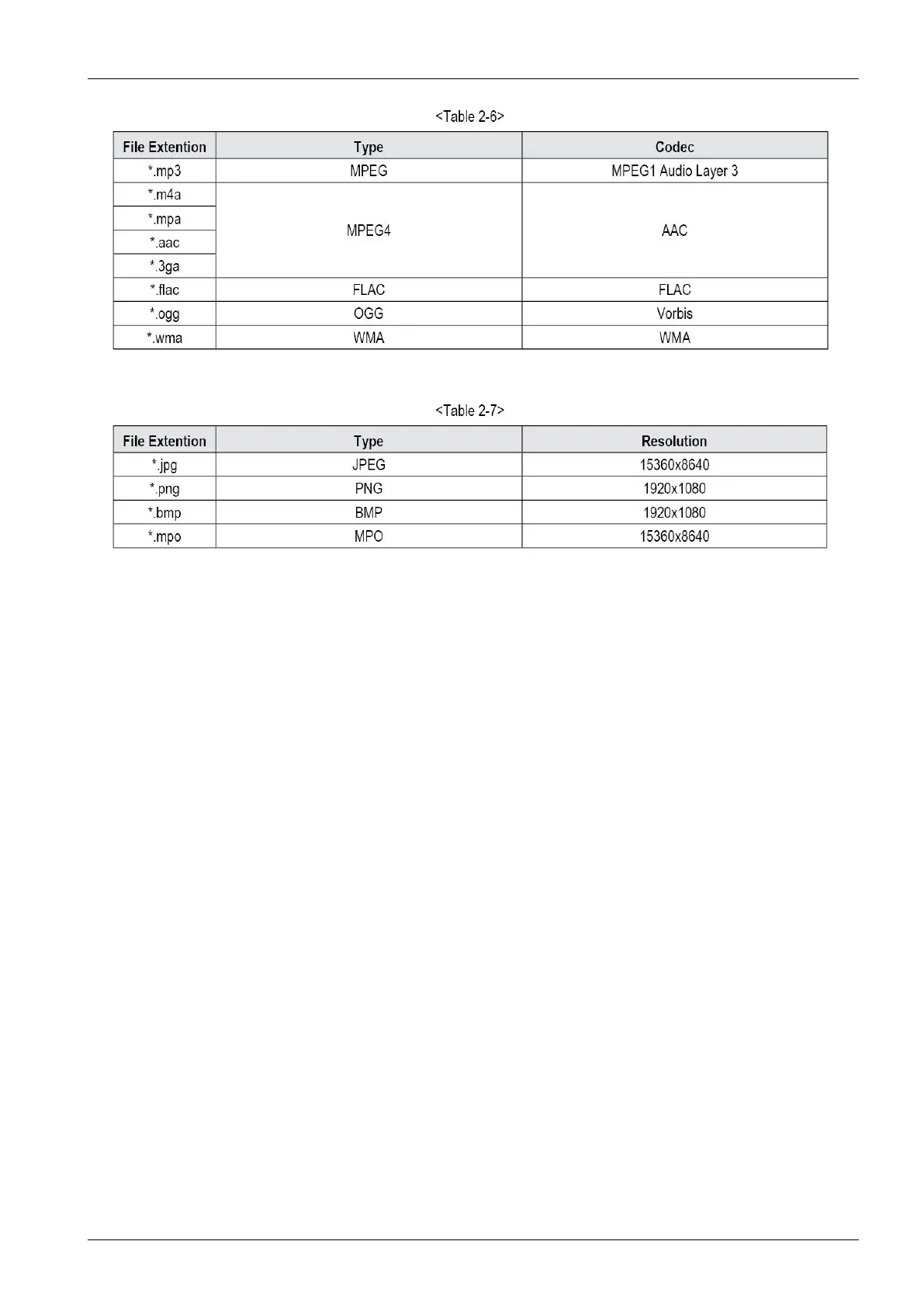
PictureFileSupport
PictureFileSupport
•YourproductsupportsUSBstoragemedia,MP3products,digitalcameras,andUSBcardreaders.
•SomeUSB/digitalcameradevicesmaynotbecompatiblewiththeproduct.
•YourproductsupportstheFAT16,FA T32,andNTFSlessystems(readonly).
•ConnectUSBdevicesdirectlytotheproduct’sUSBport.ConnectingthroughaUSBcablemaycausecompatibility
problems.
•Insertingmorethanonememorydeviceintoamulti-cardreadermaycausethereadertooperateimproperly.
•TheproductsupportsthePTPprotocol.
•DonotdisconnectaUSBdeviceduringa"loading"process.
•Thebiggertheimageresolution,thelongertheimagetakestodisplay.
•ThisproductcannotplayMP3leswithDRM(DigitalRightsManagement)downloadedfromcommercialsites.
•Yourproductonlysupportsvideothatisunder30fps(framerate).
•YourproductonlysupportsUSBMassStorageClass(MSC)devicessuchasthumbdrives,ashcardreadersandUSB
HDD.(HUBisnotsupported.)
•CertainUSBHDDDevices,multi-cardreadersandthumbdrivesmaynotbecompatiblewiththisproduct.
•IfsomeUSBdevicesrequireexcessivepower,theymaybelimitedbythecircuitsafetydevice.
•IfplaybackfromaUSBHDDisunstable,provideadditionalpowerbypluggingtheHDDintoawallsocket.Ifthe
problemcontinues,contacttheUSBHDDmanufacturer.
•YoumustremovetheUSBstoragedevicesafely(byperformingthe"SafelyRemoveUSB"functiontopreventpossible
damagetotheUSBmemory).
•SAMSUNGisnotresponsibleforanydataledamageordataloss.
Copyright©1995-2012SAMSUNG.Allrightsreserved.2-7



 To Next Page