Connections
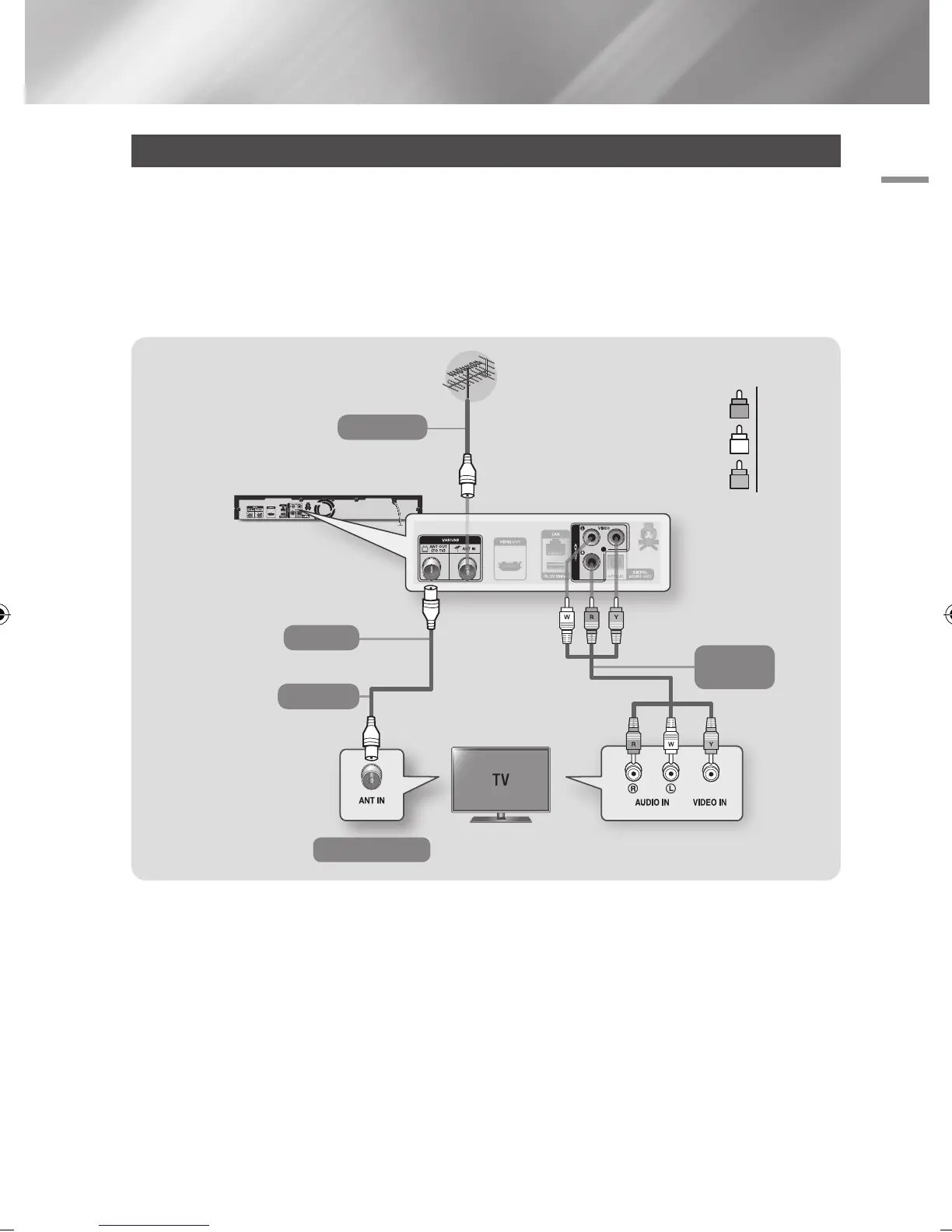
Connecting to a TV with an Audio/Video cables and RF cable
1. Connect the RF cable as shown.
2. Using video/audio cables, connect the VIDEO OUT (yellow) / AUDIO OUT (white and red)
terminals on the rear of the product to the VIDEO IN (yellow) / AUDIO IN (white and red) terminals
of your TV.
3. Plug in the product and TV.
4. Turn on the product and TV.
| NOTE |
\
The RF cable connection of this product sends only signals of TV. You must connect the Audio/Video cables to watch output
from your product.
\
Noise may be generated if the audio cable is placed too close to the power cable.
\
If you want to connect to an AV receiver, please refer to the AV receiver connection pages. (See page 19)
\
The number and position of terminals may vary depending on your TV set. Please refer to the user manual of your TV.
\
If there is only one audio input terminal on the TV, connect it to the AUDIO OUT (Red/white) terminal of the product.
| CAUTION |
\
Do not connect the product to your TV through a VCR. Video signals fed through VCRs may be affected by copyright
protection systems and the picture will be distorted on the television.
Audio
Video
To ANT INPUT
To TV
RF cable
To ANT IN
R
Red
W
White
Y
Yellow
English 17
|
02230J-BD-E8900-EN-ENG.indd 17 2012-04-13 오후 2:53:13



 To Next Page